If you want your Amazon stock to reach a U.S. fulfillment center without delays, you need to get 4 things right: shipment setup, freight booking, customs, and final delivery booking.
I’d sum it up like this: create the inbound shipment before pickup, match every carton to the right shipment ID, file customs documents on time, and make sure pallet counts and FC codes match before the truck arrives. Miss one step, and you can end up with customs holds, missed appointments, or slow FC check-in.
Here’s the full path in simple terms:
- Step 1: Set up the inbound shipment in Seller Central
- Step 2: Arrange pickup in China and move freight by air, LCL, or FCL
- Step 3: Clear U.S. customs and pay duties
- Step 4: Move cargo to a U.S. warehouse for FBA prep
- Step 5: Label, pack, and palletize to Amazon rules
- Step 6: Book the FC delivery appointment
- Step 7: Deliver the load and collect the signed POD
A few numbers matter from the start:
- Air freight: about 8–12 days to the FC
- LCL ocean: about 35–45 days
- FCL ocean: about 25–40 days
- ISF for ocean freight: must be filed 24+ hours before vessel loading
- Late or wrong ISF: can trigger penalties from $5,000 per violation
- Amazon pallet limit: up to 72 in. high and 1,500 lb per pallet
- Appointment timing: trucks that arrive 30+ minutes late may be turned away
The main point: this process is less about one big task and more about keeping each handoff clean from factory pickup to Amazon receiving.
Below, I’ll walk through the steps in the order you need to handle them.
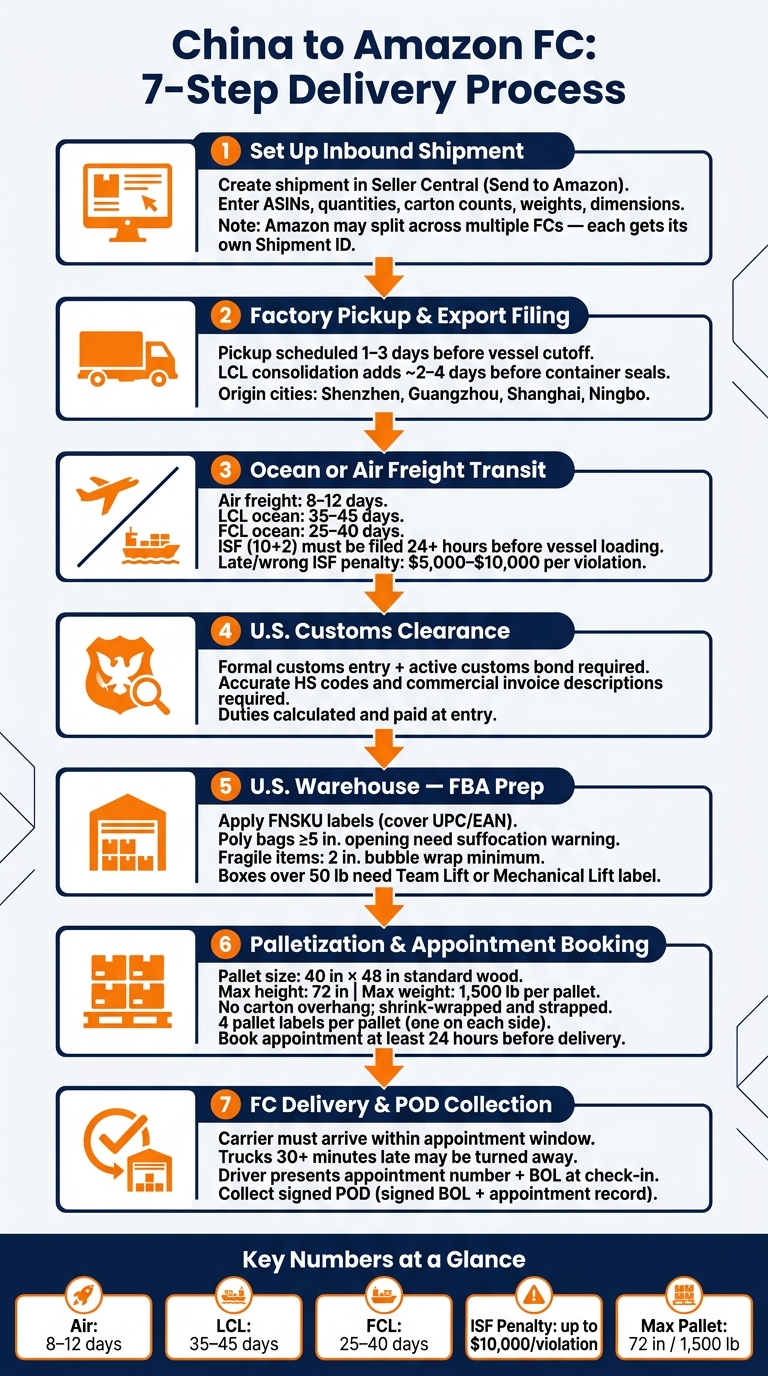
China to Amazon FC: 7-Step Shipping Process with Key Stats
Shipping from Alibaba to Amazon FBA Explained | How to Ship Products From China Tutorial
sbb-itb-f9a91f9
Step 1: Set Up the Amazon Inbound Shipment and Routing
Use Seller Central data to guide pickup, labeling, and delivery. Start by creating the inbound shipment in Send to Amazon. Then enter the ASINs, quantities, ship-from address, carton counts, and box contents for each carton.
Be precise with carton weight and dimensions. That data affects routing and receiving, and it needs to line up from the start. If the numbers are off, you can run into delays, manual review, and extra fees. Think of this as the handoff file for the whole move, from pickup to warehouse prep to final FC delivery.
Create the shipment in Seller Central
Amazon may split one plan across more than one FC, and each split comes with its own shipment ID. So don’t assume everything is going to a single FC. Check each assignment carefully, and make sure every carton is tied to only one shipment ID.
Mixing units from different shipments in the same carton isn’t allowed. It can also cause receiving issues once the freight reaches Amazon.
Print the Amazon box label for each carton and place it flat on one side of the box, next to the carrier label.
Share routing details with FCLGO before pickup
Send the shipment ID and FC assignment to FCLGO before pickup. That way, booking, warehouse handling, and delivery all follow the same plan. In plain English: the data you enter in Seller Central becomes the plan FCLGO uses to manage pickup, prep, and final delivery.
Here’s how Seller Central data maps to what FCLGO needs:
| Data Entered in Seller Central | Information Shared with FCLGO | Why It Matters |
|---|---|---|
| ASIN / SKU selection and unit quantities | Shipment ID and reference ID | Tracking and customs documentation |
| Ship-from address | Factory pickup address and city | Arranging local trucking in China |
| Box dimensions and weight | Total CBM and gross weight | Carrier booking and freight planning |
| Assigned FC code | Destination FC code | Final-mile delivery and appointment booking |
| Cargo ready date | Target delivery timing | Booking carrier space and scheduling pickup |
Once shipment IDs, labels, and destination FCs are set, the cargo can move into export filing and customs clearance. If carton counts, destinations, or timing change late, pickup plans and delivery appointments usually have to change too. It’s much easier to lock those details early and keep the shipment moving.
Once routing is locked, the shipment can move into export and U.S. customs clearance.
Step 2: Move Cargo from China and Clear US Customs
Once the route is set, your shipment can leave China and go through export and U.S. customs. This stage covers everything from factory pickup in China to customs release in the United States.
Factory Pickup, Export Filing, and Ocean or Air Freight
Lock in the cargo-ready date with your supplier as early as you can. Then send FCLGO the full pickup details: factory address, contact name, phone number, working hours, carton count, total weight, and dimensions. FCLGO arranges local trucking from major origin cities such as Shenzhen, Guangzhou, Shanghai, and Ningbo. Pickup is usually scheduled 1–3 days before the vessel cutoff or air cargo acceptance deadline.
After pickup, the cargo goes to an export warehouse or terminal for checks and export filing. Teams compare carton counts, weights, and labels against the packing list before loading. For LCL shipments, this consolidation step usually adds about 2–4 days before the container is sealed and gated in. If you miss the CY cutoff, the container rolls to the next sailing, which delays departure.
Stick with the freight mode you picked in Step 1. Air is the fastest option. FCL and LCL move on ocean schedules, so they take more time.
US Customs Clearance and Duty Coordination
Your shipment must clear U.S. customs before it can move inland.
For ocean shipments, the Importer Security Filing (ISF), also called "10+2", must be filed with U.S. Customs and Border Protection at least 24 hours before the cargo is loaded onto the vessel at the foreign port. This isn’t something to treat lightly. A late or inaccurate ISF can lead to penalties of $5,000 per violation, and in more serious cases up to $10,000, along with possible cargo holds.
Every shipment also needs a formal customs entry, backed by correct paperwork and an active customs bond. FCLGO works with broker partners to arrange the bond and manages ISF filing, HS classification, duty calculation, and entry submission for the Importer of Record.
| Requirement | Air Freight | Ocean Freight (FCL/LCL) | FCLGO Coordination |
|---|---|---|---|
| Commercial invoice | Required | Required | Reviewed/prepared with seller |
| Packing list | Required | Required | Reviewed/prepared with seller |
| HS classification | Required | Required | Advised and coordinated |
| ISF (10+2) | Not required | Required | Filed by FCLGO |
| Bill of lading / AWB | Air waybill | Ocean bill of lading | Issued and managed by FCLGO |
| Customs bond | Required | Required | Arranged via broker |
| Duty and tax payment | At customs entry | At customs entry | Coordinated by FCLGO |
On the commercial invoice, use specific product descriptions. For example, write "stainless steel kitchen knives" instead of "household goods." That kind of detail matters. Accurate HS codes help keep landed cost more predictable and lower the odds of customs delays.
After customs release, the shipment can move to a U.S. warehouse for transfer and FBA prep.
Step 3: Transfer to a US Warehouse for FBA Prep and Palletization
After customs clearance, the shipment moves to a U.S. warehouse for the last round of Amazon prep before delivery. This is your final checkpoint before Amazon takes possession of the freight, so it’s the right time to fix any packaging or labeling problems that could cause trouble at receiving.
Complete Amazon FBA packaging requirements before delivery
A prep warehouse handles label, packaging, and carton fixes before the shipment goes out.
Each unit needs one FNSKU placed on a flat surface, and the UPC or EAN must be covered. If an item is in a poly bag, the bag should be sealed. And if the bag opening is 5 in. or larger, it needs a suffocation warning printed on the bag or added as a label. The FNSKU also needs to stay visible on the outside of the bag. For fragile items, use at least 2 in. of bubble wrap on all sides, while keeping the barcode scannable through the wrap.
Single boxes over 50 lb need a Team Lift or Mechanical Lift label. Each carton should also have one original box label applied flat and away from seams or edges so it doesn’t tear in transit.
Those small details matter more than they seem. If the shipment leaves for the FC with bad labels, poor placement, or packaging issues, you can run into receiving errors, inbound problem flags, or even inventory holds.
Build pallets and transfer freight to the assigned FC
Once prep is done, the cartons are stacked onto pallets for delivery. Amazon’s pallet rules for truck freight are pretty strict: 40 in × 48 in wood pallets, no carton overhang, 72 in. max total height, 1,500 lb max per pallet, secure shrink wrap or strapping, and clear pallet labels on all sides.
These are the specs Amazon uses for LTL and FTL deliveries.
| Pallet Rule | Requirement for Amazon LTL/FTL |
|---|---|
| Pallet size | Standard 40 in × 48 in wood pallets (GMA Standard Grade B or higher) |
| Overhang | No carton overhang beyond pallet edges |
| Max height | ≤ 72 in total |
| Max weight | ≤ 1,500 lb per pallet |
| Carton stacking | Interlocking pattern; heavier cartons on the bottom |
| Wrapping | Shrink-wrapped and strapped where needed |
| Pallet labels | Four labels per pallet, one on each side near the top center |
Every carton on the pallet should still show its FBA box ID label from the outside. FCLGO can handle labeling, inspection, repacking, pallet building, shrink-wrapping, and outbound trucking from its U.S. warehouse.
Once the pallets are ready, the next move is to book the Amazon appointment and send the freight to the assigned FC.
Step 4: Book the Amazon Appointment and Complete Final Handoff
Once the pallets are labeled and staged, it’s time to book the FC appointment and send out the truck. At this point, the pallets are built, and the last job is getting the load to the Amazon FC listed in Seller Central.
Submit the delivery appointment with the correct data
Amazon requires a scheduled delivery appointment for FC freight. If there’s no appointment, Amazon can refuse the load. The request should be sent at least 24 hours before delivery, using details that match both Seller Central and the BOL.
Use the final FC code and shipment IDs from Seller Central to book the appointment. Here’s who handles each part before submission:
| Data Field | Seller Provides (Seller Central) | FCLGO / Carrier Confirms |
|---|---|---|
| FC code and delivery address | Exact FC code and full street address from the shipment creation screen | Cross-checked against routing documents and warehouse records |
| Amazon Shipment ID(s) | Shipment ID(s) and any reference IDs tied to the load | Confirmed as linked to the correct pallets |
| Carton and unit counts | Total cartons and units per shipment from the FBA shipment plan | Verified against the physical carton count at the warehouse |
| Pallet count and configuration | Intended pallet plan | Final pallet count, height, and weight confirmed from the warehouse floor |
| BOL number and details | Referenced for internal tracking | Generated and confirmed by FCLGO or the carrier |
| Trailer number and type | Not required from the seller | Confirmed by the carrier before dispatch |
The most common booking mistakes are pretty simple:
- Wrong FC codes
- Pallet counts that don’t match
- Missing shipment IDs
FCLGO checks the warehouse’s final pallet details against the seller’s Seller Central data before sending the appointment request. That extra check helps stop mix-ups before the truck is even on the road.
Delivery day: arrival, unload, and POD
After Amazon confirms the appointment, the carrier can move the load to the assigned FC.
On delivery day, timing matters. The carrier must arrive during the appointment window. If the truck shows up 30 minutes late or more, Amazon may refuse the load or push it to a new slot. At check-in, the driver gives the appointment number and the BOL. The FC then receives the same pallet count and shipment IDs that were checked at the warehouse, and Amazon’s receiving team unloads and counts the pallets against the inbound shipment data.
Before the driver leaves, they need to collect a signed POD, which is usually the signed BOL and appointment record. That paperwork matters. If there’s ever a later dispute about missing units or receiving differences in Seller Central, the signed POD is one of the first documents you’ll want on hand.
| Task | Seller | FCLGO | Trucking Carrier |
|---|---|---|---|
| Provide FC code, shipment IDs, and carton/unit counts | Primary | Verify | – |
| Coordinate warehouse release and final palletization | Approve | Primary | – |
| Submit delivery appointment with final data | Monitor | Primary | Support |
| Provide trailer number and carrier details | – | Compile and submit | Primary |
| Arrive within appointment window and check in at FC | – | Remote support if issues arise | Primary |
| Collect and store signed POD | Access for reconciliation | Archive | Collect at delivery |
Conclusion: Key Steps to Keep Amazon Inventory Moving
A single mistake in routing setup, customs clearance, warehouse transfer, FBA prep, or the final appointment can slow down FC delivery at every stage after that. The job is pretty simple: keep each handoff lined up by following a step-by-step FBA shipping guide from booking to delivery.
Choose your freight mode early. Speed and cost shape the rest of the timeline, and that choice has a direct effect on how fast inventory shows up as available in Seller Central before you run out of stock.
Most delays come from paperwork or packing mistakes that could have been avoided. The three issues that show up again and again are customs holds, prep rework, and check-in delays.
Shipment IDs, pallet counts, and FC codes need to match in Seller Central and on the physical load. Clean records and a signed POD help protect the shipment at the last step.
Using one logistics partner for origin pickup, customs, FBA prep, and FC delivery – like FCLGO – can cut delays and rework across each leg.
FAQs
Who should be the Importer of Record?
The Importer of Record (IOR) is the person or business legally responsible for making sure imported goods meet all U.S. laws and regulations, including the payment of duties and taxes.
For shipments from China to the USA, picking the IOR is a key decision for sellers. It plays a central role in customs clearance and helps inventory get to Amazon fulfillment centers without extra delays.
When should I choose air, LCL, or FCL?
Choose based on your shipment volume, budget, and timeline.
- Air freight works best for urgent restocks, new product launches, or high-value goods. Transit time is usually 5 to 10 days.
- LCL is a good fit for ocean shipments under 15 cubic meters. You pay only for the space you use.
- FCL makes more sense for shipments over 15 cubic meters. It’s often more cost-effective, faster, and comes with less handling risk.
What documents should I prepare before pickup?
Prepare these core documents before pickup:
- Commercial invoice
- Packing list
- Bill of lading
They need to match exactly. If they don’t, you can run into customs holds or even seizure.
Also, include correct SKU, quantity, and item condition details. File the ISF 10+2 at least 24 hours before the vessel leaves China. And make sure every carton shows the required FBA shipment ID.
发表回复