If Amazon uses its own barcode for your SKU, every sellable unit needs its own FNSKU label before the shipment leaves China. If I miss that step, Amazon can hit the shipment with scan failures, prep fees, relabeling work, or receiving delays.
Here’s the short version:
- I check each SKU in Seller Central to see whether it uses Amazon barcodes or manufacturer barcodes
- I match each FNSKU to the exact ASIN, seller SKU, variation, pack, and condition
- I follow Amazon FBA packaging requirements for every sellable unit, not just the outer carton
- I print labels at the right size, with clear black-on-white barcode quality
- I place the label on a flat outer surface of the final unit packaging
- I cover other scannable barcodes unless Amazon says they must stay visible
- I scan sample units before loading and keep a record of the checks
- I confirm unit counts match the shipment plan as part of the process to ship to Amazon FBA before freight moves to the U.S.
A few numbers matter here. Amazon label size should fall between 1 x 2 inches and 2 x 3 inches. Side margins should be at least 0.25 inch, and top and bottom margins at least 0.125 inch. Print quality should be 300 DPI or higher. If a carton holds 48 separately sold units, I need 48 unit labels inside that carton, plus the carton label on the outside.
The main point is simple: the unit label identifies the product for Amazon receiving, while the carton label identifies the shipping box. <u>They do different jobs, and I may need both.</u>
This article walks through when I need an FNSKU, how I print it, where I place it, what I inspect before export, and which mistakes tend to cause trouble at the fulfillment center.
Amazon FBA Barcode Labels FULL GUIDE – Everything about FNSKUs or UPC Product Labels
sbb-itb-f9a91f9
Confirm Whether Each Sellable Unit Needs an FNSKU
Check each SKU in Seller Central before you print anything. If a SKU is set to Amazon barcodes, that unit needs an FNSKU. If it’s set to manufacturer barcodes, you can use a UPC, EAN, or ISBN instead.
Check Your Barcode Settings in Seller Central
Review each SKU one by one. A single shipment can include items that use different barcode methods, so don’t assume one setting covers the whole batch.
Open the FBA product barcode preferences in Seller Central and confirm the setting for each SKU. That setting tells you whether the batch needs FNSKU labels.
Match the FNSKU to the Correct ASIN, SKU, Variation, and Condition
An FNSKU is linked to a specific seller account, ASIN, seller SKU, and product condition. That means a label made for one listing can’t be used on another one, even if the items look almost the same.
Variation, pack count, and condition can each create a separate sellable unit, and each one gets its own FNSKU.
Before you start batch labeling, record the seller SKU, ASIN, FNSKU, variation, condition, and quantity. Then match each physical unit to the right listing record. It’s a small check, but it can save you from a messy mix-up later.
Label Every Unit Inside the Case Pack, Not Just the Outer Carton
If a SKU needs Amazon barcodes, every individual sellable unit inside the case pack must have its own FNSKU. A case pack counts as one sellable unit only if Amazon is selling the case itself.
If the case is not the sellable unit, label each inner unit on its own. For example, if an outer carton holds 48 phone cases, you need one carton label on the outside and 48 FNSKU labels inside – one for each phone case.
The same rule applies to factory-packed inventory. If a supplier packs 24 individually sold cosmetic organizers into one outer carton, all 24 organizers need the right FNSKU on their own packaging. Labeling only the carton leaves the inner units unidentified, which can lead to receiving or inventory-processing problems at the fulfillment center.
Download a fresh label file for the current SKU, ASIN, variation, and condition before printing. After you confirm the match, move on to print size and barcode quality.
Next, print the label file in the correct format and verify scan quality.
Generate and Print the Correct FNSKU Label
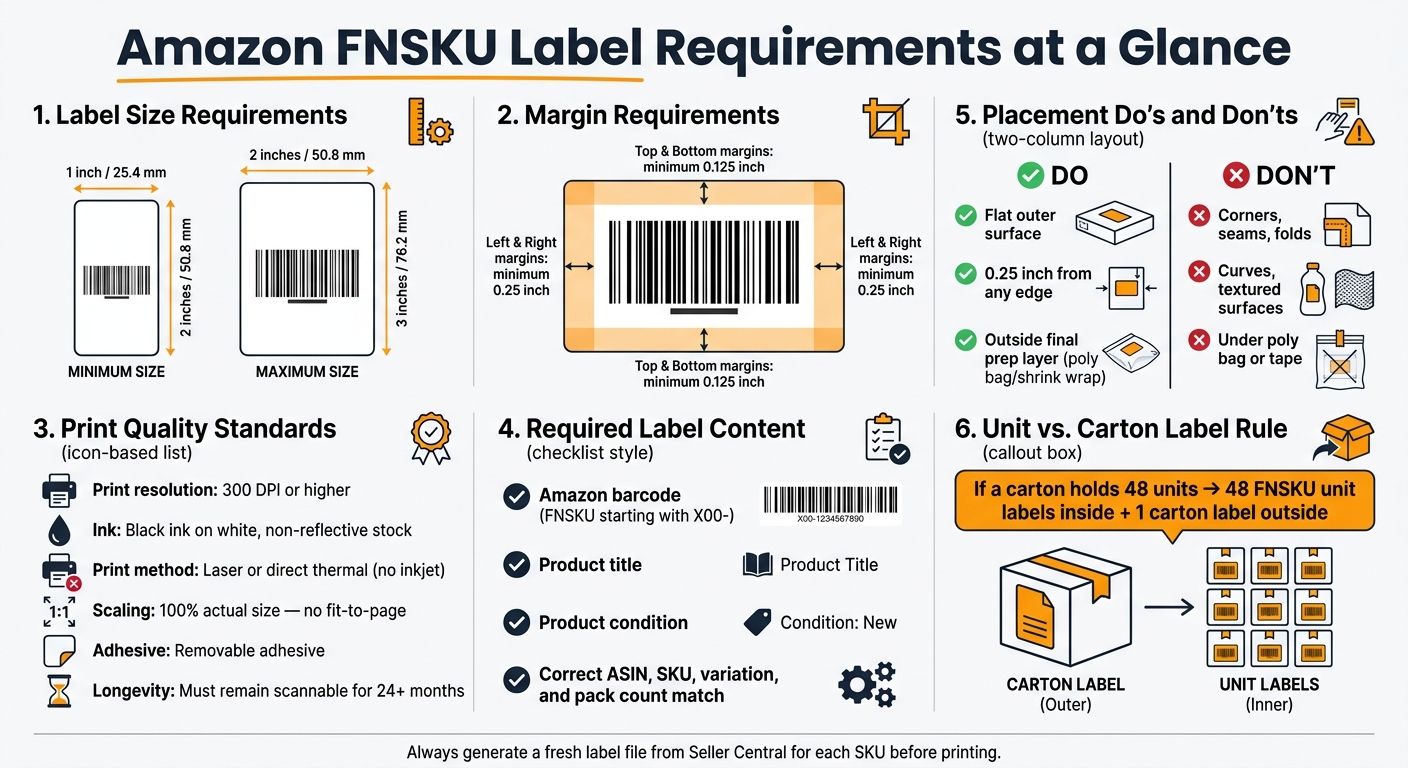
Amazon FNSKU Label Requirements: Size, Print & Placement Standards
Set Up the Right Label File Before Printing
After you confirm the SKU and barcode type, generate the label file and lock down the print specs.
In Seller Central, go to Manage All Inventory, choose the SKU, and print item labels or SKU labels for the full unit count.
Only print the label file for that exact SKU. Before anything goes into production, check the PDF and make sure it shows the right Amazon barcode, product title, and condition. FNSKUs usually start with X00-.
Send the PDF to your Amazon FBA prep services team along with a one-page spec sheet. Include:
- ASIN
- SKU
- variation
- condition
- unit count
- label size
- print settings
- margin limits
- an approved sample photo
Once the file and print specs are set, move to the next gate: the physical label itself.
Meet Amazon’s Size, Color, Margin, and Print Quality Standards
Print one test label first. Then measure it and scan it on the actual product packaging before you run the full batch.
The table below sums up Amazon’s main physical label rules and how to check each one on the production floor.
| Requirement | Amazon Standard | Inspection Method |
|---|---|---|
| Label size | 1 × 2 in. to 2 × 3 in. | Measure with a ruler before mass printing |
| Ink and surface | Black ink on white, non-reflective stock | Check contrast and glare under warehouse lighting |
| Side margins | At least 0.25 in. on left and right | Measure blank space beside the barcode |
| Top and bottom margins | At least 0.125 in. above and below | Measure blank space above and below barcode content |
| Print resolution | 300 DPI or greater | Inspect bars under magnification; scan multiple samples |
| Scaling | 100% or actual size; no fit-to-page | Confirm printer settings before every production run |
| Adhesive | Removable adhesive | Confirm label lies flat and removes cleanly |
| Barcode quality | Sharp, high-contrast, scannable | Scan from the angle and distance used in a fulfillment center |
| Required content | Amazon barcode, product title, condition | Match printed text against the Seller Central listing |
A blurry label can cause a mess fast. Skip inkjet labels that smear or feather. Use 300 DPI laser or direct thermal printing instead. Labels also need to stay readable and scannable for at least 24 months.
If you’re sending size instructions to a supplier in China, include the metric conversion too: about 25.4 × 50.8 mm to 50.8 × 76.2 mm. Still, the inch measurement should be the controlling instruction for the U.S. FBA shipment.
Apply and Inspect FNSKU Labels Before Freight Leaves China
Once the file and print settings are approved, the next step is simple: apply the labels and check them before the freight leaves China.
This part matters more than it seems. A label can look fine at a glance and still fail when scanned. That’s why the process needs both application and scan checks before loading.
Place One FNSKU on the Outside of Each Sellable Unit
Apply the FNSKU to the final sellable unit surface before packing or loading.
Put the label on a smooth, flat, visible area that sits at least 0.25 inch from any edge. Stay away from corners, seams, folds, closures, curved spots, and textured surfaces.
If the unit will be poly bagged, shrink wrapped, or bubble wrapped after labeling, the FNSKU must still stay on the outside of the final prep layer.
Cover all other scannable barcodes on the unit so Amazon scans only the FNSKU. Serial-number barcodes and Transparency codes should stay visible unless the program instructions say something else.
Run a Barcode Inspection Checkpoint Before Loading
A quick look isn’t enough here. Scan verification is required.
After labeling, check every unit against the approved file and run a barcode scan.
| Checkpoint | What to Verify |
|---|---|
| Identity | FNSKU matches the intended ASIN, SKU, variation, size, color, and condition |
| Coverage | Every sellable unit has one label on the outside of its final packaging |
| Placement | Label lies flat, firmly attached, away from edges, curves, seams, folds, and openings |
| Print quality | Barcode scans cleanly after application |
| Other barcodes | All unauthorized codes are covered; permitted codes remain visible |
Scan the first and last unit from each labeling run, along with several random units from every carton. The goal is to confirm the scanner returns the correct FNSKU, not just any barcode reading. If the shipment includes mixed variations, relabeled units, or hand-applied labels, increase the sample size. If the batch has a history of quality problems, scan every unit.
Keep a record of the date, SKU, variation, carton or batch ID, units checked, scan results, defects, corrections, and inspector name. Photos of both approved and corrected units should also be saved.
Use FCLGO for Prep Support When Labels Are Applied in China
If you need prep help in China, FCLGO’s Amazon FBA prep service can handle FNSKU labeling and barcode inspection before freight moves from China to the USA.
Before the work starts, send FCLGO:
- The approved FNSKU label files
- A clear mapping of each FNSKU to its ASIN, seller SKU, variation, and condition
- Exact unit quantities by product
- Your Amazon prep instructions
If any units need serial-number barcodes or Transparency codes to stay visible, put that in writing before labeling begins. Do the same for your inspection and photo requirements.
Avoid Receiving Delays and Finalize the Shipment Correctly
Labeling Errors That Commonly Cause Receiving Problems
After labeling and scan checks, one last problem can still slow everything down: receiving delays caused by basic label mistakes. Amazon flags issues like "barcode label missing", "barcode cannot be scanned", and "barcode label inaccessible" as inbound performance problems. When that happens, units may need manual identification, relabeling, investigation, or reconciliation before Amazon can receive them into inventory.
Use the table below as a final factory checkpoint before freight leaves China.
| Error | Likely Receiving Impact | Corrective Action |
|---|---|---|
| Wrong ASIN, variation, condition, or SKU label | Unit may be received against the wrong FNSKU record | Quarantine mismatched units and relabel from the correct file |
| Labeling only the master carton | Units cannot be identified at receiving | Apply one FNSKU to every sellable unit inside the case pack |
| Manufacturer barcode left visible | Scanners may read the manufacturer barcode instead of the FNSKU | Cover the entire conflicting barcode; preserve only Amazon-permitted exceptions such as serial-number or Transparency codes |
| Label outside Amazon size or margin limits | Bars or human-readable text can be cut off, causing scan failures | Reprint to Amazon’s size and margin limits |
| Unreadable, damaged, or low-contrast label | No-read scans and slower manual receiving | Reprint any unreadable label and replace damaged or reflective stock |
| Label placed over a seam, corner, fold, or curve | Barcode becomes unreadable | Move the label to a flat surface |
| Barcode blocked by poly bag, tape, or shrink-wrap glare | Barcode cannot be scanned through glare or wrinkles | Keep tape away from the barcode area |
| Differently labeled units mixed in one carton | Units may be received against the wrong SKU or create shipment discrepancies | Keep each ASIN, SKU, variation, and condition in separate work batches and perform a final count by SKU |
| Physical quantity doesn’t match the Seller Central shipment plan | Shipment discrepancies | Reconcile the unit count against the plan for every SKU before loading and correct differences in China |
Once those errors are cleared, do one more count check and release the shipment.
Conclusion: Unit-Level Checks That Help Protect Faster FBA Receiving
Before freight leaves China, verify every unit label, scan sample units, and match the final count to the shipment plan.
FAQs
Do all units in a case pack need their own FNSKU?
Yes. Every single unit needs its own scannable FNSKU label, even when the items are packed in a case or sold as a multi-pack.
The FBA Box ID label on the outer shipping carton does not replace the unit-level FNSKU labels inside.
When can I use a UPC instead of an FNSKU?
You can use a manufacturer barcode, such as a UPC, EAN, or GTIN, instead of an FNSKU if you choose the manufacturer barcode system.
Most new sellers stick with Amazon-generated FNSKU labels. It’s usually the safer route and helps avoid mix-ups. More established brands may choose manufacturer barcodes instead to cut labeling costs.
If you go with a manufacturer barcode, it must be the only visible, scannable barcode on the unit. That means you need to remove or cover any other barcodes. If you don’t, scanners can pick up the wrong code, which can lead to errors and inventory mix-ups.
What label mistakes cause Amazon receiving delays?
Amazon receiving delays often happen for one simple reason: the barcode label won’t scan.
That usually comes down to label placement. If a label sits over a seam, edge, fold, or curved surface, scanners can struggle to read it. The same thing can happen when the label is covered by stretch wrap or hit with glare.
Print quality matters too. Smudged, faded, or low-quality barcodes can fail at the dock. Missing quiet zones can also make a barcode hard to read.
Other delays come from shipment mix-ups, like:
- Old barcodes left on reused cartons
- More than one barcode on the same product
- The wrong or outdated FNSKU
- Carton contents that don’t match the shipment plan
It’s not flashy, but this stuff matters. A barcode that looks fine to the eye can still trip up a scanner and slow the whole receiving process.
发表回复