An Amazon FBA delivery window is an expected arrival range – not a booked appointment. I plan around the entire China-to-USA trip, including customs, warehouse handling, trucking and drayage, and Amazon’s available delivery slots.
For applicable shipments, Amazon uses a 7-day window, Sunday through Saturday. Check your dates in Send to Amazon, and update the window before it starts if your arrival estimate changes.
Here’s the checklist I use:
- Before pickup: Match shipment IDs, destinations, labels, counts, and freight documents.
- Before dispatch: Have the carrier confirm the Amazon appointment and check that the cargo is ready.
- After delivery: Save the proof of delivery and track Amazon’s receiving counts. Delivered does not mean <u>ready for sale</u>.
- When using FCLGO: Confirm who handles booking, handoff records, delays, and missing-unit paperwork.
I treat the window, appointment, delivery, and receiving as four separate milestones – and keep the records tied to the same shipment ID.
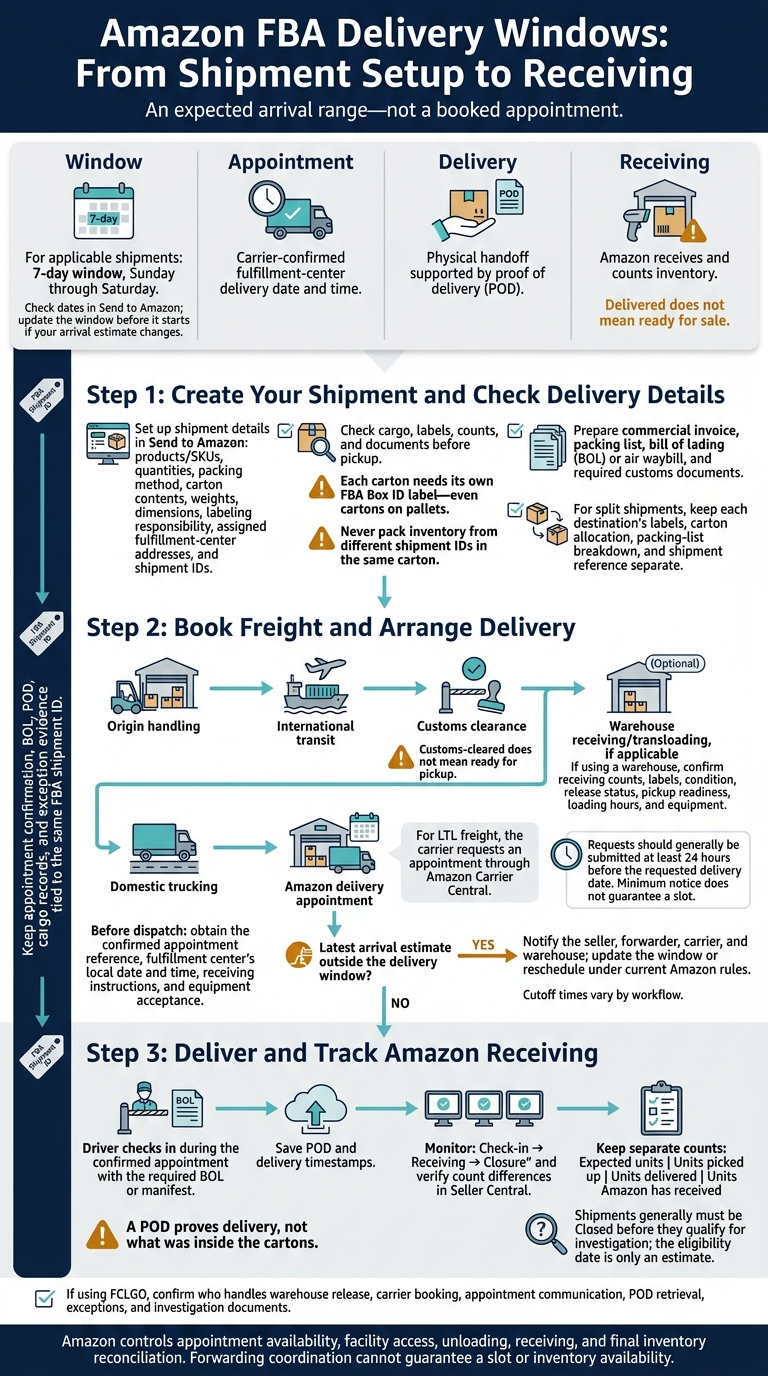
Amazon FBA Delivery Windows: From Shipment Setup to Receiving
How to Edit, Cancel & Delete an Amazon FBA Shipping Plan
sbb-itb-f9a91f9
Step 1: Create Your Shipment and Check Delivery Details
Once the delivery window is set, create the shipment using the exact carton, label, and destination data Amazon requires.
Enter Shipment Details in Send to Amazon
In Send to Amazon, enter the U.S. marketplace, products, SKUs, conditions, quantities, packing method, carton contents, carton weights, and carton dimensions. Confirm who handles labeling. Use pounds and inches unless Send to Amazon requires other units. Measure each packed carton’s exterior and weigh it with all packaging included.
Check every assigned fulfillment-center address and shipment ID before booking freight. Then select the transportation mode and carrier arrangement.
Estimate delivery time for the entire route: origin handling, international transit, customs clearance, warehouse receiving or transloading, domestic trucking, and appointment availability. Ocean or air transit time alone won’t tell you when the shipment can reach Amazon.
Check Labels, Cargo Counts, and Documents
Check the physical cargo against Send to Amazon, including SKUs, carton contents, carton and pallet counts, weights, and dimensions. Each carton needs its own FBA Box ID label – even cartons on pallets. Apply required unit and pallet labels, keep barcodes visible, and never pack inventory from different shipment IDs in the same carton.
Work with your forwarder or broker to prepare the commercial invoice, packing list, bill of lading or air waybill, and required customs documents. Check that the packing list matches the cargo. The invoice must accurately describe the goods, quantities, unit values, and country of origin. Confirm importer details and any product-specific compliance documents before dispatch.
If Amazon splits the shipment, each destination needs its own label set, carton allocation, packing-list breakdown, and shipment reference so the appointment matches the assigned window. Before pickup, send the destination breakdown, cargo-ready date, and confirmed addresses to FCLGO and the carrier. Get written confirmation of the breakdown.
Save shipment records, label files, cargo photos, and the pickup receipt for receiving checks.
Step 2: Book Freight and Arrange Delivery
Use the shipment ID, carton counts, and cargo-ready date from Step 1 to ship to Amazon FBA. Then line up customs clearance, drayage, and the Amazon appointment to keep the shipment within its delivery window. The seller or forwarder coordinates international transportation, customs clearance, and U.S. transport. The seller also monitors the delivery window in Seller Central.
Coordinate Customs Clearance and Warehouse Handoff
Track arrival, customs release, terminal availability, drayage, and warehouse release separately. Customs-cleared does not mean ready for pickup.
Confirm whether the cargo will go straight to Amazon or pass through a U.S. warehouse for prep or transloading. If it goes through a warehouse, get a receiving report that confirms counts, labels, condition, release status, and pickup readiness. Check loading hours and required equipment before matching trucking schedules to the appointment. Review the receiving report before the carrier requests an Amazon slot.
Have the Carrier Request an Amazon Appointment
For LTL freight, the carrier requests an appointment through Amazon Carrier Central. Amazon guidance says requests should generally be submitted at least 24 hours before the requested delivery date. That minimum notice does not guarantee a slot.
Give the carrier a bill of lading with the destination, FBA shipment and Amazon reference IDs, carton, pallet, and unit counts, plus the PRO or tracking number.
Before dispatch, get the confirmed appointment reference, the fulfillment center’s local appointment date and time, receiving instructions, and confirmation that the required equipment is accepted.
Update Delivery Windows and Reschedule Appointments
Compare the latest port, customs, warehouse, and trucking estimates with the Seller Central delivery window. If the timing no longer fits, notify the seller, forwarder, carrier, and warehouse right away. Then update the window or reschedule the appointment under current Amazon rules.
Save the request, Amazon’s response, revised confirmation, and dispatch instructions – especially if Amazon assigns a slot outside the expected window. Before approving changes, confirm any storage, redelivery, detention, and demurrage charges. Cutoff times vary by workflow, so don’t assume the same cutoff applies to every shipment.
After the appointment is confirmed, track delivery check-in, Amazon receiving, and count verification.
Step 3: Deliver the Shipment and Track Amazon Receiving
Once the carrier secures an appointment, the shipment is ready for delivery to the fulfillment center. The driver checks in during the confirmed appointment, identifies the shipment as an FBA delivery, and presents the required bill of lading (BOL) or manifest. Delivery confirms the handoff – not receipt of inventory. Amazon still needs to receive and count the units.
Avoid Delivery and Receiving Problems
Before dispatch, check that the shipment matches the destination, appointment, BOL, labels, and carton and pallet counts. The wrong fulfillment center, a missing appointment, document errors, damaged cartons, poor palletization, or unreadable labels can prevent acceptance.
If delivery fails, the carrier should record the facility, the reason, and the affected freight. Get documented redelivery instructions before returning or rerouting the shipment.
Keep Delivery Records and Resolve Count Differences
After Amazon accepts the shipment, monitor check-in, receiving, closure, and count differences in Seller Central. Save the appointment confirmation, proof of delivery (POD), BOL, timestamps, exception notices, damage photos, and carrier or warehouse communications under the FBA shipment ID.
Keep separate counts for expected units, units picked up, units delivered, and units Amazon has received. A POD proves delivery, not what was inside the cartons.
Shipments generally must be Closed before they qualify for investigation, and the eligibility date is only an estimate. Compare Amazon’s counts with your packing list and freight records. When the shipment becomes eligible, submit the requested proof of inventory ownership and proof of delivery.
Confirm Delivery Responsibilities With FCLGO
If FCLGO handles your shipment, confirm who is responsible for the final handoff documents and exception follow-up. FCLGO handles China-to-USA FBA forwarding, including freight, customs clearance, warehousing, drayage, trucking, and direct delivery.
Check which tasks your quote covers and who handles warehouse release, carrier booking, appointment communication, POD retrieval, exceptions, and investigation documents.
Amazon controls appointment availability, facility access, unloading procedures, receiving workflows, and final inventory reconciliation. Forwarding coordination cannot guarantee an appointment slot or when your inventory becomes available.
Conclusion: Match Your Delivery Window to Your Shipment Plan
Set your delivery window around the full shipping timeline, not just ocean or air transit. Keep Amazon, carrier, and customs details in sync, and leave time for customs, warehouse processing, inland trucking, and available appointments. Use the cargo-ready date – the date goods will be packed, counted, labeled, and documented – as your planning anchor.
Treat window, appointment, delivery, and receiving as four separate milestones. Link the appointment confirmation, BOL, and POD to the shipment ID.
Before pickup, send FCLGO the shipment ID, counts, destination, and arrival range. Reconfirm the appointment and cargo status before dispatch. If anything changes, resolve it before pickup.
FAQs
How much buffer should I add to my FBA delivery estimate?
Work backward from your target in-stock date, leaving time for every step from production to delivery. Add a 5–10-day buffer for customs holds, appointment changes, or carrier shifts.
Plan for these lane-specific windows:
- FCL: Allow 7–14 days for the West Coast and 10–15 days for the East Coast.
- LCL: Allow 14–21 days for the West Coast and 20–30 days for the East Coast.
From August through December, add another 10–14 days.
What if Amazon offers an appointment outside my delivery window?
If Amazon misses a scheduled appointment or offers a time outside your requested window, booking another slot through the Carrier Appointment System can push delivery back several days. Book as early as possible to lower that risk.
If a fulfillment center turns your truck away, you may face extra costs and scheduling problems. One common workaround is to unload at a nearby third-party warehouse while arranging a later appointment. This can help you avoid detention fees.
What should I do if delivered inventory remains unavailable?
Check shipment tracking in Seller Central. Proof of delivery doesn’t mean your inventory is ready for sale. Amazon still needs to receive and scan the cartons, which typically takes 3 to 7 business days.
Peak periods or facility workload can extend receiving times. Build this delay into your inventory planning to avoid perceived stockouts.
发表回复