Partial vs Split Shipments for FBA
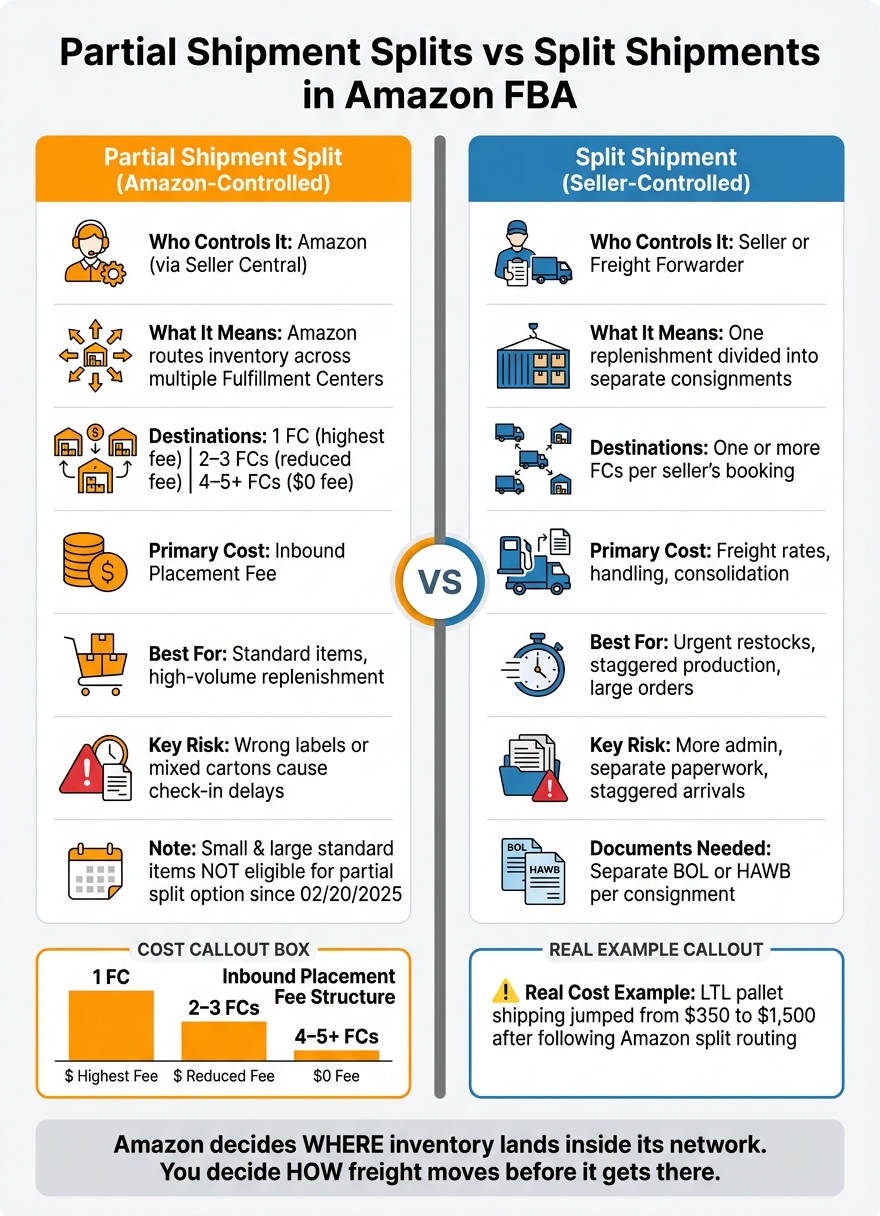
These two terms are not the same, and mixing them up can cost you money. In Amazon FBA, a partial shipment split is Amazon’s inbound placement choice. A split shipment is your freight choice, like sending part by air and part by ocean.
Here’s the short version:
- Amazon controls partial shipment splits
- You control freight split shipments
- Amazon may route inventory to multiple fulfillment centers — for example, West Coast units often go to ONT8 or PHX7, while East Coast units may be directed to ABE1 or BFI1y to 1 FC, 2–3 FCs, or 4–5+ FCs
- 1 FC usually means the highest placement fee
- 2–3 FCs can mean a lower fee
- 4–5+ FCs can mean $0 placement fee
- Since 02/20/2025, small standard and large standard items are not eligible for the partial shipment split option
- If cartons, labels, or Shipment IDs do not match Amazon’s routing, check-in can slow down if you don’t follow a step-by-step shipping guide
- One seller reported LTL pallet shipping jumping from $350 to $1,500 after following Amazon’s split routing
If I had to sum it up in one line, it would be this: Amazon decides where inventory goes inside its network, while I decide how the freight moves before it gets there.
Partial Shipment Splits vs Split Shipments: Amazon FBA Guide
How To Get Amazon Optimized Shipment Splits – FBA Send to Amazon Flows
sbb-itb-f9a91f9
Quick Comparison
| Point | Partial Shipment Split | Split Shipment |
|---|---|---|
| Who controls it | Amazon | Seller or forwarder |
| What it means | Amazon places inventory across FCs | I divide one replenishment into separate consignments |
| Main cost | Inbound placement fee | Freight, handling, and paperwork |
| Common use | Lower Amazon placement cost | Urgent air freight restocks, batch production, large orders |
| Paperwork | Shipment IDs and FBA labels | Separate tracking and transport documents |
| Main risk | Wrong labels or mixed cartons | More admin and separate arrivals |
So when I book freight, print labels, or plan replenishment timing, I need to treat these as two separate decisions. That’s the whole point of this article.
How Partial Shipment Splits Work in Amazon FBA
How Amazon Routes Inventory Across Fulfillment Centers
Amazon gives sellers three inbound placement options in the Send to Amazon workflow. Each option sends inventory to a different number of fulfillment centers.
| Destinations | Fee |
|---|---|
| 1 FC | Highest fee |
| 2–3 FCs | Reduced fee |
| 4–5+ FCs | No fee ($0) |
Amazon decides placement based on product mix, inventory levels, customer demand, and FC capacity.
After Amazon assigns those FCs, your part is pretty simple in theory: make sure each split is prepped right and each carton gets the right label. That’s where a lot of sellers trip up.
Booking Steps After Amazon Assigns Multiple FCs
Start by matching every Shipment ID to its FC code before you print labels. That matters because Amazon can assign separate Shipment IDs even when two splits are headed to the same FC.
If you want the $0 option, there’s a strict rule: each SKU must ship in at least five identical cartons or pallets, with the same quantities and the same carton mix.
One thing to keep straight: Amazon controls the placement split. The freight split is a separate piece.
Receiving Timelines and Check-In Delays
Each FC in a split receives and checks in inbound freight on its own timeline. So it’s normal for one destination to move ahead while another lags behind.
Delays often happen when sellers mix split shipments together or use the wrong labels and Shipment IDs. In plain English, if the cartons don’t match the routing Amazon set, check-in can slow down fast.
That’s Amazon-controlled routing, not seller-controlled freight planning.
Split Shipments as a Freight Planning Tool for FBA
Seller-controlled split shipments are a freight planning move. One replenishment goes out in two or more separate consignments. After Amazon assigns the destination FCs, the seller chooses how to divide the freight.
When to Split One Replenishment Into Multiple Consignments
The most common reason is stockout risk. Splitting a replenishment lets you send part of the inventory on a faster mode while the rest moves on a lower-cost option.
Another common reason is large orders or staggered production. A supplier might finish goods in batches, or the purchase order may be too big for one load. In those cases, breaking the shipment into smaller consignments can make planning easier. The tradeoff is cost: multiple smaller consignments usually increase freight spend, so it makes sense to compare total landed cost before you commit to the split.
Booking and Documentation Across Each Consignment
Each consignment needs its own booking reference, label set, and transport documents. For LTL, that also means a separate Bill of Lading. Even when the goods are the same or headed to the same fulfillment center, Amazon treats each consignment as its own shipment. So each one must be labeled and prepped separately.
A freight forwarder can handle the moving parts across both consignments, including air, ocean, customs clearance, warehousing, and delivery.
How Staggered Consignments Affect Amazon Receiving
When split consignments show up at different times, Amazon receives and processes each one on its own. If one consignment has different prep standards or missing paperwork, the later arrival is more likely to run into check-in delays. That’s why it helps to keep labels, carton prep, and shipment details the same across all consignments.
Those shipment-level choices shape cost, booking workload, and receiving speed.
Partial Shipment Splits vs Split Shipments: Direct Comparison
Amazon controls inbound placement splits. You control freight splits. Once that line is clear, the main issue comes down to cost, control, and receiving speed.
Who Controls the Split, Where Inventory Goes, and What It Costs
Amazon splits mainly affect placement fees. Freight splits mainly affect freight spend, handling, and consolidation costs. For small and large standard items, sellers can choose between a single-FC split with a fee or an Amazon-optimized split to 4 or more FCs if the shipment qualifies. Amazon-optimized routing can remove the placement fee, but it can also push up your total shipping spend because you’re sending smaller loads to more destinations.
| Factor | Amazon-Controlled Split | Freight Split Shipment |
|---|---|---|
| Controlled by | Amazon via Seller Central | Seller or freight forwarder |
| Destinations | Multiple FCs based on Amazon routing | One or more FCs per your booking |
| Primary cost | Inbound placement fees | Freight rates, handling, consolidation |
| Best for | Standard items and high-volume replenishment | Urgent restocks and larger replenishments |
A simple way to think about it: Amazon decides where inventory lands inside its network, while you decide how freight moves before it gets there. That difference matters. One choice can trim placement fees. The other can help you time inventory flow with a lot more precision.
Booking Steps, Tracking, and Receiving Complexity
Amazon-controlled splits live inside Seller Central. Freight split shipments happen across separate bookings with your carrier or FBA prep and warehousing partner. That means more moving parts.
Each freight consignment needs its own booking reference, transport documents, and tracking number – whether that’s a Bill of Lading for ocean freight or a House Air Waybill (HAWB) for air. If something breaks, gets delayed, or goes missing, you need to trace it back to the exact consignment, not just the Shipment ID.
| Step | Amazon-Controlled Split | Freight Split Shipment |
|---|---|---|
| Booking | Inside Seller Central workflow | Separate bookings per consignment |
| Documents | Multiple Shipment IDs + FBA labels | Multiple BOLs or HAWBs |
| Tracking | Integrated in Seller Central | Managed via carrier or forwarder |
| Receiving | Each Shipment ID checked in separately | Each consignment received independently |
In plain English: Amazon splits are easier to manage day to day. Freight splits give you more say, but they also bring more admin work. More bookings. More paperwork. More chances for one piece of the shipment to drift off schedule.
Matching Each Option to Bulky Items, Urgent Restocks, and Large Orders
The right split depends on SKU size, urgency, and total landed cost. You can use a CBM calculator to determine if your shipment volume justifies the extra freight spend.
Bulky SKUs often work better with a minimal split. If sending inventory to several FCs drives freight spend above the placement fee, paying Amazon’s fee may be the cheaper move.
Urgent restocks are where freight-level splits make a lot of sense. You can send a small portion by air while the rest moves by ocean. That helps prevent stockouts without forcing the whole order onto a higher-cost shipping mode.
Large replenishment orders can fit either option. It depends on how the supplier ships and how much inventory you’re moving. If the order comes in batches, or if it’s too large for one load, a freight-level split lets you break it into separate consignments and control timing more closely.
Conclusion: Pick the Right Split and Reduce Check-In Delays
Partial shipment splits are Amazon inbound placement splits set up in Seller Central. Split shipments, on the other hand, are a freight planning move where one replenishment is divided into separate consignments. That distinction matters because the right split keeps Amazon routing, freight booking, and receiving documents lined up from origin to FC.
The biggest problem is usually a mismatch. If Amazon assigns one routing path but the freight documents point to something else, issues can start fast. In most cases, check-in delays begin when labels, Shipment IDs, or paperwork don’t match Amazon’s routing.
If you’re using Amazon inbound placement splits, there’s one last rule to follow: keep carton contents identical across the required cartons or pallets.
For China-to-USA sellers, tighter coordination across freight, prep, customs, and delivery can cut down hand-off gaps. FCLGO offers end-to-end support for shipments moving from China to Amazon fulfillment centers.
FAQs
How do I know whether Amazon or I control the split?
Amazon controls the exact split. In Seller Central, you can only pick from the inbound placement options Amazon shows you, such as Minimal, Partial, or Amazon-optimized splits.
Which options you see depends on things like product type, shipment quantity, current network inventory, regional demand, and whether your shipment qualifies. In plain English, you can’t force a specific split.
When is paying the placement fee cheaper than splitting to more FCs?
Paying the inbound placement fee can be the lower-cost option when the extra logistics and shipping expense of sending inventory to several fulfillment centers ends up costing more than the fee itself.
Amazon-optimized splits may get rid of the placement fee. But they can also drive up freight and handling costs. Before you book anything, compare the total inbound shipping cost for each option against the placement fee.
What mistakes usually cause FBA check-in delays?
FBA check-in delays usually come down to one thing: Amazon’s rules weren’t followed exactly.
The most common problems are:
- Incorrect or old FNSKU barcodes
- Weak packaging that leads to damage or items shifting in transit
- Cartons that go over Amazon’s weight limits: 50 pounds for standard items and 30 pounds for hazardous materials
Other mistakes show up a lot too. Sellers sometimes mix different SKUs inside the same case-packed box, which can create problems at receiving. Another common issue is sending inventory to a fulfillment center that doesn’t match the routing Amazon assigned.
发表回复