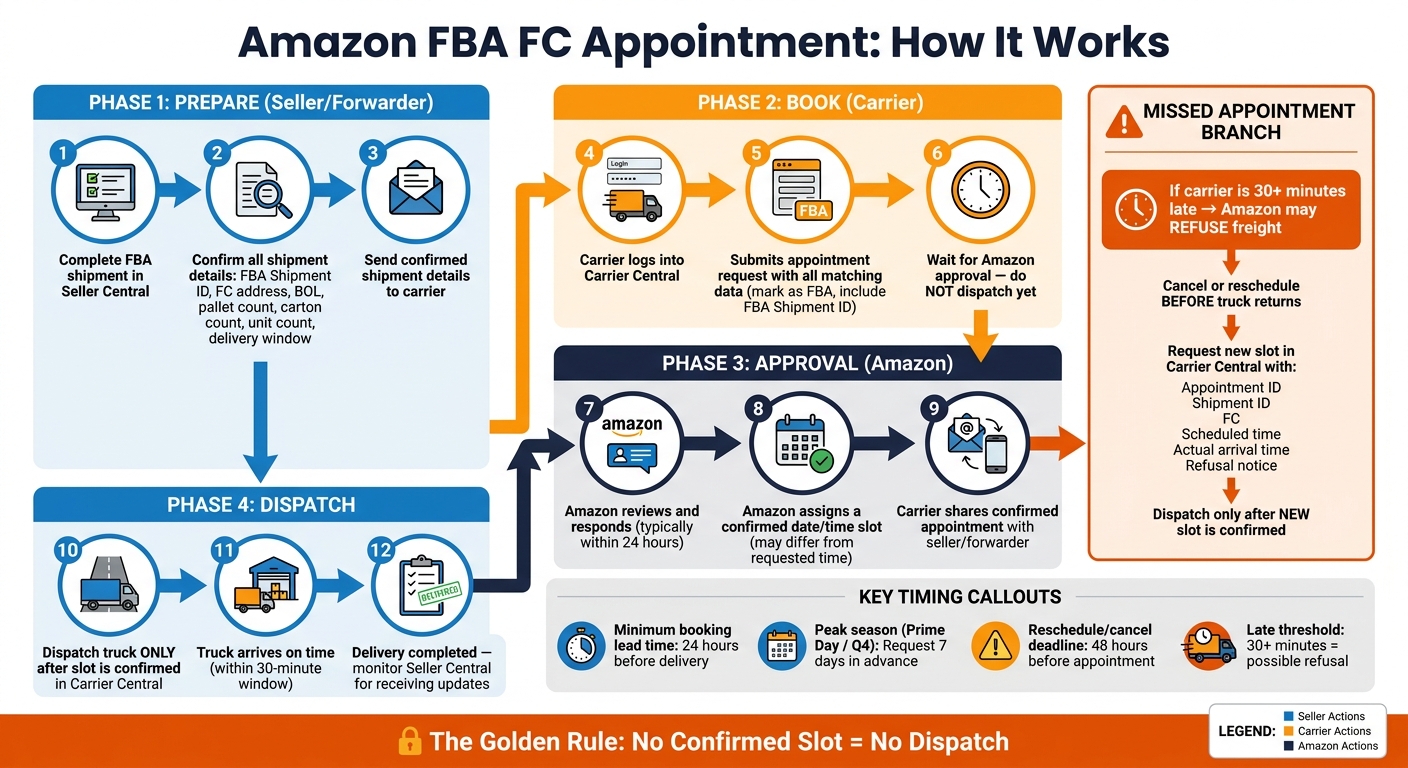
If your carrier does not have a confirmed Amazon FC appointment, the truck should not go. That is the main rule. For many FBA inbound shipments – especially LTL, FTL, and FCL – Amazon wants a booked delivery slot, and a truck that arrives 30 minutes late or more can be refused.
Here’s the short version:
- The carrier books the appointment in Carrier Central.
- The seller or forwarder sends the shipment details from Seller Central.
- Those details must match the BOL, pallet count, carton count, and FC destination.
- Amazon usually replies in about 24 hours, but peak periods can take more planning.
- Peak seasons may call for 7 days of lead time.
- If the slot is missed, the carrier usually needs to cancel or reschedule before trying again.
- If the load changes after booking, the appointment data should be updated before dispatch.
In other words: no confirmation, no dispatch. If you get the data wrong or miss the time window, costs can stack up fast – detention, extra truck moves, storage, drayage, demurrage, and late inventory.
I’d read this article as a simple playbook for four things: who books the slot, what data must match, when to request it, and what to do if the appointment is missed.
Amazon FBA FC Appointment Process: Step-by-Step Guide
How to Schedule FBA Delivery to Amazon and Use Carrier Central
sbb-itb-f9a91f9
Who books the appointment and what the carrier needs
The carrier submits the appointment in Carrier Central. The seller or freight forwarder provides the shipment data, and the carrier should book only after those details are checked and then wait for approval before dispatching. A requested date is not a confirmed appointment. Do not dispatch the truck until Amazon approves the slot.
Before the carrier submits the request, the shipment details need to match exactly.
The carrier’s role vs. the seller’s role
The seller completes the FBA shipment in Seller Central and sends the full shipment details to the carrier. The carrier then checks those details against the bill of lading, submits the request in Carrier Central, marks it as FBA, and includes the correct FBA Shipment ID.
After submission, the carrier keeps an eye on Carrier Central for Amazon’s response and shares the confirmed appointment with the seller or freight forwarder.
Shipment details that must match before booking
Every data point entered in Carrier Central should match what appears in Seller Central and on the bill of lading. Even small mismatches can cause problems. The table below shows the minimum data the carrier needs in order to submit the appointment.
| Required Data Point | Where It Comes From |
|---|---|
| FBA Shipment ID | Summary page in Seller Central |
| Amazon reference number | Seller Central shipment plan |
| Fulfillment center name and full address | Seller Central shipment destination |
| Shipper name | Shipment documentation |
| Bill of lading details | Carrier-issued BOL |
| PRO number (if applicable) | Assigned by the LTL carrier |
| Pallet count and carton count | Physical load confirmation |
| Total unit count (if available) | Packing list or Seller Central |
| Approved delivery date | Coordinated between seller and carrier |
If the physical load changes after booking – for example, the warehouse confirms 11 pallets instead of 12 – the carrier and forwarder should update the appointment details in Carrier Central before the truck leaves.
How FCLGO can help coordinate the handoff
For China-to-USA shipments, FCLGO can help line up customs clearance, drayage, U.S. warehousing, and delivery paperwork so the carrier books with the right shipment data.
Next: when to request the appointment and how long Amazon takes to approve it.
When to book and how long approval takes
Amazon requires carriers to request a fulfillment center appointment at least 24 hours before delivery. Treat that as the bare minimum. Send the request only after the shipment is fully ready to move. If the pallet count, carton count, routing, or arrival date changes after submission, Amazon may require a new request, which can slow down receiving.
Once the request is in, the big thing to watch is how fast Amazon confirms the slot.
When to request the appointment
Before the carrier submits anything in Carrier Central, check these details first:
- Confirm the FC address, shipment ID, reference numbers, and BOL match Seller Central.
- Lock in the final pallet and carton totals, including whether the freight is floor-loaded or palletized.
- Make sure the carrier has a confirmed delivery window that’s realistic.
For ocean shipments, leave room for the usual hiccups: drayage delays, terminal hold-ups, port congestion, chassis shortages, weather, and traffic. Those issues can throw off timing fast.
During peak periods like Prime Day or the Q4 holiday season, Amazon recommends requesting the appointment at least 7 days in advance. If it fits the shipment, a freight forwarder like FCLGO can help confirm cargo readiness, line up BOL details, and coordinate drayage timing so the carrier submits clean, accurate information.
What Amazon’s appointment status stages mean
Amazon usually responds to an appointment request within about 24 hours, though it may assign a time that’s different from the one requested. And even after a slot is confirmed, it may still change. Amazon can reschedule a confirmed appointment if FC capacity shifts. So don’t dispatch the truck until the slot is officially confirmed.
Amazon’s appointment updates usually move through three stages:
| Appointment stage | Meaning | Who controls the next step | What to do next |
|---|---|---|---|
| Request submitted | The request is in Carrier Central and pending Amazon review. | Amazon assigns the slot. | Keep freight ready and wait for confirmation. |
| Appointment confirmed | Amazon has approved a specific delivery date and time. | The carrier is responsible for meeting the confirmed slot. | Record the confirmed date and time, update dispatch instructions, and send the truck with the BOL and FBA references. |
| Delivery completed | The shipment has been delivered at the FC. | Amazon controls receiving and inventory check-in. | Keep proof of delivery and monitor Seller Central for receiving updates. |
Missed the slot? The next section covers late deliveries and rescheduling.
What happens after a missed appointment and how to reschedule
If a confirmed slot is missed, the delivery has to be reset before the truck comes back. Amazon can delay receiving a missed FC appointment and require a new slot before redelivery. If a carrier shows up 30 minutes or more late, Amazon may refuse the freight at no cost to Amazon. So don’t send the truck back until a new appointment has been requested and approved.
What happens next depends on why the appointment was missed. If the carrier already knows it can’t make the slot, it should cancel or reschedule as early as possible. A no-show may be marked as a missed-appointment record, and that can affect delivery-performance records.
| Situation | Typical Amazon response | Main cost or timing risk |
|---|---|---|
| Late but within gate window | Amazon may still receive the truck | Waiting, detention, or a lost slot |
| Carrier arrives 30 minutes or more late | Amazon may refuse the freight; a new appointment is required | Extra trucking, storage, detention, and possible missed-appointment record |
| Cancellation or reschedule made in advance | Usually better if the cutoff is met | A later slot may delay inventory availability |
| No-show | Amazon may flag the appointment as a missed-appointment record | Performance impact plus added transport or storage costs |
Steps to take after a late or missed delivery
As soon as the outcome is clear, document the miss and start the reset process. Once the delay is confirmed, check whether the truck is still on the way or whether Amazon refused it. Then record:
- Appointment ID
- Shipment ID
- FC
- Scheduled time
- Actual arrival time
- Refusal notice
Send those same details to the seller, freight forwarder, or logistics coordinator right away.
If FCLGO is handling the China-to-U.S. move, it can keep drayage, customs, and final-mile updates lined up while the carrier works the appointment inside Carrier Central.
How to cancel or reschedule correctly
Carriers can manage appointments in Carrier Central by finding the record with the appointment request ID, appointment ID, or shipment ID, then choosing the edit or reschedule option. In Seller Central, go to Inventory → Manage FBA Shipments → Manage FC Appointments. Open the record, click Reschedule or Cancel, pick a new open date and time if needed, add a clear reason, and submit it.
Amazon’s Seller Central guidance says changes should be made at least 48 hours before the scheduled appointment. Other Amazon guidance uses 24 hours for some cancel or reschedule cases, and some programs use different deadlines. That’s why the safest move is to follow the deadline shown in the exact appointment record. If no workable slot appears, escalate with the appointment ID, shipment ID, refusal proof, and requested delivery date. After Amazon confirms the new slot, dispatch the freight only for that revised appointment.
Key rules to follow for smoother FC delivery
Use these last checks before every appointment request. Before you book anything, confirm the shipment details: FBA shipment ID, FC address, BOL, pallet and carton counts, weights, dimensions, and the delivery window. Even one mismatch can hold up approval or slow down receiving.
One rule is simple: don’t send the truck out until Carrier Central shows a confirmed slot. Amazon usually replies within 24 hours.
Once the slot is locked in, timing becomes the whole game. Add extra buffer time during Q4 and other busy periods.
If there are port delays, customs holds, or equipment problems, report them right away so the carrier can reschedule before the slot expires. If FCLGO is handling the China-to-USA move, send transit updates early so the appointment request matches the latest drayage and customs timing.
A good way to think about it: plan backward from the appointment date. Every update should connect to that slot.
FAQs
What if Amazon changes my confirmed appointment?
If Amazon changes your confirmed appointment, you’ll need to book a new slot through the Carrier Appointment System in Seller Central. And because open slots can be hard to get, that can push your shipment back by several days.
To soften the hit, add a 5- to 10-day buffer to your logistics plan. If you work with FCLGO, its team can track appointment status and coordinate with Amazon to help cut down delays.
Can I reuse the same appointment if the load changes?
No. You can’t reuse an existing appointment if your load details change.
Amazon needs appointment details to match the load that actually shows up. That helps the company manage facility congestion and keep inventory moving through the building without backups.
If the load size or configuration changes in a major way, work with your carrier to update or reschedule the appointment in Amazon Carrier Central. If the appointment doesn’t match the actual load, you could miss your delivery window, lose the slot, and run into delays.
Who should fix a missed FC appointment?
If an Amazon fulfillment center delivery appointment is missed, the carrier has to book a new slot through the Carrier Appointment System in Seller Central.
Because a new appointment can take several days to get, stay in close contact with your logistics provider. If you use FCLGO, its team takes care of scheduling the appointment and rescheduling it if something goes wrong.
发表回复