博客

  • FCLGO | FBA Stockout: Ocean vs Air Freight

    If your stock will run out before an ocean shipment reaches Amazon, I’d use air for the gap and ocean for the rest. That’s the core decision.

    Here’s the short version:

    • Use ocean freight when your inventory can cover the full restock cycle to Amazon.
    • Use air freight when ocean is too slow and the stockout cost is higher than the extra freight cost.
    • Use a split shipment when sending everything by air would cut too deeply into margin.

    I’d look at four numbers first:

    • Landed cost per unit
    • Total lead time to sellable FBA stock
    • Days of inventory cover
    • Contribution margin per unit

    A simple check helps: if you have 15 days of cover but ocean takes 35 to 55+ days end to end, ocean alone will not prevent a stockout.

    A few numbers from the article stand out:

    • China-to-U.S. ocean freight can take about 25 to 45 days door to Amazon, and published Amazon estimates can run 45 to 55 days for FCL and 54 to 64 days for LCL
    • China-to-U.S. air freight is often about 5 to 10 days for the transport leg, but customs, FBA prep, trucking, and Amazon receiving add more time
    • LCL can add about 5 to 14 days versus FCL on the same lane
    • Amazon receiving can take 2 to 4 weeks, and often more in Q4

    Quick Comparison

    Option Best for Main upside Main downside Timing note
    Amazon FBA shipping via ocean Planned restocks Lower per-unit shipping cost More stockout risk if booked late Often 25 to 45 days door to Amazon, sometimes more
    Air freight Urgent replenishment Faster arrival Higher landed cost, especially for bulky cartons About 5 to 10 days for flight/transit only
    Split restock Gap coverage Balances cost and timing More planning across two shipments Air covers the shortfall while ocean refills base stock

    One more point: don’t compare freight quotes alone. I’d compare the extra air cost against lost margin from going out of stock, plus possible ranking and Buy Box damage.

    That’s the decision in plain English: ocean supports the base plan, air protects near-term availability, and a split shipment handles the middle ground.

    Ocean Freight for Planned FBA Restocks

    Use ocean freight when your inventory can cover the entire replenishment cycle. It usually brings down landed cost per unit, especially for dense shipments. Then the next call is simple: FCL or LCL, based on how much you’re shipping and how fast you need the booking to move.

    For China-to-U.S. ocean freight, expect 25 to 45 days door to Amazon once you include inland handling, customs, prep, and receiving. That full time frame matters. Don’t build your reorder point around vessel sailing time alone. Amazon’s listed standard service estimates show 45 to 55 days for FCL and 54 to 64 days for LCL on China-to-U.S. West Coast routes.

    When FCL and LCL Each Make Sense

    Choose FCL for bigger loads and LCL for smaller ones. FCL works best when your shipment fills most of a container. LCL makes more sense when it doesn’t, since you pay only for the space your cargo uses.

    The catch is timing. LCL cargo has to be consolidated at origin and deconsolidated at destination. That extra handling can add 5 to 14 days compared with a direct FCL move on the same lane. If you’re shipping around 12 to 15 CBM, get quotes for both. The break-even point can shift based on fees, weight, and what the service includes.

    Cost Savings vs. Longer Lead-Time Risk

    Ocean freight can save money, but it punishes late planning. Book too late, and a cheap shipment turns into a stockout problem.

    Indicative FCL pricing runs about $1,500 to $4,000 per container to the U.S. West Coast. LCL is usually priced by cubic meter, and the cost per unit often gets better as shipment density goes up. On the risk side, a blank sailing can add 7 to 14 days to a transpacific shipment.

    Use this tradeoff to line up the shipment method with your restock window:

    Factor Ocean freight implication
    Cost Usually the lowest-cost option per unit for larger or denser shipments, especially when container use is high
    Speed Slower than air; published Amazon service estimates can run 45 to 55 days for FCL and 54 to 64 days for LCL on listed China-to-U.S. West Coast routes.
    Shipment size FCL fits regular, higher-volume shipments using a full container; LCL fits smaller planned shipments that do not justify a full container
    Stockout exposure High if demand changes after booking
    Best use Planned restocks for stable, predictable SKUs

    When you set your reorder point, use the full replenishment formula, not just transit time:

    Required coverage = production time + ocean transit + customs, inland handling, prep, receiving, and buffer.

    If that buffer starts looking too thin, switch to air freight for the recovery shipment.

    Air Freight for Urgent FBA Replenishment

    When your inventory won’t hold out until an ocean shipment lands, air freight can be the right move. The key is simple: use it when the money you’d lose from a stockout is higher than the extra amount you’ll pay for air. In other words, don’t look at freight cost by itself. Compare the air premium with your expected stockout loss.

    Air transit from China to the U.S. is often quoted at about 5 to 10 days for the transportation leg. But that’s only the flight and core transit portion. It does not include export handling, U.S. customs clearance, domestic delivery, FBA prep, or Amazon’s receiving process. Your units aren’t sellable until Amazon receives and processes them, so total lead time is longer than the flight window. That’s why it makes more sense to plan backward from your projected stockout date, not forward from the day you book the shipment.

    When Speed Outweighs Freight Cost

    Air freight fits best when time is the main problem: stockout recovery, product launches, high-margin items, and short demand spikes.

    Use this formula to check whether air is worth it:

    Maximum justified air premium = Expected stockout loss − Cost of the ocean alternative

    This should be based on total landed cost, not just the freight line item. That means adding everything tied to the shipment:

    • Pickup
    • Export documentation
    • Air charges
    • Customs-related fees
    • Duties
    • U.S. delivery
    • Prep and labeling

    A low quoted rate per kilogram can look good at first glance, but the all-in cost may tell a different story.

    How Chargeable Weight Affects the Cost

    Air freight is billed using chargeable weight: actual weight or dimensional weight, whichever is higher. The standard air-cargo formula for dimensional weight is:

    Dimensional weight (kg) = (Length cm × Width cm × Height cm) ÷ 6,000

    So if a carton measures 100 cm × 60 cm × 50 cm, its dimensional weight is 50 kg. If the actual gross weight is only 35 kg, the quote will still be based on 50 kg. That difference can hit your per-unit cost hard, especially across a larger shipment.

    This is why bulky, lightweight, low-margin products usually don’t work well for air freight. Dense, compact, higher-value goods tend to handle air rates much better.

    Factor Air freight implication
    Cost Higher than ocean in most cases; justify it against lost contribution margin and stockout exposure
    Speed Roughly 5–10 days for the transportation leg; customs, prep, and Amazon receiving extend total lead time
    Shipment size Best for smaller, time-sensitive quantities; bulky shipments become expensive due to chargeable weight
    Stockout exposure Reduces replenishment time and can protect sales continuity, rankings, and launch timing
    Best use Urgent recovery, product launches, high-value products, short-term demand spikes, and split restocks that bridge an ocean shipment

    When you ask for a quote, send exact carton dimensions and gross weights. Even a small measurement mistake can change whether the shipment is billed by actual weight or dimensional weight, and that can shift your landed cost per unit in a meaningful way. It’s also smart to ask for an all-in quote that breaks out freight, fuel surcharges, origin handling, customs clearance, U.S. delivery, and any FBA prep needs.

    FCLGO can coordinate air freight along with customs clearance, FBA prep, and direct delivery to Amazon fulfillment centers. If air is only there to cover the shortfall, split the restock: use air for the gap and let ocean replenish your base inventory.

    Ocean Freight vs. Air Freight: Decision Matrix for FBA Sellers
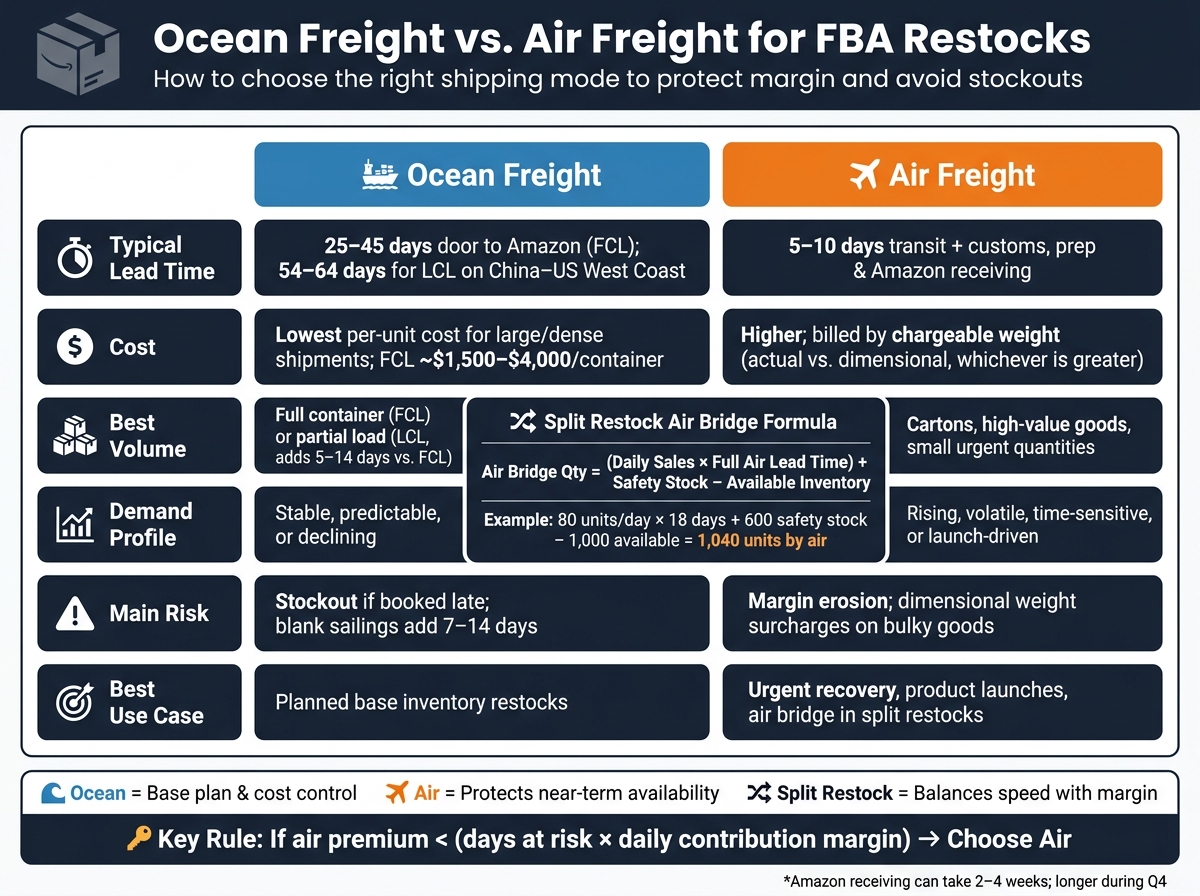
    Ocean Freight vs. Air Freight for FBA Restocks: Cost, Speed & Risk

    Ocean Freight vs. Air Freight for FBA Restocks: Cost, Speed & Risk

    Use this matrix to pick the shipping mode that protects your margin without leaving you with too much stock.

    It works best when your remaining inventory cover is getting close to your full replenishment lead time. At that point, the call usually comes down to four things: landed cost, inventory cover, demand velocity, and the cost of going out of stock.

    Here’s the rule of thumb:

    air premium vs. stockout loss avoided = days covered × daily contribution margin.

    If the damage you avoid by staying in stock – including possible ranking and Buy Box effects – is greater than the extra cost of air, then air makes financial sense. If your inventory cover can comfortably handle the ocean lead time and demand is steady, ocean is usually the lower-cost move.

    Side-by-Side Comparison: Cost, Speed, and Risk

    The best mode depends on your SKU’s cost profile, how fast you need inventory, and how demand is behaving.

    Decision factor Ocean freight Air freight
    Primary advantage Lowest transportation cost for larger shipments Fastest replenishment option
    Typical role Planned base inventory and routine replenishment Emergency coverage, launch support, or a short-term inventory bridge
    Volume fit Best for pallets, container quantities, and larger replenishment cycles; FCL suits a full container, while LCL suits smaller shipments Best for cartons, samples, high-value goods, and limited quantities needed quickly
    Demand profile Stable, predictable, or declining demand Rising, volatile, or time-sensitive demand
    Lead-time tolerance Requires enough inventory to cover the full ocean cycle, often around 25–45 days door to FBA Appropriate when available inventory may not cover the longer ocean lead time
    Financial trade-off Lower freight cost but more capital tied up longer and greater exposure to delays or excess inventory Higher freight cost but potentially lower lost-sales cost and less time waiting for replenishment
    Main risk Stockout risk increases if the shipment is booked too late; demand may change while goods are in transit Margin erosion, dimensional-weight surcharges, and insufficient quantity for sustained demand
    Best stockout response Use for the main replenishment when inventory coverage is adequate Use for urgent recovery, an air bridge, or a split restock when waiting for ocean would create a stockout

    How to Choose When Demand Changes

    When demand shifts, this stops being a simple cost question. It becomes a coverage-risk question.

    Stable or declining demand: go with ocean. Your inventory covers the full cycle, and landed cost stays lower.

    Rising demand: use an air bridge. Send a smaller batch by air to cover the gap, then let the larger ocean shipment do the heavy lifting.

    Unexpected spikes: move to air if stock will run out before ocean can land. Then use ocean for the larger follow-up quantity once you know the spike is sticking around.

    Launches and seasonal peaks: work backward from the FBA in-stock date. Send base volume by ocean, and send the gap volume by air.

    Split Restocks and Final Mode Selection

    When stockout risk goes up but sending the whole order by air would crush margin, split the shipment: send the shortfall by air and move the base quantity by ocean. From there, the job is simple in theory but easy to get wrong in practice: size the air bridge with precision.

    Air Bridge with Ocean Base Inventory

    Use this formula to size the air bridge:

    Air bridge quantity = (forecast daily sales × full air lead time) + safety stock − available inventory

    Use available sellable inventory only. Don’t use factory stock or units that are still in transit.

    Full air lead time means the whole path from pickup to FBA-ready status. That includes supplier handling, export clearance, transit, customs, drayage, delivery, and Amazon receiving. Amazon receiving can take 2–4 weeks under normal conditions and longer during Q4.

    Here’s a simple example. If you sell 80 units per day, need 18 days of coverage, keep 600 units of safety stock, and have 1,000 sellable units available, your air bridge comes to 1,040 units. Round up to the nearest full case pack or pallet when needed, using a CBM calculator to verify volume.

    After you size the gap, subtract any inventory that will become sellable before the air shipment lands. That can include:

    • Open POs
    • Inbound units
    • Reserved units
    • Stranded stock

    Then ship only the remaining gap by air. Let the ocean leg cover the rest.

    Split restocks also mean each leg needs its own plan, paperwork, customs filing, and delivery appointment. Ask for separate all-in quotes and service assumptions for air and ocean. FCLGO can coordinate ocean freight, air freight, customs clearance, FBA prep, warehousing, trucking, and delivery to Amazon fulfillment centers across both legs.

    If the math still leaves you torn, use the table below to make the final call.

    Final Decision Table and Key Takeaways

    Use the table below to choose the right mix based on inventory cover and demand pattern.

    Situation Preferred method Reason
    Stable demand with enough inventory cover Ocean freight Lower cost works when current stock can cover the ocean lead time.
    Stockout risk before ocean arrival Air bridge + ocean balance Air protects near-term availability while ocean controls total freight cost.
    Large, steady shipment FCL ocean freight Predictable volume suits container utilization and lower unit freight cost.
    Smaller planned shipment LCL ocean freight Move a partial load without waiting to fill a full container.
    Temporary demand spike Limited air shipment Covers the incremental increase without moving the entire order at air rates.
    Urgent launch or high-value SKU Air freight, or air + ocean Fast availability may outweigh the higher chargeable-weight cost.

    The rule of thumb is straightforward: ocean freight supports the base plan, air freight protects availability, and split restocks balance cost with speed.

    FAQs

    How do I calculate my air bridge quantity?

    Calculate your air bridge quantity by estimating how much inventory you need to cover the gap between your current stock and when your next ocean shipment arrives.

    For the air portion, compare each packed carton’s actual scale weight with its volumetric weight:

    (Length × Width × Height in cm) ÷ 6,000 = kg

    The higher of the two is the chargeable weight. That’s the number used to calculate your air freight cost.

    What costs should I include in landed cost?

    Include every cost between the factory floor and the Amazon fulfillment center. That means freight, handling, consolidation, and Amazon inbound placement fees, whether Amazon manages that part or you do.

    You’ll also want to account for FNSKU labeling, palletizing, prep, customs clearance, duties, terminal handling, and inland trucking.

    And here’s where many sellers get caught off guard: extra charges can show up fast if something goes wrong. A delayed or rejected shipment may lead to demurrage, per diem, or rework fees. Those costs aren’t rare edge cases – they’re part of the math.

    When should I choose FCL over LCL?

    Choose FCL when your shipment is over 15 CBM. For large, regular restocks, it usually gives you a lower cost per CBM and faster transit than LCL.

    There’s another plus: the container stays sealed from origin to destination. That means less handling, lower risk of damage, and no extra port time for LCL consolidation and deconsolidation.

    If your shipment is under 15 CBM, LCL is usually the more cost-effective option.
  • FCLGO | FBA Invoice Checklist for China to USA

    One wrong invoice field can delay U.S. customs clearance, slow Amazon receiving, or add duty costs. If I had to boil this guide down to one point, it’s this: before cargo leaves China, I would check all 12 invoice items against the packing list, shipment plan, and transport documents.

    Here’s the short version of what matters most:

    • Match the parties: shipper, importer of record, consignee, and U.S. tax ID
    • Match the invoice ID details: invoice number, date, currency, and Incoterms
    • Describe each product clearly: what it is, what it’s made of, and what it’s for
    • Use the right HTS code for each item
    • Check all quantities: units, weight, and carton count
    • Check all math: unit price, line total, and invoice total
    • List country of origin on each line
    • Separate goods value from freight and insurance
    • Add shipment references: PO, Amazon Shipment ID, HBL/container, booking ref
    • Make sure every document matches
    • Sign and certify the invoice before pickup
    • Never list Amazon as the buyer, seller, or importer of record

    A few details can make or break the shipment. CBP can stop an entry if the EIN is missing, a vague product description can trigger a hold, and even a carton mismatch can delay release by 5 to 14 days. Also, origin errors can lead to a 10% ad valorem marking duty.

    Item What I would check first Common problem
    Parties Legal names, addresses, EIN Wrong IOR or blank tax ID
    Product lines Description, HTS, origin Vague wording or wrong code
    Counts and values Quantity, weight, totals Math errors or carton mismatch
    Charges and refs Freight, insurance, Shipment ID Missing reference numbers
    Final review Match all docs, sign invoice Unsigned or inconsistent paperwork

    If you want a clean shipment handoff, this checklist is the last review I’d do before booking and loading.

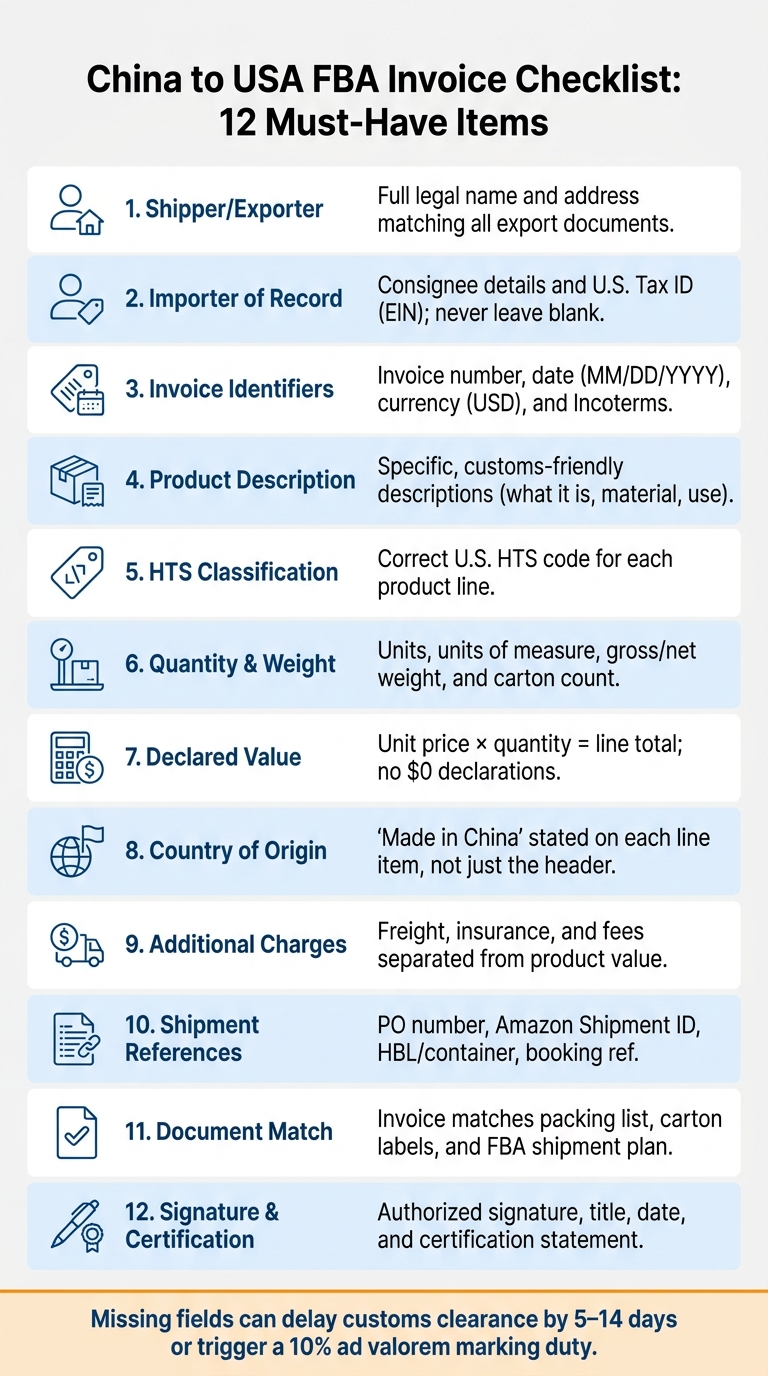
    China to USA FBA Invoice Checklist: 12 Must-Have Items

    China to USA FBA Invoice Checklist: 12 Must-Have Items

    Part 1: Seller, buyer, and invoice identity details

    These fields are the base of a compliant commercial invoice. They need to match the packing list, bill of lading, and customs entry. If these identity details line up, you can then move on to product description, classification, and quantity.

    Use the supplier’s full legal name, not a brand name or a shortened version. For example, "Shanghai ABC Trading Co., Ltd." and "ABC Trading" are not the same in customs records.

    Include the complete address, country, business phone, and business email.

    These details also need to match the sales contract, packing list, and freight booking. The simplest way to handle this? Keep one master record for supplier details and reuse it across all documents.

    2. Importer of record, consignee, and U.S. tax ID

    The importer of record, or IOR, is the U.S. entity responsible for customs entry, duties, and compliance. List the importer’s legal name, U.S. address, and EIN in EIN format, such as EIN: 12-3456789. For formal entries, CBP requires an Ultimate Consignee ID: EIN or SSN.

    The consignee is the delivery party. For FBA shipments, list the Amazon fulfillment center exactly as it appears in your shipment plan. If the goods are going to a U.S. warehouse first, use that warehouse instead.

    Party Required Details
    Shipper / Exporter Full legal name, street address, city, province, postal code, phone, email
    Importer of Record U.S. legal entity name, U.S. street address, EIN or SSN
    Consignee / Ship-to Amazon FC name and code or U.S. warehouse, full address

    3. Invoice number, issue date, currency, and Incoterms

    Use one invoice number across the invoice, packing list, freight booking, and house bill of lading. It should be unique and easy to trace, like FBA-2026-08-015.

    Use the U.S. date format: MM/DD/YYYY, for example 08/31/2026.

    State the currency as USD and format values like this: $12,500.00.

    Also include the Incoterms, named place, and version, such as FOB Shanghai, Incoterms 2020.

    Next, list the product details CBP uses to classify the shipment.

    Part 2: Product, quantity, value, and origin data

    Line-item mistakes are one of the biggest reasons shipments get held up at customs. The smart move is to check the description and classification fields first, then work through quantity, value, and origin.

    4. Product description

    Each line item needs a plain-English description that explains what the product is, what it’s made from, and what it’s used for. Vague terms like "gift item" or "parts" don’t give Customs much to go on.

    A solid description looks like stainless steel insulated water bottle, 500 ml, for reusable beverage storage. That level of detail helps CBP and your broker confirm what’s in the shipment without opening cartons.

    5. HS or HTS classification

    The HTS code affects the duty rate, any Section 301 China tariffs that apply, and how the entry gets reviewed. Each code should tie straight back to your internal SKU and Amazon ASIN so every record points to the same classification.

    This is where small shortcuts can turn into big problems. Don’t pull a code from a similar item and assume it works. If the materials change, the tariff line can change too. A cotton T-shirt, a polyester T-shirt, and a blended T-shirt may each fall under a different tariff line based on fiber content alone.

    6. Quantity, units of measure, weight, and carton count

    List the quantity for each line item with a clear unit of measure, such as pieces, sets, or pairs. Then keep that same unit of measure across the invoice, packing list, and carton data. If one document says "pieces" and another says "sets", you’re asking for trouble.

    Weight needs the same kind of cross-check. Net and gross weight should match the carton records. Carton counts also need to line up with the physical shipment and Amazon carton contents records. If they don’t, you can end up with receiving issues at the fulfillment center or extra customs questions.

    7. Unit price, line total, and invoice value

    Every SKU should show a declared unit price and a line total that equals unit price × quantity. After that, check that all line totals roll up to the right subtotal and grand total. Include other charges in the total only when customs value rules call for it.

    Basic math errors are easy to avoid, but they still happen all the time. If 150 units are priced at $4.80 each, the line total must be $720.00.

    The declared value also needs to match the actual commercial transaction value. A declared value of $0 is not allowed. Even free-of-charge samples must be declared at fair market value.

    8. Country of origin

    Country of origin has to appear on each line item, not just once at the top of the invoice. It also needs to match the physical product markings and carton labels, such as "Made in China", and reflect where the goods were actually made or substantially transformed.

    This isn’t just a paperwork detail. Origin mistakes can lead to a 10% ad valorem marking duty or CBP-supervised re-marking. Before the shipment leaves, check supplier declarations and carton markings side by side.

    Next, match charges and references to the shipment documents.

    Part 3: Charges, references, and document matching

    With origin confirmed, the next step is to check the charges and reference numbers.

    9. Freight, insurance, and other charges

    Keep the product value separate from freight, insurance, and any other charges. Break out the product subtotal, freight, insurance, packaging, handling, commissions or rebates, and export fees.

    Freight and insurance should appear as their own line items so your broker can calculate customs value the right way. Even if those costs are rolled into the sale price, list them separately for customs valuation.

    10. Payment terms, shipment mode, and reference numbers

    State the payment terms, shipment mode, and all reference numbers in a clear way. CBP and your customs broker may use payment terms to review the transaction value and confirm that this is a bona fide sale for export.

    Be specific about shipment mode. For example:

    • Ocean freight – FCL 1 × 40′ HQ
    • Ocean freight – LCL consolidation
    • Air freight

    This ties the invoice to the right transport document – bill of lading for ocean shipments and air waybill for air shipments – and helps your broker file the right customs entry.

    Also include the PO number, Amazon Shipment ID, forwarder booking reference, and container or HBL number. Those references help your customs broker connect the commercial invoice to the entry summary and the bill of lading. They also help Amazon’s warehouse team confirm that the inbound shipment matches the shipment plan.

    Once those references line up, compare the invoice against the packing list and the FBA cartons.

    11. Match the invoice to the packing list, shipping labels, and FBA cartons

    Do a line-by-line check before loading. Even one carton quantity mismatch between the invoice and packing list can trigger a CBP entry hold, which can delay clearance by 5 to 14 days until corrected documents are submitted.

    Each SKU on the invoice should appear on the packing list with the same description, quantity, and unit of measure. Then check the total carton count on both documents against the number of cartons with Amazon FBA box labels. After that, confirm that each label points to the right destination fulfillment center. Fix every mismatch before loading.

    A simple checklist helps here:

    • Mark each line as Match or Mismatch
    • Fix every mismatch
    • Have a second person sign off before the cargo is loaded

    Final review and conclusion: Sign-off before cargo leaves China

    12. Signature, certification, and final compliance check

    Once every line item matches, wrap up the invoice with signatures and certification. An authorized representative should sign the invoice, print their name and title, add the company name and address, and date it in MM/DD/YYYY format. A company seal (chop) is optional, but it’s commonly used on Chinese export documents.

    Add this certification statement exactly as written:

    "I certify that this invoice is accurate and that the goods are of the stated origin."

    Before pickup, do one last check against CBP rules, Amazon FBA shipping documents, and the agreed Incoterms. One detail matters a lot here: do not list Amazon as buyer, seller, declarant, or importer of record. Fill in the importer of record field correctly. If that field is blank or wrong, customs clearance can be delayed or the entry can be stopped.

    FCLGO can review export documents and FBA prep details before departure.

    Checklist summary: all 12 invoice items at a glance

    Use this table for the final pre-departure check. Missing fields or quantity mismatches can slow customs clearance and Amazon receiving.

    Use the checklist below for the last pass before pickup.

    # Category What to verify
    1 Shipper/Exporter Legal name and full address matching export documents
    2 Importer of Record Consignee details and U.S. Tax ID (EIN); not left blank
    3 Invoice Identifiers Invoice number, issue date (MM/DD/YYYY), currency (USD), and Incoterms
    4 Product Description Specific, customs-friendly descriptions for each item
    5 HTS Classification Correct U.S. HTS code for each product line
    6 Quantity & Weight Units, units of measure, gross/net weight, and carton count
    7 Declared Value Unit price, line totals, and total invoice value
    8 Country of Origin Clearly stated as China for each product line
    9 Additional Charges Freight, insurance, and other fees separated from product value
    10 Shipment References Payment terms, shipment mode, PO/reference numbers, and Amazon Shipment ID
    11 Document Match Invoice matches packing list, carton labels, and shipment plan
    12 Signature and certification Authorized signature, printed name and title, company name, date, and certification statement

    Getting all 12 items right before cargo leaves China is one of the simplest ways to avoid customs delays, surprise duty bills, and Amazon receiving errors.

    FAQs

    Who should be listed as the importer of record for an Amazon FBA shipment?

    The Importer of Record (IOR) is the person or company legally responsible for making sure a shipment follows U.S. import laws and rules.

    The IOR must appear on all customs paperwork. They handle customs entry filings, pay any duties owed, and make sure the documents are accurate. FCLGO helps sellers with customs clearance and filing.

    What happens if the invoice does not match the packing list or carton labels?

    If your invoice doesn’t match the packing list or carton labels, your shipment can hit delays and processing problems fast. U.S. Customs may hold it for 3 to 7 days, and that can lead to extra storage fees, labor charges, or even seizure.

    At an Amazon fulfillment center, mismatched unit counts or wrong labels can set off manual receiving, delays, or even shipment rejection.

    How can I verify the correct HTS code and country of origin for each SKU?

    Cross-check each SKU’s product specs against official trade documents and Seller Central rules. Also, verify HTS codes before filing to help avoid penalties or customs clearance delays.

    For the country of origin, make sure it’s entered correctly in Seller Central and marked as Made in China on every master carton. Review these details before cargo departure to help prevent shipment rejection and storage fees.

  • FCLGO | FBA Shipping: 9 Booking Mistakes to Avoid

    Most FBA shipping delays start before the freight leaves the factory. In this article, I break down the 9 booking mistakes that often push China-to-U.S. Amazon shipments off schedule, including late booking requests, wrong cargo ready dates, missing carton counts, slow file sharing, weak follow-up, poor holiday planning, no shared shipping timeline, booking before packaging and labels are ready, and no buffer time for problems.

    Here’s the short version:

    • If a supplier misses a cutoff, the shipment can roll to the next vessel and lose 7–21 days
    • FCL cargo often needs terminal handoff 3–5 days before departure
    • LCL cargo often needs 5–7 days
    • Many sellers book when production is about 70%–80% complete
    • Peak-season booking can need 4–6 weeks of lead time
    • A bad carton count, label mismatch, or late ISF file can delay both departure and Amazon check-in

    The main fix is simple: I’d lock dates earlier, confirm final shipment data before booking, use one shared timeline, and add buffer before port cutoff and Amazon delivery.

    Quick Comparison

    Mistake What goes wrong Common result
    Late booking requests Space gets booked too late Missed sailing
    Wrong cargo ready dates Factory date doesn’t match actual readiness Rolled shipment
    Missing carton counts Space and paperwork use bad numbers Rework or delay
    Slow file sharing Forwarder gets files too late Filing cutoff missed
    Weak follow-up Problems sit too long Last-minute delay
    Poor holiday planning Factory and port calendars get ignored Peak-season slip
    No shared shipping timeline Teams work from different dates Milestones get missed
    Booking before packaging and labels are ready Shipment is “booked” before prep is done Data changes after booking
    No buffer time for exceptions No room for fixes or trucking issues Extra cost and stockout risk

    If you use Amazon FBA shipping from China, this list gives you a simple way to spot delay risk early and keep inventory moving on time.

    1. Late Booking Requests

    Late booking requests are one of the main reasons FBA freight misses its sailing. Miss one cutoff, and the shipment can get pushed to the next vessel. The squeeze starts early, right at the booking stage. Understanding the shipping process to Amazon FBA is critical for avoiding these early bottlenecks.

    Missed Cutoff Risk

    Carriers work with firm deadlines for booking, documents, and terminal gate-in. If you miss any one of them, the shipment can roll to the next sailing. For FCL shipments, cargo usually needs to reach the terminal 3–5 days before departure. For LCL, it’s 5–7 days because the freight still has to be consolidated.

    Document and Data Accuracy

    Late booking also shrinks the time available to get paperwork right. When a booking lands at the last minute, details like the invoice, packing list, carton counts, dimensions, and FBA data are more likely to be rushed or left incomplete.

    That’s where small mistakes turn into big problems. A document error can lead to customs holds, misrouted freight, or rejection at Amazon fulfillment centers.

    To keep things on track, suppliers and sellers should send final carton-level details to their forwarder at least 3–5 days before pickup. If the booking comes in late, that cleanup has to happen fast, and under pressure.

    Supplier-to-Forwarder Handoff Timing

    The supplier needs to confirm the cargo ready date early enough for the forwarder to do three basic things before terminal cutoff:

    • book space
    • review documents
    • arrange pickup

    If that handoff happens too late, the whole shipment starts running behind before it even leaves the factory.

    Impact on Amazon FBA Receiving Schedule

    A rolled vessel doesn’t just add a few days at sea. It can delay ocean transit, customs, drayage, and Amazon receiving. For an FBA seller, that can easily turn into a stockout.

    That’s why experienced sellers usually lock in bookings when production is about 70%–80% complete – not when the last carton is finally packed. On China–USA lanes, that often means confirming space at least 2 weeks before ETD in normal conditions, and 4–6 weeks out during peak season or around Chinese New Year.

    Late booking is only one timing mistake. A wrong cargo ready date creates the same kind of delay, just from the other direction.

    2. Wrong Cargo Ready Dates

    Late bookings can delay a shipment. A wrong CRD can do the exact same thing, just from the factory side.

    A cargo ready date (CRD) is the date the goods are fully produced, packed, labeled, and ready for pickup. Sounds simple. But when a supplier gives a CRD that looks good on paper and doesn’t match what’s happening on the floor, the whole shipment schedule starts to slide.

    Missed Cutoff Risk

    If the CRD is off, the shipment can miss the vessel cutoff and get rolled to the next sailing.

    That kind of slip can cost more time than people expect. One bad date at the factory level can throw off the port handoff, the loading window, and the planned departure all at once.

    Document and Data Accuracy

    An overly optimistic CRD often comes with quantities, carton counts, and weights that are still preliminary. That creates a paperwork problem fast.

    If the commercial invoice and packing list don’t match the actual cargo, export filing can get held up. U.S. customs review can also slow down for the same reason. In plain terms, the shipment isn’t just late physically. The data is late too.

    Supplier-to-Forwarder Handoff Timing

    A good CRD sets the pace for the whole handoff process. Share tentative booking details 7–10 days before the CRD. Then send final carton counts 3–5 days before pickup. And don’t treat the CRD as a one-time estimate. Treat it as a shared checkpoint and confirm it again 3–5 days before pickup.

    Even when the CRD is correct, missing carton counts can still stall the booking.

    Impact on Amazon FBA Receiving Schedule

    Missing the cutoff can delay Amazon check-in by 1–2 weeks and increase stockout risk.

    A forwarder like FCLGO can cross-check supplier CRDs against sailing schedules and flag dates that don’t look realistic early.

    3. Missing Carton Counts

    Freight forwarders need the final carton count, carton dimensions, and weight so they can book the right amount of space. "’Around 100–150 cartons’ is not a usable count."

    Missed Cutoff Risk

    When carton counts are off, the booking may be sized the wrong way. That can push the shipment to the next sailing. And if the carton count changes after booking, the carrier may re-rate the freight or reject the cargo if the actual volume is above the space that was booked.

    Document and Data Accuracy

    Carton counts need to match across every file tied to the shipment:

    • commercial invoice
    • packing list
    • bill of lading
    • Amazon shipment plan

    If those numbers don’t line up, customs clearance can slow down. The ISF filing may also need a correction before the vessel departs.

    Supplier-to-Forwarder Handoff Timing

    Carton counts need the same final confirmation as the cargo ready date. A simple rule works well here: send preliminary carton counts 5–7 days before the cargo ready date, then send final dimensions and weights 2–3 business days before the booking cutoff.

    That timing gives the forwarder enough room to check the numbers, size the booking, and catch gaps before they turn into a missed sailing. Once carton counts are locked, the next bottleneck is file sharing.

    Impact on Amazon FBA Receiving Schedule

    If the carton count doesn’t match the shipment plan, Amazon may delay check-in until the issue is fixed. That can slow the whole receiving timeline.

    A forwarder like FCLGO can standardize carton templates and flag mismatches before booking.

    4. Slow File Sharing

    Slow file sharing is a booking mistake because a forwarder can’t confirm or move a shipment without the full set of documents. If files are missing, the forwarder can’t file customs, submit ISF data, or route the shipment the right way. Once carton counts are locked, the next choke point is simple: getting the right files to the forwarder fast.

    Missed Cutoff Risk

    For US-bound ocean freight, the ISF must be filed at least 24 hours before the vessel is loaded. That deadline comes up fast. Even a short delay with documents can push the filing past cutoff and roll the shipment to the next sailing.

    Customs brokers and forwarders also can’t file the entry or the ISF until they have accurate, complete files in hand. So this isn’t just paperwork for the sake of paperwork. No files, no filing. No filing, no departure.

    Document and Data Accuracy

    If the packing list, labels, and declared weights don’t match, the forwarder has to stop and ask for fixes before filing. That back-and-forth can eat up time when the cutoff window is already tight.

    Here are the key files and why they matter:

    Document Why It’s Urgent
    Commercial Invoice Required for customs valuation and ISF filing
    Packing List Needed for cargo verification and customs entry
    FBA Carton Labels Required for Amazon receiving setup
    FNSKU Barcodes Needed for unit-level inventory tracking at the FC
    ISF Data Must be filed before vessel loading

    These are the files that need to arrive first.

    Supplier-to-Forwarder Handoff Timing

    Suppliers should send complete files as soon as packing is done. In practice, that means asking for final files right after packing finishes, not a day later and not only when someone follows up.

    Use a hard cutoff for the final packing list and labels three business days before pickup. That gives the forwarder enough time to check the data, catch mismatches, and submit customs paperwork before the cutoff hits. If the handoff is slow, follow-up becomes the next source of delay.

    Impact on Amazon FBA Receiving Schedule

    Late file sharing delays departure. That pushes back arrival, which makes Amazon receiving harder to plan. For sellers running lean inventory, that can mean stockouts before the next replenishment lands.

    FCLGO can help by coordinating the document handoff, reviewing file completeness as soon as files come in, and moving the shipment into customs and carrier processing without unnecessary delays.

    5. Weak Follow-Up

    Once a booking starts moving, the next problem is simple: silence.

    Teams send the files, assume things are on track, and move on. That’s where trouble starts. Cargo readiness, document receipt, pickup, and handoff all need to be checked and confirmed. One email at the start isn’t enough.

    Missed Cutoff Risk

    Delays often stay hidden when nobody is checking key milestones. A supplier might say the cargo will be ready by Friday. But if no one follows up to confirm that status, a production delay can sit there unnoticed until the cutoff is already gone.

    At that point, the booking may roll to the next sailing. And that can mean another full week of delay.

    Document and Data Accuracy

    Weak follow-up also lets old or incorrect data keep moving through the process. Say a supplier increases the carton count after a production overage, but nobody confirms the update. Now the freight estimate, export paperwork, and warehouse receiving plan may all be built on the wrong numbers.

    That kind of mismatch can snowball fast. Any shipment change needs to be reconfirmed before filing, especially when the port document cutoff window is tight.

    Supplier-to-Forwarder Handoff Timing

    Clear ownership matters here. Each checkpoint should have one person responsible for it:

    • The seller confirms readiness
    • The supplier sends final carton data
    • The forwarder confirms pickup

    When each step has a clear owner, updates are less likely to slip through the cracks.

    Impact on Amazon FBA Receiving Schedule

    Wrong shipment details can lead to Amazon discrepancies and slow down check-in. And when nobody is checking for updates, even a small issue can turn into a booking delay.

    That risk gets higher when factory calendars get tighter.

    6. Poor Holiday Planning

    Holidays shrink the shipping timeline fast. Factories close, vessel space gets tight, and schedules start to slide. Most of the time, the problem starts with a missed date on the calendar, not a missed container.

    Missed Cutoff Risk

    When suppliers confirm dates late, holiday cutoffs can vanish in a hurry. Chinese New Year shuts down most factories for 2–3 weeks, and Golden Week brings a similar squeeze before the holiday. Miss the cutoff, and the cargo usually rolls to the next sailing.

    Document and Data Accuracy

    The holiday rush also brings more paperwork mistakes. Incomplete packing lists, wrong carton counts, and mismatched SKU data show up more often when teams are moving fast. With lean holiday staffing, there’s usually less time to catch and fix those errors.

    Supplier-to-Forwarder Handoff Timing

    A shared holiday cutoff calendar helps keep everyone on the same page. It should include the last dates for:

    • Production completion
    • Document submission
    • Pickup
    • Booking confirmation

    Without that shared calendar, even a shipment that’s ready to go can still miss the booking window.

    Impact on Amazon FBA Receiving Schedule

    Holiday congestion doesn’t stop at the port. Drayage can slow down, and Amazon appointment slots can get pushed back even after the shipment arrives. For Q4, book 60+ days ahead, wrap up ocean moves by early November, and add a large transit buffer.

    7. No Shared Shipping Timeline

    The earlier mistakes get worse when nobody works from the same shipping calendar. If the seller, supplier, and forwarder all follow different schedules, one missed milestone can throw off the entire booking.

    Missed Cutoff Risk

    A shared timeline helps you avoid missing port gate-in and document cutoffs. Miss either one, and your cargo can get rolled to the next vessel.

    Document and Data Accuracy

    Set one document lock date so carton counts, weights, and SKU data are final before filing. That gives everyone one version to work from instead of chasing last-minute changes.

    Supplier-to-Forwarder Handoff Timing

    The shared timeline should include five milestones, each with a clear date and a clear owner:

    • Production complete
    • QC done
    • Packaging and labeling signed off
    • Pickup scheduled
    • Final files submitted

    When those dates are set in advance, the handoff from supplier to forwarder tends to run much more smoothly.

    Impact on Amazon FBA Receiving Schedule

    A shared timeline keeps restock dates tied to actual vessel schedules, not guesses. That matters a lot with Amazon FBA, where timing slips can ripple into stock issues and missed sales windows.

    Once the timeline is shared, the next failure point is booking before packaging and labels are ready.

    8. Booking Before Packaging and Labels Are Ready

    A shared timeline helps, but it doesn’t fix one big mistake: booking too soon.

    If packing, labeling, and palletizing aren’t done, an early booking can throw an FBA shipment off track. The main issue is simple. The CRD may look fine on paper, but it no longer matches what’s happening at the factory.

    Missed Cutoff Risk

    Small prep delays can cause big shipping problems.

    If packaging runs late or FNSKU labeling takes a bit longer than planned, the cargo can miss the port cutoff. And once that happens, the shipment may roll to a later sailing.

    Document and Data Accuracy

    Early booking can also create paperwork headaches.

    When the final packout isn’t done yet, the forwarder may need to revise the packing list, booking confirmation, bill of lading instructions, and AMS/ISF data after the fact. That’s extra work, and it opens the door to mistakes.

    That’s why booking should come after final packout, not before it.

    Supplier-to-Forwarder Handoff Timing

    The cleanest handoff happens when the supplier first confirms that prep is done and sends the final packout files.

    At that point, the forwarder can check the data, make sure it lines up, and file everything the right way. A clear "prep complete" milestone helps avoid last-minute fixes.

    Impact on Amazon FBA Receiving Schedule

    When packaging or labeling issues cause a missed vessel, the damage doesn’t stop at the port.

    Amazon receiving gets pushed back, and the risk of stockouts goes up. If prep is already running close to cutoff, even a small exception can knock the shipment off schedule.

    9. No Buffer Time for Exceptions

    Even when packing is done and labels are on, things can still go sideways. Late production, damaged cartons, or a trucking delay can throw off the whole shipment. That’s why a solid plan needs some breathing room.

    Missed Cutoff Risk

    Ocean freight cutoffs don’t move. If you miss the gate-in time or the document deadline, the cargo usually gets pushed to the next sailing. That can add 7–21 days to the timeline.

    Document and Data Accuracy

    That extra time gives you room to fix issues in packing lists, HS codes, and ISF data before filing. A good rule is to leave 1–2 business days between final packing and final document submission. That gives the forwarder time to check the data and send back clean files before the cargo reaches the port.

    Supplier-to-Forwarder Handoff Timing

    Send shipment details early so the forwarder has time to book space, line up trucking, and pre-file documents before the cutoff. When that lead time disappears, the first place it usually shows up is in the Amazon delivery window.

    Impact on Amazon FBA Receiving Schedule

    A rollover puts pressure on every step that comes after it. And if inventory lands after the sales window, sellers often end up paying for costly air freight.

    Quick Reference Tables

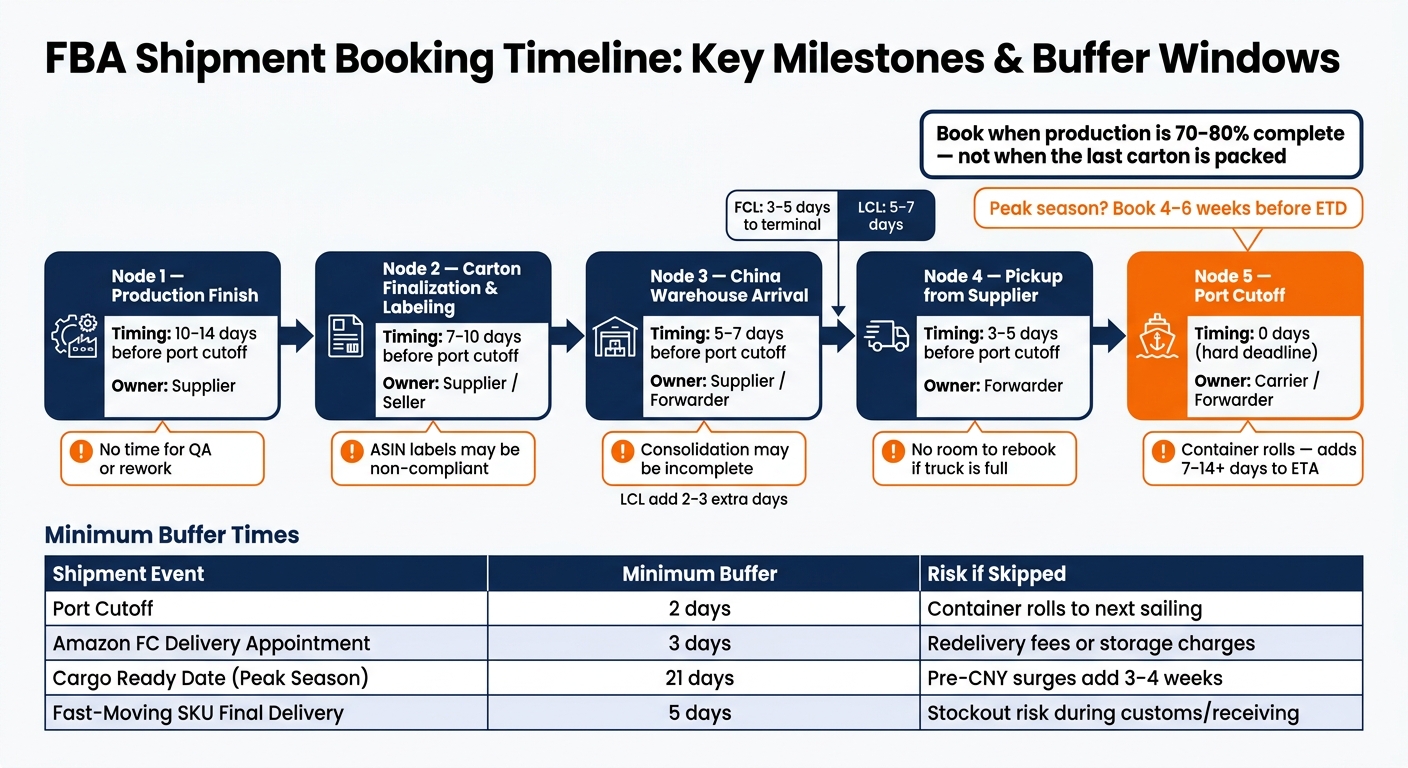
    FBA Shipment Booking Timeline: Key Milestones & Buffer Windows

    FBA Shipment Booking Timeline: Key Milestones & Buffer Windows

    Use these tables to check timing, shipment data, and buffer risk before you confirm a booking.

    Carton Count Discrepancy Impact

    Check this table before you send final booking details. If the carton count is off, booking space and receiving plans can shift fast.

    Reported Count Actual Count Difference Risk Level Shipment Impact Action Required
    100 102 +2 Low Forwarder can usually absorb a small change; pickup may be delayed a bit Confirm final count with supplier; update packing list before pickup
    200 220 +20 Medium Original truck or container plan may not fit; shipment may slip to the next sailing, adding 5–7 days Reissue carton count to forwarder at least 3–5 days before loading; adjust booking
    80 72 −8 Medium Volume was overstated; you pay for space you don’t use (check your shipping volume first); forwarder must adjust Amazon FC appointment Remove canceled cartons from FBA shipment plan; update packing list and commercial invoice
    Not finalized 180 Unknown High Forwarder can’t book space with confidence or arrange the right trucking; high risk of missing port cutoff and Amazon FC appointment Lock final carton count before any booking is made; never submit unconfirmed counts to your forwarder

    Lock final carton counts before pickup.


    Shared Shipping Timeline Template

    Next, line up supplier and forwarder dates on one calendar. One shared timeline helps stop drift between the supplier, seller, and forwarder.

    Milestone Timing Before Port Cutoff Owner Risk if Missed
    Production Finish 10–14 days Supplier No time for QA or rework; inspections get rushed or skipped
    Carton Finalization & Labeling 7–10 days Supplier / Seller ASIN labels may be non-compliant; FBA prep can be delayed
    China warehouse arrival 5–7 days Supplier / Forwarder Consolidation may be incomplete; truck booking can be missed
    Pickup from Supplier 3–5 days Forwarder No room to rebook if the truck is full or customs docs are incomplete
    Port Cutoff 0 days Carrier / Forwarder Container rolls to the next vessel, adding 7–14+ days to ETA

    Share this timeline with your supplier and forwarder. Add 2–3 extra days for LCL.


    Buffer Time by Shipment Event

    Finally, add buffer time to the dates that matter most. A planned date looks fine on paper, but without buffer, one small issue can throw the whole shipment off.

    Shipment Event Minimum Buffer Risk if No Buffer
    Port Cutoff 2 days Any truck delay, customs inspection, or document issue causes the container to roll to the next sailing
    Amazon FC Delivery Appointment 3 days Missed appointment triggers redelivery fees or storage charges
    Cargo Ready Date (Peak Season) 21 days Pre-CNY surges add 3–4 weeks to normal transit; space fills fast
    Fast-moving SKU Final Delivery 5 days Stockout risk; lost sales while inventory clears customs or the receiving queue

    Increase buffers during Chinese New Year, Golden Week, and Q4.

    How a Freight Forwarder Can Help With Booking Coordination

    A freight forwarder keeps the booking process on one schedule. A China-to-USA Amazon FBA freight forwarder like FCLGO works directly with your supplier to confirm cargo-ready dates, check carton counts and volume, and collect the needed documents before placing the booking. That matters most when the booking window is tight and there’s not much room for back-and-forth.

    The same team can also handle ocean freight for both FCL and LCL, air freight, U.S. customs clearance, FBA prep, warehousing, drayage, and delivery to Amazon fulfillment centers. When those jobs sit under one roof, it’s much easier to line up FBA delivery appointments with actual vessel ETAs, add sensible customs clearance time, and rebook trucking if an upstream delay throws off the plan. Instead of each step moving on its own track, the factory, customs, and trucking timelines stay tied to one plan.

    Having one point of contact also cuts rework. ETAs, customs clearance, and truck moves stay in sync, which makes the booking process easier to manage and easier to control.

    Conclusion

    These mistakes all point to the same fix: tighter control before production ends.

    Most FBA delays don’t start at the port. They start earlier, in booking, shipment data, and day-to-day follow-up. That’s the common thread: weak control before pickup.

    Start with backward planning. Lock in the Amazon delivery deadline first, then work back through each milestone: receiving, drayage, customs clearance, vessel ETD, and cargo-ready date. That timing only holds if the shipment data is final. Carton counts, weights, dimensions, labels, and shipment IDs need to match before booking, not after.

    Once the numbers are locked, file sharing needs to move fast. Use one shared folder and one contact on each side. Build in 7–21 days of buffer for rollovers, factory delays, and missing documents. And treat booking coordination as part of inventory planning. The sellers who stay in stock are usually the ones who plan earliest.

    FAQs

    When should I book my FBA shipment?

    Work backward from the date your shipment needs to arrive at the Amazon fulfillment center. Build in time for production, origin handling, ocean or air transit, customs clearance, and final delivery.

    It also helps to add a 5- to 10-day buffer in case something slips, like port congestion or carrier schedule changes. If you’re shipping during peak season, from August through November, give yourself even more room.

    One more thing: booking 2 to 4 weeks before your planned sailing date can make it easier to lock in space.

    What shipment details should be final before booking?

    Before you book anything, lock in your cargo details. It’s a small step that can save you from a lot of delays later.

    You’ll want to confirm the total weight, total volume in CBM, the origin city, and the Amazon fulfillment center code for the destination.

    Your shipment plan also needs to match your paperwork exactly. That means SKU quantities, carton-level weights, and carton dimensions should all be accurate and consistent across your documents.

    How much buffer time should I add for delays?

    Build in at least 5 to 10 days for normal planning. In peak shipping windows, like August through November or the run-up to Chinese New Year, add 2 to 4 weeks on top of your estimated port-to-port transit time.

    If you skip that cushion, common delays, such as port congestion, customs holds, missed consolidation cutoffs, or appointment changes, can turn into stockouts fast.

  • FCLGO | Country of Origin Checklist for FBA

    If your product origin mark is missing, wrong, or covered, your Amazon FBA shipment can get delayed, re-labeled, or hit with a 10% marking duty plus other customs costs.

    When I check a shipment before it leaves China, I focus on five things:

    • Product and retail packaging marks say the right country in English, such as “Made in China”
    • Supplier proof confirms origin at the SKU level
    • Invoice and packing list match the product line by line
    • FNSKU, carton, and prep labels do not hide the origin mark
    • ISF and customs entry data match the same origin, HTS line, importer, and Amazon delivery details

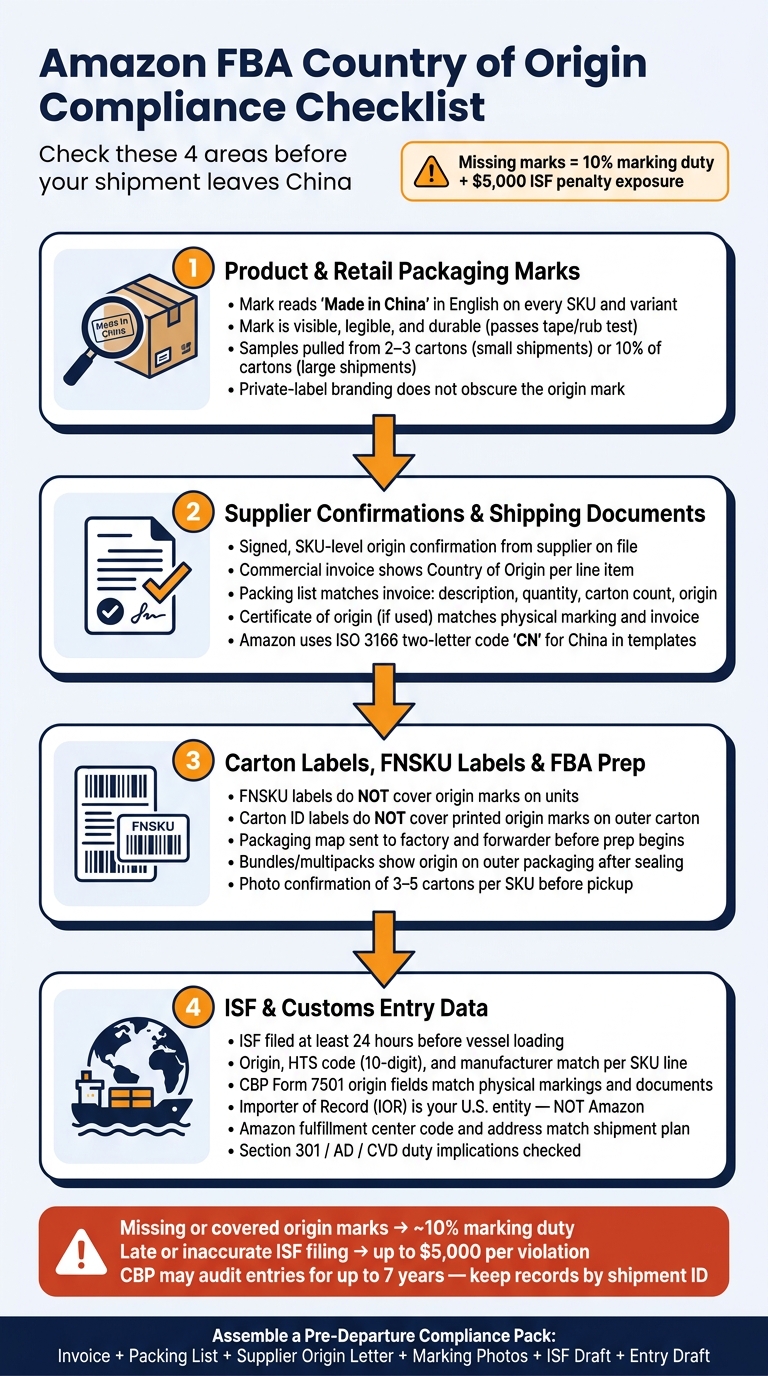
    In short: check the product, check the paperwork, check the labels, and check the filing data before pickup. That is the easiest way to cut the risk of cargo holds, rework, storage fees, and $5,000 ISF penalty exposure.

    Here’s the full checklist in plain English.

    Amazon FBA Country of Origin Compliance Checklist

    Amazon FBA Country of Origin Compliance Checklist

    Amazon News: Avoid cross-border restrictions – Provide Country of Origin information

    Checklist 1: Check Origin Marking on Products and Retail Packaging

    Start with the product and packaging. If the origin mark is wrong, it can turn into a customs issue later. Check every product and every retail package before pickup. The mark needs to be correct, easy to see, and able to stay on through normal handling.

    Confirm the Right Origin Statement for Each SKU

    If the country of origin is China, use the exact origin mark required for that SKU, usually Made in China. In some cases, P.R. China may also be allowed; PRC by itself is misleading. Check each SKU and each variant on its own, including every color, size, and bundle setup.

    For private-label products, don’t let U.S.-based branding cover up or distract from a clear Made in China mark. The manufacturing country should appear near the branding and in at least the same size.

    A simple way to stay organized is to build a SKU master list with:

    • Product title
    • Variation details like size and color
    • Amazon ASIN/FNSKU
    • Exact origin wording required

    Use that list during the factory check so no variant slips through the cracks.

    Check That Marks Are Visible, Readable, and Lasting

    A mark that technically exists but can’t be found or read won’t meet the standard. CBP says origin marks must be conspicuous and legible. In plain English, that means people should be able to spot them during normal handling and read them without strain.

    Placement matters more than many sellers think. On a retail box, the origin statement should be on an outer panel that’s visible when the box sits on a shelf, not hidden under a flap or printed inside. On a polybag, it should be printed or labeled on the outside in a font that can be read at arm’s length. For apparel, a woven or printed neck label is a safer bet than a paper hangtag that can fall off in transit.

    Durability matters too. A quick factory check can save a headache later. Lightly rub the mark with a damp cloth, or place clear tape over it and remove it. That test helps show whether the print will make it through the trip to an Amazon fulfillment center. If it smears or peels, fix it before pickup.

    Inspect Samples From Multiple Cartons Before Pickup

    Don’t rely on one carton. One box can hide old packaging or uneven labeling. For shipments up to about 10 cartons, pull samples from at least 2–3 cartons from different pallet spots. For larger shipments, check at least 10% of cartons, with at least one carton from each production lot or date code.

    If it’s a replenishment order, or if the packaging artwork was changed recently, target cartons from both before and after the change. That’s the best way to make sure old, non-compliant packaging isn’t still in the mix. Mixed cartons need extra attention too. If several SKUs share one carton, check every SKU inside, not just the main one.

    Use the table below as your on-site checklist. Your inspector, factory QC contact, or freight forwarder’s prep team should complete it before cargo is loaded. Add carton numbers or lot codes in the notes so you can trace an issue later if one comes up.

    Item Requirement Verified By Date (MM/DD/YYYY)
    Each SKU, color, and size variant Verify every variation separately for origin mark
    Bundles/multipacks Outer packaging clearly shows origin for the full set
    Polybags Origin mark visible on exterior; suffocation warning if opening > 5 inches
    Durability check Mark does not smear or peel with light rubbing or tape test
    Multi-carton sample Units pulled from at least 2–3 cartons on small shipments, or 10% of cartons on larger shipments, per SKU

    Save the completed checklist under the shipment ID and keep it with your purchase order records. If you spot a problem – for example, one color variant is missing the mark – fix it at the factory before pickup. Alternatively, you can use US-based FBA prep services to correct labeling issues after arrival. Don’t wait and hope it sorts itself out.

    Once the product and packaging pass, match the supplier’s written origin confirmation to the invoice and packing list.

    Checklist 2: Match Supplier Confirmations With Shipping Documents

    Once the physical marks check out, the next step is simple: make sure the paperwork says the same thing before you book the shipment. Use the SKU list from Checklist 1 to compare the factory’s stated origin against the shipping documents.

    Get Written Origin Confirmation From the Supplier

    Get a signed, SKU-level origin confirmation before booking. Put it on the pro forma invoice or commercial invoice as a line-item field, not as a vague note at the bottom. If more than one factory is involved, list the factory address and origin for each SKU.

    A signed declaration on supplier letterhead also works well for shipments tied to more than one factory. It should list each SKU, the PO number, the invoice number, and the factory address. This becomes part of your compliance file and gives your freight forwarder the data they need for ISF and customs entry details.

    Check the Invoice, Packing List, and Origin Statements Line by Line

    Review the commercial invoice and packing list line by line. Every SKU line should show the same description, quantity, carton count, and country of origin. If you’re using a certificate of origin or a separate origin statement, that document also needs to match the invoice and the physical marking on the product.

    Here’s what to check in each core document:

    Document Origin Field Name Where Used Key Verification Points
    Pro forma invoice Country of Origin / Origin Quotation, PO confirmation Origin per SKU; factory location; no mixed-origin SKUs under one line
    Commercial invoice Country of Origin Customs entry, ISF filing Each line item matches product marking; descriptions and HTS codes align
    Packing list Origin (if shown) / Notes Carton checks, warehouse receiving Carton counts, SKU-to-carton mapping, origin notes vs. physical carton marks
    Certificate of origin Country of Origin, Exporter Customs clearance, compliance audits Origin matches product marking and invoice; exporter and consignee data correct
    Origin declaration letter Origin per SKU Internal compliance file, forwarder use Every SKU listed; PO and invoice numbers cross-checked; signed and dated

    Amazon’s own invoice and packing list templates require a country of origin field for each line item. They often use ISO 3166 two-letter country codes, such as "CN" for China. If your templates don’t use that format yet, update them now.

    Fix Any Mismatch Before Cargo Leaves China

    Handle any mismatch before pickup. That may mean correcting the origin, relabeling the goods, and reissuing the invoice, packing list, and origin declaration.

    Once the documents are clean and match the physical marks, send the final versions to your freight forwarder so they can update ISF filings and customs entry data before departure. Next, check carton and FNSKU labels to make sure they don’t cover the origin mark.

    Checklist 3: Match Carton Labels, FNSKU Labels, and Amazon FBA Prep

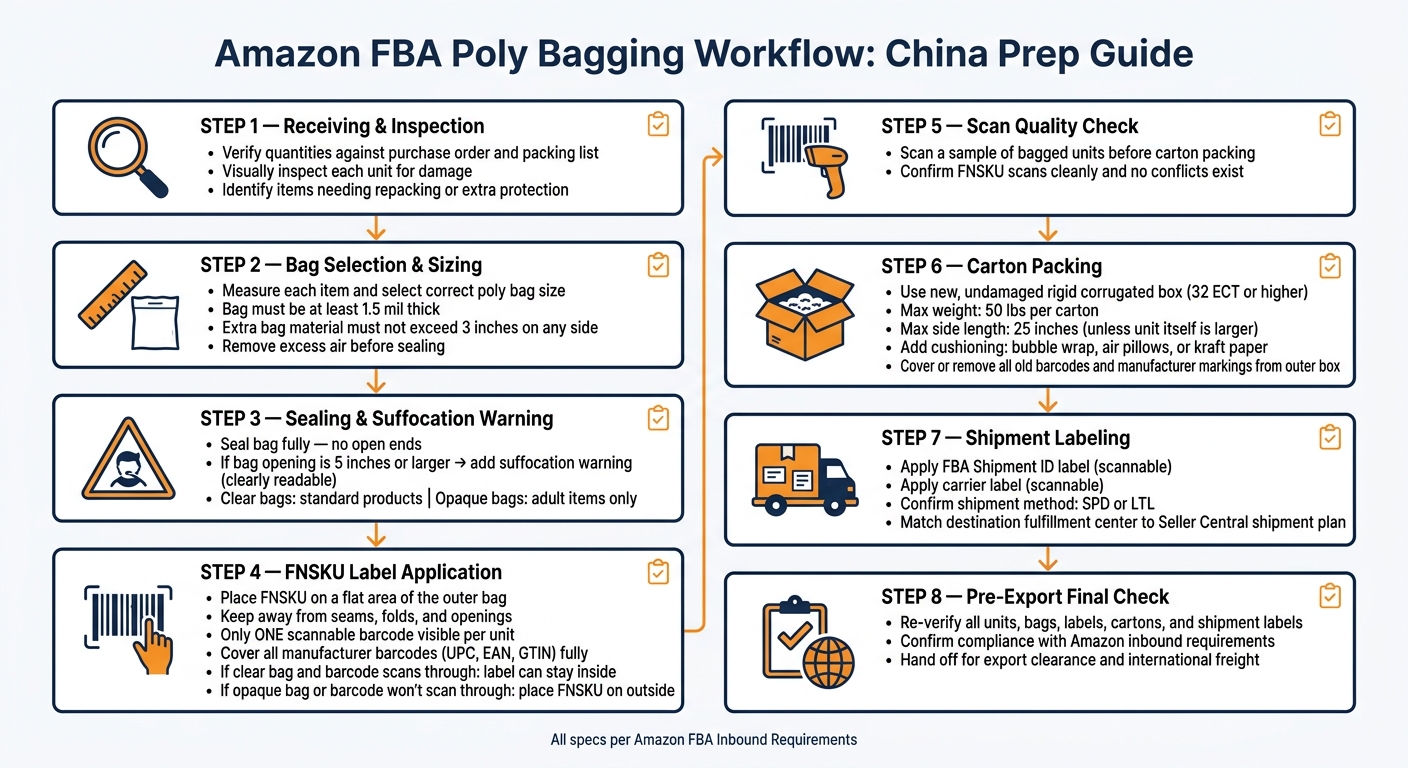
    Labels added during FBA prep can cover origin marks after you’ve already checked them. And once the mark is covered, customs can treat it the same way they would a missing mark. This happens a lot with FNSKU labels, which often get placed wherever there’s open space, including right over the country-of-origin text. Polybag suffocation warnings can cause the same issue. Even simple box-sealing tape can block the mark if the factory printed it along a carton seam. The point of this step is simple: protect the origin mark through every labeling, packing, and repacking stage.

    Make Sure Amazon Labels Do Not Cover Origin Marks

    The easiest fix is to use a packaging map for each SKU. That can be a photo or a simple diagram showing exactly where the origin mark appears and which areas are approved for labels. Send that map to both the factory and your forwarder before prep starts. Then require photo confirmation of sample units before cargo is picked up.

    Check Outer Cartons, Bundles, and Multipacks

    Use the same origin wording you’ve already cleared on the invoice and packing list. Then check both the individual unit and the outer carton. A shipment can fail if the mark is wrong – or hidden – at either level.

    Level Consistency Check Common Errors
    Unit-level Wording matches the commercial invoice and customs entry; consistent across all units in the shipment FNSKU placed over origin text; origin printed only on an inner flap or manual; low-contrast or undersized font
    Carton-level Carton origin matches the unit origin and customs entry data; origin visible on at least one external face Carton ID label placed over the printed origin mark; mixed-origin SKUs in one carton marked with a single origin; reused cartons with old labels or markings

    For bundles and multipacks, the final sellable unit still needs to show the correct origin on the outside. If shrink wrap, a polybag, or a sleeve covers the mark on the units inside, then the bundle packaging itself needs its own origin statement. Check this after sealing, not before.

    Add Origin Checks to Your FBA Prep Process

    Every prep step can hide an origin mark. That includes relabeling, repacking, polybagging, and palletizing. So build a fast visual check into each stage. Before sealing a carton, make sure the unit’s origin text is still readable. Before placing a pallet label, make sure the carton’s origin mark is visible on a different face.

    If FCLGO handles your FBA prep in China, send them the packaging map and ask for photo checks of 3–5 cartons per SKU before pickup. Once carton labels are cleared, match the ISF and entry data before departure.

    Checklist 4: Check ISF and Customs Entry Data Before Departure

    After your carton labels and prep photos are approved, use that same origin data in your ISF and customs entry filings. Don’t treat this as a separate task. The SKU list and origin details you already checked on the product and commercial invoice should carry straight through.

    Match Origin Data Across ISF, HTS Lines, and Entry Records

    The Importer Security Filing (ISF) must be filed at least 24 hours before vessel loading, and the manufacturer, origin, and HTS must match each line item. If you’re shipping multiple SKUs from different countries, each SKU needs its own correct origin entry. Don’t group mixed-origin SKUs under one origin code. Use a master SKU list that shows the confirmed origin for every item before anything gets filed.

    This matters because CBP looks at origin data at the line level when it checks duty exposure and trade remedies. That includes Section 301 tariffs, antidumping duties, and countervailing duties when they apply.

    Step Origin-Related Data Responsible Party Check Completed
    ISF Filing Country of origin, HTS code (at least 6 digits), manufacturer info per SKU Broker prepares, Seller reviews [ ]
    HTS Classification 10-digit HTS confirmed; Section 301/AD/CVD implications checked Customs broker [ ]
    Entry Draft Review CBP Form 7501 origin fields match physical markings and documents Broker prepares, Seller reviews [ ]
    Final Sign-Off Pre-departure compliance pack assembled and shared Seller [ ]

    Once the filing data lines up, check the parties and delivery details tied to the entry.

    Confirm Importer, Consignee, and Amazon Delivery Details

    Before departure, three identity blocks need to match across all documents: your importer of record (IOR), your consignee, and the Amazon fulfillment center address from your shipment plan.

    Amazon will not act as importer of record for FBA inventory. Your U.S. entity or IOR service needs to appear on the customs entry. Amazon can be listed as the ultimate consignee in care of FBA, but the legal name, address, and tax ID should match what your broker has on file and what appears on your CBP bond setup. Even a small spelling mistake or tax ID mismatch can slow release.

    Also check that the Amazon fulfillment center code and address in your shipment plan match the forwarder’s delivery instructions. If the shipment plan changes after booking, send the update to your forwarder and broker in writing before the vessel departs.

    Put Together a Pre-Departure Compliance Pack

    Keep one shipment folder with all origin-supporting documents in one place. Think of it as your proof file. It should show that the product markings, supplier records, and filing data all say the same thing.

    Include:

    • The origin-verified invoice
    • The matching packing list
    • Supplier origin letters
    • Marking photos
    • Draft ISF data
    • Draft entry data

    Ask your broker for draft ISF and entry summaries before filing so you can catch mistakes early. If FCLGO is handling your ocean freight, FBA prep, customs clearance, and final delivery to Amazon fulfillment centers, share the compliance pack with them too. That helps keep origin data aligned from pickup through Amazon check-in. CBP may review entries for up to seven years, so it’s smart to keep records sorted by shipment ID and date long after delivery.

    Conclusion: Final Sign-Off Before Your Amazon FBA Shipment Leaves China

    Once the compliance pack and ISF draft match, do one last sign-off before loading. This last review ties together product marks, paperwork, labels, and entry data.

    Missing origin marks, or marks hidden by labels or packaging, can lead to about 10% marking duty. Late or inaccurate ISF filings can also lead to cargo holds and $5,000 per violation in liquidated damages.

    Final Sign-Off Checks for Every Shipment

    Use this sign-off for every shipment.

    Check What to Confirm
    Origin marking Each SKU and retail package shows "Made in China" or the correct country of origin in English, in a clear and permanent way
    Supplier declaration Written origin confirmation for each SKU is on file and matches your customs documents
    Document consistency The invoice, packing list, HTS codes, quantities, and origin fields match line by line
    Label placement FNSKU and Amazon box labels do not cover origin marks on units or master cartons
    Customs data ISF and entry records show the correct origin, HTS, importer of record, consignee, and Amazon fulfillment center details

    If FCLGO is handling the shipment, send the completed compliance pack before loading.

    No shipment should leave China without a finished sign-off that is dated and filed under the shipment ID.

    FAQs

    Who is responsible for country of origin compliance for Amazon FBA shipments?

    The Amazon seller is mainly responsible for country of origin compliance. You need to state the country of origin correctly on master carton labels and in Amazon Seller Central.

    If that information is missing or wrong, Amazon may reject your shipment, delay it, or charge storage fees. FCLGO can help with compliance through labeling, inspection, and customs documentation.

    What if my shipment includes products from more than one country?

    You need to track where each item was made with care. If the country of origin is wrong or missing, your shipment can be rejected, hit with extra storage fees, or delayed during processing.

    In Seller Central, enter the correct country of origin for every product.

    Each master carton also needs a clear country-of-origin mark, such as "Made in China," to meet U.S. customs rules. If your supply chain has a lot of moving parts, FCLGO can help with the paperwork and labeling for Amazon FBA shipments.

    How long should I keep origin marking and customs records?

    The search results don’t say how long you should keep origin marking or customs records.

    To stay compliant, check with your customs broker or review official U.S. Customs and Border Protection (CBP) record-keeping rules for importers.

  • FCLGO | FBA Appointment Scheduling Guide

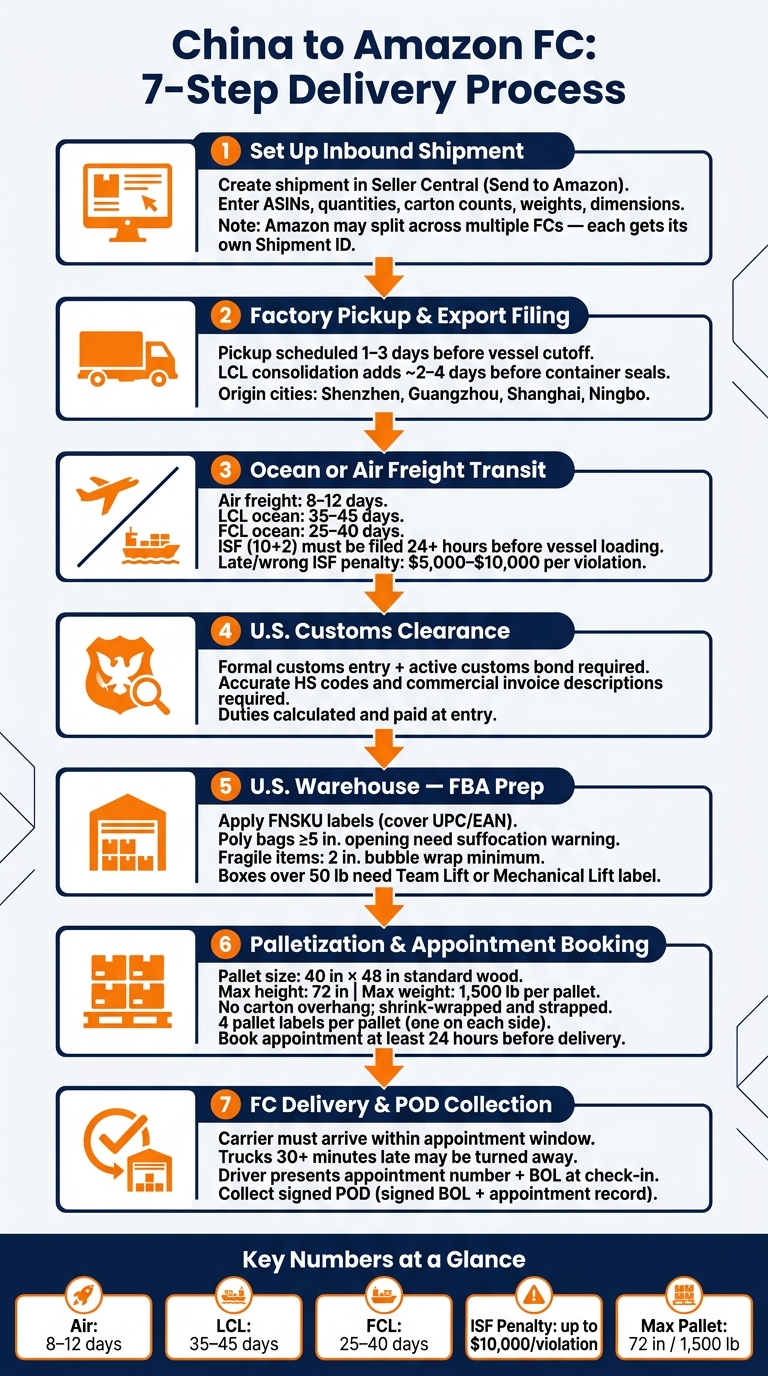
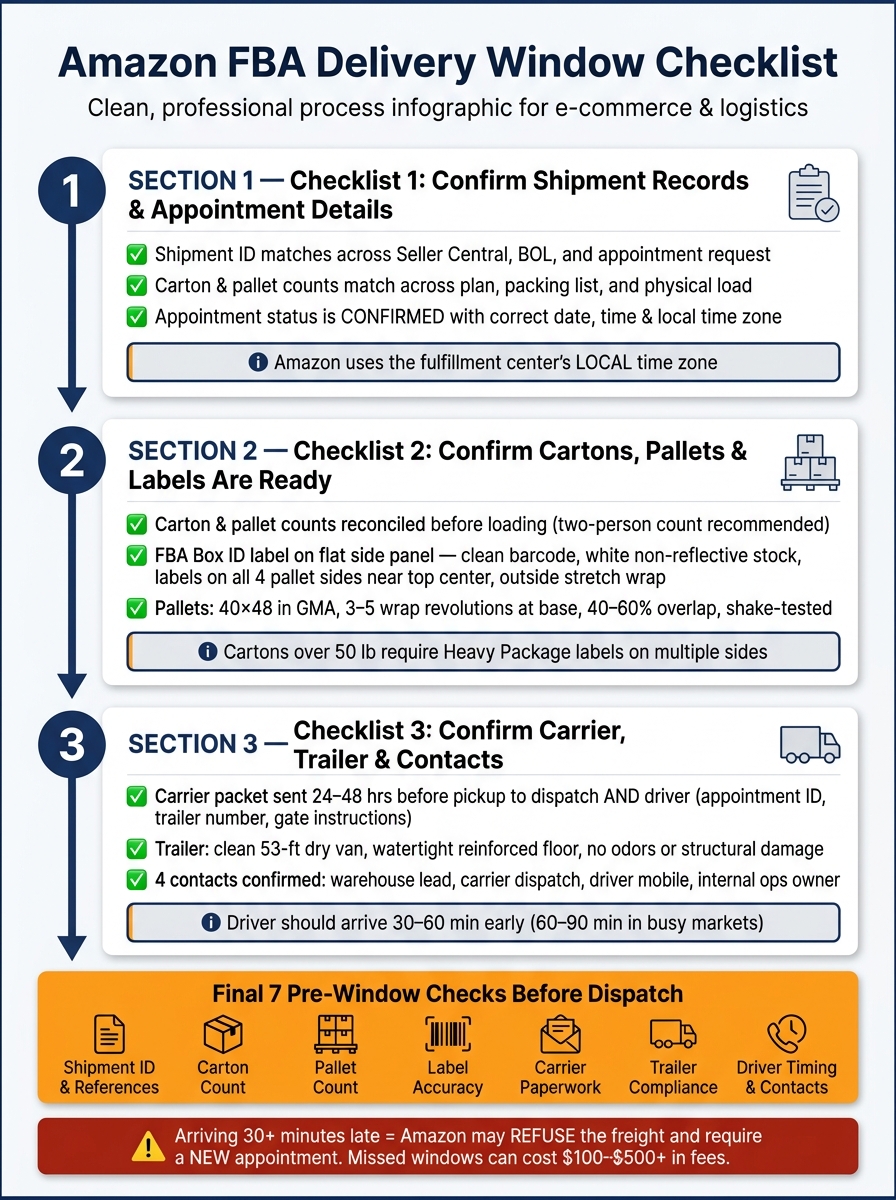
    If your pallet count, carton count, weight, or reference numbers are off, Amazon can refuse the truck. In most cases, LTL, FTL, and container freight need an appointment booked 24 to 96 hours ahead, and drivers should plan to arrive about 30 minutes early.

    Here’s the short version of what I’d focus on:

    • I create the shipment plan in Seller Central first
    • I lock the exact carton count, pallet count, dimensions, and weight
    • I collect every ID the carrier needs, like the FBA Shipment ID, BOL, PRO, and trailer or container number
    • I send one clean booking file to the carrier
    • I check the confirmed date, time window, FC code, and load details before the truck leaves
    • If timing changes, I reschedule early instead of waiting

    This process is simple on paper: plan the load, match the data, book the slot, and deliver on time. But the margin for error is small. Even a minor mismatch can lead to redelivery fees, detention costs, and stock delays.

    Quick comparison:

    Shipment type Needs appointment? Main point
    Small Parcel (SPD) No Uses parcel carrier network
    LTL Yes Carrier or forwarder books dock time
    FTL / Container Yes Carrier or forwarder books dock time

    I see the article as a step-by-step guide to one core rule: Amazon receiving runs on exact shipment data. If the numbers and references match from booking to delivery, the load has a much better shot at getting checked in without trouble.

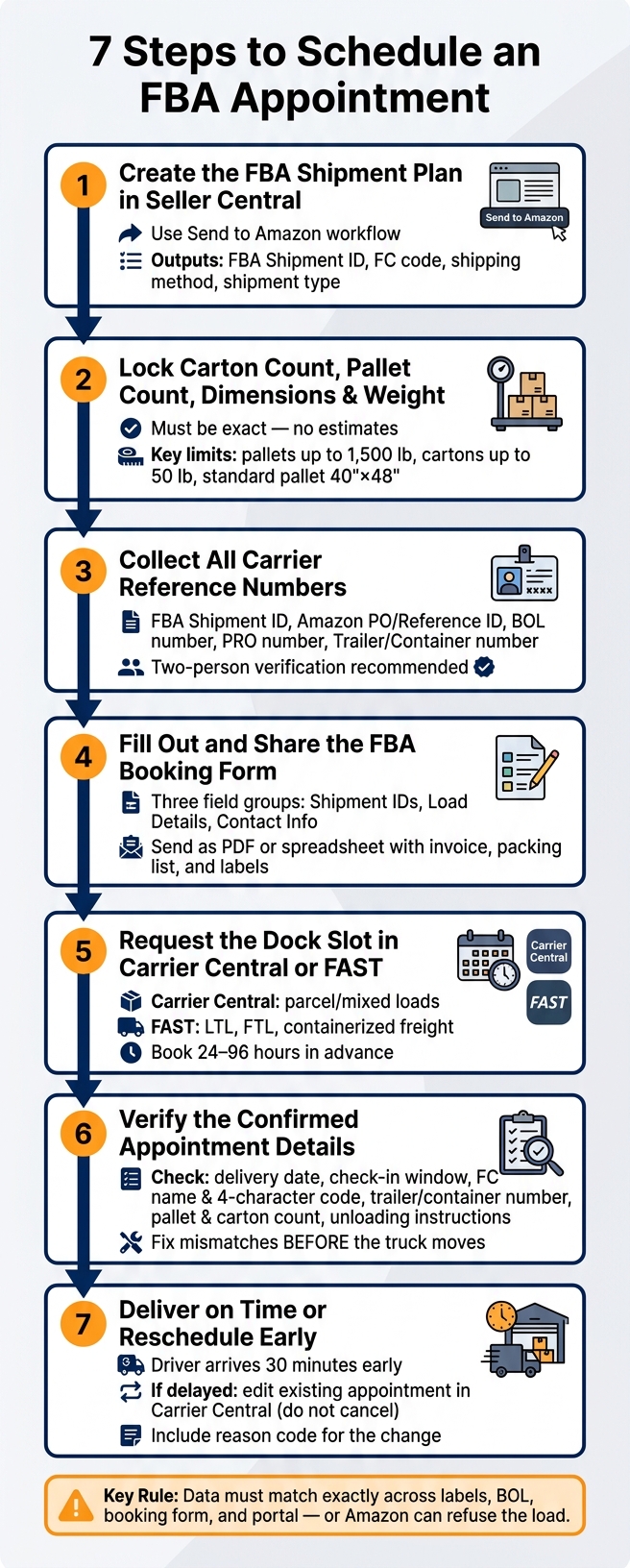
    7 Steps to Schedule an FBA Appointment: A Visual Checklist

    7 Steps to Schedule an FBA Appointment: A Visual Checklist

    Steps 1 and 2: Build the Shipment Plan and Lock In Carton and Pallet Data

    Step 1: Create the FBA Shipment Plan in Seller Central

    Use Amazon’s Send to Amazon workflow in Seller Central to build the shipment plan. Pick your SKUs from Manage Inventory, enter the ship-from address, choose the pack type – individual or case-packed – and confirm the quantity for each SKU.

    This workflow creates the booking details your carrier will need:

    • FBA Shipment ID
    • Destination fulfillment center (FC) code and full U.S. address (such as LAX9)
    • Shipping method, which is usually LTL or FTL for truck deliveries
    • Shipment type for the U.S. inbound leg: palletized or floor-loaded

    Once the shipment plan is set, check the packed freight against it.

    Step 2: Confirm Carton Count, Pallet Count, Dimensions, and Weight

    At this stage, the physical load needs to match the shipment plan. No guesswork.

    Before a carrier can request a dock slot, these details need to be final, not estimated:

    Detail Requirement
    Total carton count Exact number of cartons on the truck
    Units per carton Per SKU, matching the shipment plan
    Total pallet count Confirmed after pallets are built
    Pallet dimensions Length × width × height in inches; standard U.S. pallets are 40" × 48"
    Pallet weight In pounds; keep within Amazon’s inbound limits, typically up to 1,500 lb per pallet
    Total shipment weight In pounds; cartons generally should not exceed 50 lb

    For China-origin shipments, lock these numbers only after the cargo has been physically received and palletized at the U.S. warehouse. Factory packing plans from China can help at the start, but they aren’t the final word. Production changes or QC rework can shift carton counts. Use warehouse-confirmed data, not factory estimates.

    With carton and pallet data locked, the next move is getting the carrier reference numbers needed for booking.

    Palletized vs. Floor-Loaded Freight

    The load type you declare in Step 1 has a direct effect on scheduling. Palletized freight is simpler to unload and tends to book with fewer issues. Floor-loaded freight means loose cartons are stacked without pallets. That setup takes hand-unloading, adds more risk of damage from shifting in transit, and usually needs a longer appointment window.

    If the load is floor-loaded, declare Load Type: Floor Loaded in Carrier Central and set pallet count to 0.

    Load Type Unloading Ease Damage Risk Documentation Needs
    Palletized High (forklift-ready) Low (securely wrapped) Pallet labels on 4 sides
    Floor-Loaded Low (manual labor) Higher (shifting risk) Carton labels on every box

    Steps 3 Through 5: Gather Reference Numbers, Fill Out the Booking Form, and Request the Appointment

    Step 3: Collect All Reference Numbers the Carrier Needs

    Once the load is locked, gather every reference the carrier will need to enter. That includes the FBA Shipment ID, Amazon PO/reference ID, BOL number, PRO number, and trailer/container number.

    These details need to match exactly across your box labels, the BOL, the booking form, and the portal entry. No extra spaces. No missing digits. No small mismatch that turns into a big delay.

    A simple way to avoid errors is to split the task between two people:

    • One person compiles all IDs
    • Another person checks them line by line

    It also helps to keep a shared document for each shipment and update it any time equipment or routing changes. That way, everyone is working from the same set of numbers.

    Step 4: Fill Out and Share the FBA Booking Form

    The master booking file is the document the carrier uses to enter the shipment into Amazon’s portal. To keep it clean and easy to review, group the fields into three sets:

    • Shipment IDs: Seller name, destination FC code and full address, FBA Shipment ID, and Amazon PO or reference ID
    • Load details: Pallet and carton counts, dimensions and weight per pallet in inches and pounds, load type, carrier SCAC code, and trailer or container number
    • Contact info: A U.S. phone number and email reachable during the FC’s business hours, plus any handling notes such as non-stackable pallets or a required live-unload window (often managed by an Amazon FBA prep service)

    Send the completed form as a PDF or spreadsheet with the commercial invoice, packing list, and labels. Add a short cover note that says who owns the booking, the preferred delivery window, and any restock deadline.

    For example:

    Preferred delivery: 09/15/2026, 10:00 AM–2:00 PM local time. Must be delivered no later than 09/20/2026 due to restock limits.

    That packet becomes the source file for the portal request.

    Step 5: Request the Dock Slot in Carrier Central or FAST

    Using the booking form, the carrier submits the appointment request in Carrier Central or FAST.

    Aspect Carrier Central FAST
    Who typically books Parcel carriers and some integrated carriers Freight carriers, LTL/TL providers, and forwarders
    Common load type Small parcel or mixed shipments Full truckload, LTL, and containerized freight
    Key required fields Carrier account, destination FC, shipment IDs, delivery window FBA Shipment ID, FC code, pallet/carton counts, weight, equipment details, SCAC

    The carrier enters the FC, shipment IDs, counts, weight, load type, requested window, trailer or container number, and SCAC.

    Steps 6 and 7: Confirm the Appointment and Complete Delivery

    Step 6: Check the Confirmed Date, Time Window, and Load Details

    Once the request is submitted, check the returned slot before the truck moves. After the carrier sends the request, compare the confirmation line by line against the booking form before dispatch.

    Make sure the confirmed pallet count, carton count, and load details match the booking form.

    Verify these fields:

    • Delivery date in U.S. format (for example, 09/15/2026)
    • Check-in window in the facility’s local time
    • Destination FC name and 4-character code (for example, ONT8, LAX9, FTW1)
    • Trailer or container number
    • Pallet count and carton count
    • Unloading instructions, including live unload or lumper requirements

    If anything in the confirmation is off, fix it before the truck leaves. A small mismatch here can turn into a missed delivery later.

    Step 7: Deliver on Time and Reschedule Early If Plans Change

    With the slot confirmed, delivery day comes down to timing.

    On delivery day, the driver should arrive 30 minutes early for gate processing. If the driver shows up late, the appointment may be marked as a no-show after the grace period tied to that slot.

    At check-in, the driver should have the appointment confirmation, BOL, and matching references ready. Keep the POD for your records.

    Delays happen. Traffic backs up, trailers run late, and schedules slip. When that happens, don’t sit on it. Reschedule as soon as the delay appears. Edit the existing appointment in Carrier Central instead of canceling and booking a new one, and include a reason code or comment that explains the change.

    Early notice gives you a better shot at getting a new slot close to the original date and helps protect inventory availability.

    How to Schedule FBA Delivery to Amazon and Use Carrier Central

    Conclusion: 7-Step Checklist for a Confirmed FBA Appointment

    Once the slot is confirmed, execution matters more than planning. At that point, the job is simple in theory and unforgiving in practice: move freight from the shipment plan to the dock in a checked, repeatable sequence.

    The big thing to get right is data accuracy. If the data doesn’t match, Amazon can delay check-in, refuse the load, or add extra fees. That’s where a lot of shipments go sideways.

    For Amazon FBA shipping from China, FCLGO can coordinate pickup, FBA prep, customs clearance, warehousing, trucking, and delivery to Amazon fulfillment centers. Just as important, accurate data and early rescheduling help keep the dock slot in place and inventory moving.

    FAQs

    Who is responsible for booking the Amazon dock appointment?

    You’re responsible for scheduling the delivery appointment in the Carrier Appointment System in Seller Central.

    That said, if you use FCLGO as your freight forwarder, it can take care of the coordination for you. That includes trucking and appointment scheduling, so your shipment can get the dock slot it needs and avoid delays.

    What happens if my shipment details change after the appointment is booked?

    If your shipment details change after booking, you can run into check-in delays. Amazon expects the physical cargo and the paperwork to match the routing plan exactly.

    If carton counts, weights, dimensions, or labels don’t line up, the shipment may be flagged or rejected. That can mean updating documents or booking a new delivery window.

    Always make sure your shipping documents and labels match your current Seller Central shipment plan.

    How far in advance should I schedule an FBA appointment?

    Plan to schedule your FBA delivery appointment 2 to 3 weeks in advance to help secure an available slot at Amazon fulfillment centers.

    Slots can fill up fast, especially during peak season. So it’s smart to book at least 14 days ahead to help avoid delays and leave room for final-mile variables.

  • FCLGO | China Supplier Consolidation Plan

    If I’m buying from 3 China suppliers, I plan one shipment only when the dates, carton data, and Amazon prep can line up. If they can’t, I split early instead of waiting for one late factory to hold up everything.

    Here’s the short answer:

    • I collect the same data from all 3 suppliers: SKU, carton count, size, weight, CBM, value, factory address, and ready date
    • I work backward from my Amazon delivery target and set one warehouse cutoff date
    • I send all cargo to one China warehouse for receiving, checks, labeling, and final prep
    • I verify carton counts, dimensions, weight, and labels before freight is booked
    • I build one master packing list with supplier-level traceability
    • I compare LCL vs. FCL using final volume, final weight, and total landed cost
    • I book U.S. delivery steps early, following a step-by-step guide to ship to Amazon FBA, because Amazon receiving can take days or even weeks in peak periods

    A few numbers matter right away:

    • Amazon carton limit is often 50 lb. max gross weight
    • Amazon carton side limit is often 25 in. on any side
    • LCL often fits smaller loads, often under 15 CBM
    • Standard pallet size is 48 in. × 40 in.
    How to Consolidate 3 China Suppliers into One Amazon FBA Shipment

    How to Consolidate 3 China Suppliers into One Amazon FBA Shipment

    How to Handle FCL/LCL Consolidation from China Suppliers? #chinacargoconsolidation

    Quick Comparison

    Decision point What I look at Simple rule
    Combine or split Supplier ready dates If one factory will miss cutoff, I decide early
    Pickup or supplier drop-off Control vs. visibility I use forwarder pickup when I want one contact point
    Basic check or deeper inspection Supplier history, item risk, order value New or high-value items need more checking
    LCL or FCL Final CBM, handling, timing, total cost Smaller loads often go LCL; larger loads may fit FCL
    Final delivery timing Port ETA, customs release, FC appointment I book drayage and delivery before arrival

    The main idea is simple: I don’t treat consolidation as “put 3 orders together.” I treat it as a date-and-data project. If the dates are tight and the shipment file is clean, one combined Amazon FBA shipment can cut duplicate freight, customs, and delivery costs.

    Map Your 3 Suppliers and Build a Shipment Timeline

    Before you book any pickup, lay out exactly what each supplier is sending and when it will be ready. That one step makes the rest of the process much easier. When all three factories are working from the same shipment plan, you cut down on confusion and missed dates.

    Collect Each Supplier’s Ready Date, Quantity, and Location

    Ask all three suppliers for the same details in the same format. That means:

    • Supplier name
    • Factory location
    • SKU
    • Carton count
    • Carton dimensions
    • Gross weight
    • CBM
    • Invoice value
    • Ready date
    • Logistics contact

    For CBM, use this formula: CBM = L × W × H ÷ 1,000,000, or use a CBM calculator to find the total volume for your carton count.

    Once you have totals from all three suppliers, you can start looking at LCL vs. FCL.

    Put all of this into one shared Google Sheet and set up automatic CBM formulas. Mark date changes in red so delays jump out right away. Then share the sheet with your freight forwarder from day one. They can check the numbers and line them up with sailing schedules.

    When all three supplier data sets sit in one sheet, you can set a single warehouse cutoff date.

    Set the Latest Warehouse Arrival Date for All 3 Shipments

    Start with your Amazon delivery date and work backward. Your warehouse cutoff needs to leave room for China pickup, receiving, prep, export loading, ocean transit, customs, and U.S. trucking. This cutoff is the date that drives the whole consolidation plan. Once that date is locked, the rest of your schedule follows from it.

    Send the cutoff date to all three suppliers in writing, and add it to your purchase contracts so the schedule is clear.

    If one supplier is going to miss the cutoff, make that call early. You may need to split the shipment or send partial cargo.

    Once the cutoff is set, the next move is deciding how each supplier’s cargo gets to the warehouse.

    Choose Factory Pickup or Supplier Delivery to the Warehouse

    There are two main ways to move cargo from your factories to the consolidation warehouse: forwarder pickup or supplier delivery.

    Method Cost Control Scheduling Risk Visibility Best Fit
    Factory Pickup Strong Moderate High Scattered suppliers, tighter timelines, sellers who want full control
    Supplier Drop-off Variable Higher Lower Experienced exporters clustered near the warehouse

    Factory pickup through a forwarder like FCLGO gives you one point of accountability. They manage all three pickups, can flag when one factory is not ready, and can report delays as they happen.

    Supplier drop-off can work if your suppliers are experienced exporters and close to the consolidation warehouse. But there’s a catch. If one supplier books a late truck or gives the wrong delivery date, you may not know there’s a problem until the cargo never arrives.

    Once all three shipments are booked to the warehouse, the next step is receiving, inspection, and FBA prep.

    Receive the Goods and Check Them Before Consolidation

    When cartons from all three suppliers arrive at the consolidation warehouse, receive them first and verify everything before combining the shipment.

    Match Cartons to Packing Lists and Flag Problems Early

    Sort cartons by supplier and PO, count them, and compare each line item with the packing list. Check carton markings, SKU mix, and labels so any shortages, extra units, or mixed-SKU cartons are logged right away.

    Look over the outside of every carton for crushed corners, wet spots, broken straps, open seals, holes, or signs of re-taping. Photograph any damaged carton before accepting it. Those photos give you a clean record if you later need a replacement or credit from the supplier.

    Weigh and measure sample cartons, or every carton if needed, and update the shipment plan when the actual weight or size differs from the booking data. Amazon’s standard carton limits are 50 lb (22.7 kg) gross weight and 25 inches (≈63.5 cm) on any single side.

    If the receiving check shows damage or mismatches, go deeper before prep begins.

    Decide What Level of Product Inspection You Need

    Pick the inspection level based on supplier history, product risk, and order value.

    Check Type What It Covers Cost Impact When To Use It
    Basic Receiving Check Carton count vs. packing list; visible carton damage; gross weight and dimensions; basic SKU matching at carton level Low – usually included in standard warehouse handling Every shipment from every supplier
    Enhanced Carton Check Everything in basic check, plus opening select cartons per SKU; unit count per carton; spot-check of packaging and label placement; quick barcode scan Moderate – extra labor for opening, counting, resealing New SKUs from known suppliers; medium-value goods; products where packaging presentation matters
    Full Product Inspection AQL-based sampling; unit-level checks for finish, functionality, and packaging quality; comprehensive barcode and label verification; defect classification and reporting Higher – charged per man-day or per unit inspected First orders from new suppliers; high-value or fragile items; critical launches

    Scan FNSKU labels during inspection and relabel any unreadable units before export.

    Once you’ve set the inspection standard, finish FBA labeling and packaging before you lock the final carton data.

    Finish Amazon FBA Prep Before Locking the Final Packing Plan

    Complete FNSKU labeling, barcode covering, poly bagging, bubble wrapping, bundling, carton labels, and pallet prep before taking final weights and dimensions. Even a small prep change can alter carton size or weight. And that affects your freight quote, your LCL or FCL choice, and the shipment data Amazon checks on arrival.

    This is the point to catch labeling and packaging mistakes before freight booking and export. Fixing them at the China warehouse is far easier than dealing with them after the cargo lands.

    A provider like FCLGO can handle this receiving and prep workflow in one place, combining carton verification, inspection, and FBA prep at the consolidation warehouse before the cargo is merged and shipped.

    After prep is done, the warehouse can merge the cartons into one master shipment for freight booking.

    Merge the Cargo and Book the Right Freight Mode

    After receiving and prep are finished, the warehouse combines the three supplier orders into one outbound shipment. Use the final carton counts and weights recorded during receiving to create the outbound shipment file.

    Build One Master Packing List From 3 Supplier Orders

    Bring the three suppliers into one master packing list. Include the SKU, quantity, carton count, dimensions, gross weight, and shipment totals. On each line, add the supplier name, PO number, and invoice number.

    Keep line-level traceability in place so your team can still use a separate breakdown sheet for finance and QC. That way, if a defect or labeling problem shows up later, you can trace it back to the original supplier without breaking the shipment into three separate packing lists.

    Also make sure the HS codes, product descriptions, declared values, invoices, discounts, and free-of-charge items match across all three suppliers. If those details don’t line up, customs can stop the shipment.

    Use 48" × 40" pallets, keep total pallet height within 72", wrap the pallets tightly, and place shipment IDs on all four sides.

    Choose LCL or FCL Based on Final Volume, Cost, and Timing

    Start with total volume. LCL is often the better fit when the combined cargo is roughly under 15 CBM, because you pay only for the space used. FCL starts to make more sense as volume grows, since a flat container rate can reduce the per-unit freight cost and keep the cargo in a sealed container with fewer handling touches.

    Once the master packing list is done, freight mode becomes the next call.

    Mode Typical Shipment Size Cost Structure Transit Control Handling Risk Best Use Case
    LCL Smaller consolidated loads, often under 15 CBM Charged by CBM or weight; lower total bill for small volumes, higher per-unit cost Moderate; fixed sailing schedules, but cargo may be consolidated and deconsolidated Higher; more handling touches and possible re-palletization Testing new products, smaller replenishments, or cash flow control
    FCL Larger consolidated loads that can substantially fill a 20-foot or 40-foot container Flat rate per container; higher headline cost, lower per-unit cost at volume Higher; dedicated container with fewer intermediate steps Lower; cargo stays sealed with fewer third-party touches Higher-volume replenishments and tighter delivery windows

    It’s smart to compare door-to-door quotes for both modes using the same ship dates before making the call. On paper, one rate may look cheaper. But once you factor in handling risk and smoother Amazon receiving, the total cost picture can shift.

    Confirm Booking, Export Documents, and U.S. Import Data

    Before the forwarder books space, confirm these details:

    • Cargo-ready date
    • Final measured CBM and weight
    • Consolidated master packing list
    • Commercial invoices from all three suppliers
    • Shipper and consignee details
    • HS codes
    • Declared values
    • Amazon shipment IDs
    • Destination fulfillment center codes
    • Routing instructions

    When the data matches across the shipment, export and import documents stay aligned with the cargo. Then the forwarder can move ahead with the booking.

    FCLGO can handle pickup, consolidation, FBA prep, freight booking, customs clearance, and delivery to Amazon.

    Final Delivery to Amazon and Key Takeaways

    Once the freight is booked and customs is cleared, the shipment moves into the U.S. delivery stage. After U.S. Customs release, inland transport begins. For FCL, a drayage carrier takes the container from the port to your warehouse or straight to Amazon, if that route is approved. For LCL, a trucker picks up the pallets from the CFS.

    Timing matters here. To avoid added fees and delays, pre-book drayage a few days before the vessel arrives. Share the container number, ETA, and terminal details as early as possible, especially during peak season.

    After import clearance, finish any final prep at the warehouse. Wrap up all last-mile FBA prep before palletizing. Use 48" × 40" wood pallets with four-way access, and make sure cartons are labeled and palletized to Amazon’s rules before the shipment leaves the warehouse. Once the cargo is ready, create the Seller Central shipment, assign the FCs, and book appointments through Carrier Central. If you’re moving a large volume, spread appointments across multiple days so you don’t jam up the FC dock.

    You also need to plan around Amazon’s receiving lag. During peak periods, check-in can take days or even weeks. That delay should be built into your restock timeline from the start.

    This plan works best when a few moving parts stay in sync:

    • Align all three supplier ready dates before booking so you don’t end up with partial loads or split shipments
    • Send all cargo to one consolidation warehouse to make packing, prep, and outbound routing easier
    • Verify cargo against the master packing list before export to catch quantity or labeling issues early
    • Finish all FBA prep before locking final measurements so freight booking and Amazon shipment plans use correct data
    • After customs release, pre-book drayage and finish any last-mile prep before the final Amazon delivery appointment

    FCLGO supports this entire flow for sellers shipping from China to the USA.

    FAQs

    What if one supplier misses the cutoff date?

    If even one supplier misses the origin consolidation cutoff, your cargo will probably miss the planned vessel departure. In most cases, that leads to a 7 to 10 day delay while the goods wait for the next available sailing.

    To limit the hit to inventory planning, add extra buffer time to your schedule. And if your total shipment volume is more than 15 CBM, consider FCL to reduce consolidation risk.

    How do I know if I should ship LCL or FCL?

    For 3 suppliers, line up production so every shipment arrives at the China consolidation warehouse during the same time window. Once everything is there, the team can inspect the goods, pack them into master cartons with FBA Box IDs, and book a single shipment. FCLGO can handle pickup, paperwork, customs clearance, and final delivery to Amazon fulfillment centers.

    Choose FCL if the total shipment is over 15 cubic meters. Choose LCL if it is under 15 cubic meters.

    Do I need to inspect goods before consolidation?

    Yes. Inspecting goods before consolidation helps make sure each unit has a scannable FNSKU label, each carton shows the right FBA Box ID, and no old or conflicting barcodes are still on the packaging.

    Doing this before shipment can cut the risk of Amazon receiving delays or even shipment rejections. FCLGO can also help with inspection, labeling, and palletizing at its partner warehouse.

  • FCLGO | Poly Bagging Amazon FBA – China Prep Tips

    If I want to avoid Amazon receiving problems, I need to get five things right before inventory leaves China: bag thickness, suffocation warning, FNSKU scan, carton limits, and shipment labels.

    Here’s the short version: Amazon wants poly bags at 1.5 mil or thicker, a warning on bag openings of 5 inches or more, only one scannable barcode per unit, and master cartons that stay under 50 lb and use 32 ECT corrugated boxes. If I miss any of those checks, I can end up with delays, relabeling, or rejected inventory.

    What I’d confirm before export:

    • Inspect each unit for damage before bagging
    • Use the right bag size and keep extra material under 3 inches
    • Seal bags fully with no open side
    • Add the suffocation warning when the opening is 5 inches or larger
    • Make sure the FNSKU scans through the bag, or place it on the outside
    • Cover other barcodes to stop scan conflicts
    • Pack in new corrugated cartons rated 32 ECT or higher
    • Keep each carton at 50 lb max
    • Apply both labels: Amazon shipment label and carrier label
    • Match the shipment plan for SPD or LTL

    This guide boils the process down to the main checks I’d review so my shipment is ready before it heads to Amazon.

    Let’s Talk POLY BAGS for Amazon FBA

    2. Amazon Poly Bag Rules China Prep Teams Must Follow

    These are the checks China prep teams should complete before any unit is bagged or labeled.

    Bag Size, Thickness, and Sealing Standards

    Every poly bag must be at least 1.5 mils thick, leave no more than 3 inches of extra bag material on any side, and be sealed all the way with no open ends. Clear bags are the standard. Opaque bags are required for adult items. When you use an opaque bag, place the barcode on the outside.

    Suffocation Warnings and Barcode Visibility

    Any bag with an opening 5 inches or larger must display a suffocation warning. Check that the text is easy to read and sized correctly before packing.

    For barcodes, each unit should show only one scannable barcode. If the bag is clear and the barcode scans through the material, leave it inside. If the bag is opaque, or the inner barcode won’t scan through the bag, place the FNSKU on the outside on a flat spot away from seams and the heat seal.

    When an FNSKU is in use, cover any manufacturer barcodes – UPC, EAN, or GTIN – fully to avoid scan conflicts at the receiving dock. It also helps to scan a sample of bagged units before export, so the team can catch barcode problems early. This ensures a smooth process for Amazon FBA shipping from China to the US.

    Once the bag rules are set, the prep team moves to receiving, inspection, and SKU-level bag selection.

    3. China Prep Workflow: Poly Bagging and FNSKU Labels Step by Step

    Amazon FBA Poly Bagging Prep Checklist: China to FBA Step-by-Step

    Amazon FBA Poly Bagging Prep Checklist: China to FBA Step-by-Step

    Receiving, Inspection, and Bag Selection

    When inventory arrives at a China prep facility, the first step is to verify quantities against the purchase order and packing list. That helps catch SKU mix-ups before bagging begins.

    After that, each unit goes through a visual inspection for damage. The team also checks whether any items need repacking or extra protection.

    Next, the team measures each item and picks the right poly bag. They remove excess air before sealing to cut volume and help prevent bags from bursting.

    Once the bag size is confirmed, the team applies the FNSKU and checks scan quality before carton packing.

    How to Apply FNSKU Labels Correctly

    Place the FNSKU on a flat area of the outer bag, away from seams, folds, and openings. Make sure only one scannable FNSKU is visible.

    Run a final scan check before carton packing.

    After the labels pass inspection, the prep team moves to carton packing and the final shipping process to Amazon FBA.

    4. Carton Packing and Shipping from China to Amazon FBA

    Once the units are bagged and labeled, the team packs them into master cartons for export. This step sounds simple, but it matters a lot. If the cartons are packed or labeled the wrong way, Amazon can delay receiving the shipment or reject it.

    Master Carton Rules and Shipment Labels

    Amazon requires new, undamaged, rigid corrugated boxes rated at 32 ECT or higher. The outside of each carton should also be clean from a scanner’s point of view. That means no old barcodes, and no manufacturer markings that might throw off Amazon’s system.

    Amazon’s carton checkpoints include the following:

    Carton Checkpoint Amazon FBA Requirement
    Box Condition New, undamaged, rigid corrugated (32 ECT or higher)
    Weight Limit Max 50 lbs
    Max Side Length 25 inches on any side (unless the unit itself is larger)
    Cushioning Bubble wrap, air pillows, or kraft paper inside
    Barcode Prep Cover or remove all manufacturer/old barcodes on the outer box
    Labeling FBA Shipment ID label + carrier label; both must be scannable

    In plain English, the carton needs to be strong, clean, and easy for Amazon to scan. Inside the box, cushioning like bubble wrap, air pillows, or kraft paper helps protect the products during transit. On the outside, both the FBA Shipment ID label and the carrier label need to be clear and scannable.

    Once the cartons pass these checks, the prep team hands them off for export and final delivery.

    Direct Delivery to Amazon Fulfillment Centers

    After carton inspection, the shipment moves through export clearance, international freight, U.S. customs, and direct delivery to the assigned Amazon fulfillment center.

    FCLGO can handle pickup in China, Amazon FBA prep, freight, customs clearance, and direct delivery to Amazon fulfillment centers.

    5. Conclusion: What to Confirm Before Inventory Leaves China

    After carton packing, do one last pre-export check. Before inventory leaves China, make sure every unit, bag, label, carton, and shipment label follows Amazon inbound rules.

    Here’s what to verify:

    • Unit inspection: Check each unit for transit damage before poly bagging and labeling.
    • Bag thickness and fit: The bag must be at least 1.5 mil thick, and the product should fit without putting stress on the bag.
    • Suffocation warning: This is required on any bag with an opening larger than 5 inches.
    • FNSKU placement: Each unit needs one scannable barcode, placed flat and left unobstructed.
    • Carton standards: Use a new corrugated box, stay within the 50-lb limit, and apply the correct FBA Shipment ID label.
    • Shipping method alignment: Confirm whether the shipment is SPD or LTL, and make sure the destination fulfillment center label matches your Seller Central shipment plan.

    If your team wants help with that handoff, FCLGO can handle the full China-to-Amazon flow. That includes pickup in China, Amazon FBA prep, customs clearance, and direct delivery to Amazon fulfillment centers.

    FAQs

    What happens if my poly bags don’t meet Amazon rules?

    If your poly bags don’t meet Amazon’s rules, Amazon may reject the shipment at the receiving dock or refuse to process it. And that can turn into a mess fast.

    Instead of moving straight into fulfillment, the shipment may need to be rerouted to a third-party facility for manual rework. That adds delays, drives up costs, and increases the chance that you’ll go out of stock.

    To stay compliant, your bags need to meet three basic requirements:

    • Be at least 1.5 mil thick
    • Include a suffocation warning if the opening is over 5 inches
    • Be securely sealed

    It’s a small detail, but one that can hold up an entire shipment.

    When should the FNSKU go on the bag instead of inside it?

    Place the FNSKU on the outside of the poly bag if the barcode isn’t clearly visible and scannable through the bag.

    Amazon requires the label to stay scannable, whether it’s attached to the product itself or placed on the outside of the protective poly bag. That helps the item get received properly at Amazon fulfillment centers.

    How do I know if my shipment should be SPD or LTL?

    It mostly comes down to your shipment volume, budget, and timeline.

    SPD is usually the go-to option for smaller shipments sent with carriers like UPS, FedEx, or USPS.

    LTL tends to cost less for larger shipments, especially those with more than 150 units or multiple pallets. It also takes more coordination, including setting up delivery appointments through the Carrier Appointment System in Seller Central.

  • FCLGO | Amazon FC Delivery from China Guide

    If you want your Amazon stock to reach a U.S. fulfillment center without delays, you need to get 4 things right: shipment setup, freight booking, customs, and final delivery booking.

    I’d sum it up like this: create the inbound shipment before pickup, match every carton to the right shipment ID, file customs documents on time, and make sure pallet counts and FC codes match before the truck arrives. Miss one step, and you can end up with customs holds, missed appointments, or slow FC check-in.

    Here’s the full path in simple terms:

    • Step 1: Set up the inbound shipment in Seller Central
    • Step 2: Arrange pickup in China and move freight by air, LCL, or FCL
    • Step 3: Clear U.S. customs and pay duties
    • Step 4: Move cargo to a U.S. warehouse for FBA prep
    • Step 5: Label, pack, and palletize to Amazon rules
    • Step 6: Book the FC delivery appointment
    • Step 7: Deliver the load and collect the signed POD

    A few numbers matter from the start:

    • Air freight: about 8–12 days to the FC
    • LCL ocean: about 35–45 days
    • FCL ocean: about 25–40 days
    • ISF for ocean freight: must be filed 24+ hours before vessel loading
    • Late or wrong ISF: can trigger penalties from $5,000 per violation
    • Amazon pallet limit: up to 72 in. high and 1,500 lb per pallet
    • Appointment timing: trucks that arrive 30+ minutes late may be turned away

    The main point: this process is less about one big task and more about keeping each handoff clean from factory pickup to Amazon receiving.

    Below, I’ll walk through the steps in the order you need to handle them.

    China to Amazon FC: 7-Step Shipping Process with Key Stats

    China to Amazon FC: 7-Step Shipping Process with Key Stats

    Shipping from Alibaba to Amazon FBA Explained | How to Ship Products From China Tutorial

    Step 1: Set Up the Amazon Inbound Shipment and Routing

    Use Seller Central data to guide pickup, labeling, and delivery. Start by creating the inbound shipment in Send to Amazon. Then enter the ASINs, quantities, ship-from address, carton counts, and box contents for each carton.

    Be precise with carton weight and dimensions. That data affects routing and receiving, and it needs to line up from the start. If the numbers are off, you can run into delays, manual review, and extra fees. Think of this as the handoff file for the whole move, from pickup to warehouse prep to final FC delivery.

    Create the shipment in Seller Central

    Amazon may split one plan across more than one FC, and each split comes with its own shipment ID. So don’t assume everything is going to a single FC. Check each assignment carefully, and make sure every carton is tied to only one shipment ID.

    Mixing units from different shipments in the same carton isn’t allowed. It can also cause receiving issues once the freight reaches Amazon.

    Print the Amazon box label for each carton and place it flat on one side of the box, next to the carrier label.

    Share routing details with FCLGO before pickup

    Send the shipment ID and FC assignment to FCLGO before pickup. That way, booking, warehouse handling, and delivery all follow the same plan. In plain English: the data you enter in Seller Central becomes the plan FCLGO uses to manage pickup, prep, and final delivery.

    Here’s how Seller Central data maps to what FCLGO needs:

    Data Entered in Seller Central Information Shared with FCLGO Why It Matters
    ASIN / SKU selection and unit quantities Shipment ID and reference ID Tracking and customs documentation
    Ship-from address Factory pickup address and city Arranging local trucking in China
    Box dimensions and weight Total CBM and gross weight Carrier booking and freight planning
    Assigned FC code Destination FC code Final-mile delivery and appointment booking
    Cargo ready date Target delivery timing Booking carrier space and scheduling pickup

    Once shipment IDs, labels, and destination FCs are set, the cargo can move into export filing and customs clearance. If carton counts, destinations, or timing change late, pickup plans and delivery appointments usually have to change too. It’s much easier to lock those details early and keep the shipment moving.

    Once routing is locked, the shipment can move into export and U.S. customs clearance.

    Step 2: Move Cargo from China and Clear US Customs

    Once the route is set, your shipment can leave China and go through export and U.S. customs. This stage covers everything from factory pickup in China to customs release in the United States.

    Factory Pickup, Export Filing, and Ocean or Air Freight

    Lock in the cargo-ready date with your supplier as early as you can. Then send FCLGO the full pickup details: factory address, contact name, phone number, working hours, carton count, total weight, and dimensions. FCLGO arranges local trucking from major origin cities such as Shenzhen, Guangzhou, Shanghai, and Ningbo. Pickup is usually scheduled 1–3 days before the vessel cutoff or air cargo acceptance deadline.

    After pickup, the cargo goes to an export warehouse or terminal for checks and export filing. Teams compare carton counts, weights, and labels against the packing list before loading. For LCL shipments, this consolidation step usually adds about 2–4 days before the container is sealed and gated in. If you miss the CY cutoff, the container rolls to the next sailing, which delays departure.

    Stick with the freight mode you picked in Step 1. Air is the fastest option. FCL and LCL move on ocean schedules, so they take more time.

    US Customs Clearance and Duty Coordination

    Your shipment must clear U.S. customs before it can move inland.

    For ocean shipments, the Importer Security Filing (ISF), also called "10+2", must be filed with U.S. Customs and Border Protection at least 24 hours before the cargo is loaded onto the vessel at the foreign port. This isn’t something to treat lightly. A late or inaccurate ISF can lead to penalties of $5,000 per violation, and in more serious cases up to $10,000, along with possible cargo holds.

    Every shipment also needs a formal customs entry, backed by correct paperwork and an active customs bond. FCLGO works with broker partners to arrange the bond and manages ISF filing, HS classification, duty calculation, and entry submission for the Importer of Record.

    Requirement Air Freight Ocean Freight (FCL/LCL) FCLGO Coordination
    Commercial invoice Required Required Reviewed/prepared with seller
    Packing list Required Required Reviewed/prepared with seller
    HS classification Required Required Advised and coordinated
    ISF (10+2) Not required Required Filed by FCLGO
    Bill of lading / AWB Air waybill Ocean bill of lading Issued and managed by FCLGO
    Customs bond Required Required Arranged via broker
    Duty and tax payment At customs entry At customs entry Coordinated by FCLGO

    On the commercial invoice, use specific product descriptions. For example, write "stainless steel kitchen knives" instead of "household goods." That kind of detail matters. Accurate HS codes help keep landed cost more predictable and lower the odds of customs delays.

    After customs release, the shipment can move to a U.S. warehouse for transfer and FBA prep.

    Step 3: Transfer to a US Warehouse for FBA Prep and Palletization

    After customs clearance, the shipment moves to a U.S. warehouse for the last round of Amazon prep before delivery. This is your final checkpoint before Amazon takes possession of the freight, so it’s the right time to fix any packaging or labeling problems that could cause trouble at receiving.

    Complete Amazon FBA packaging requirements before delivery

    A prep warehouse handles label, packaging, and carton fixes before the shipment goes out.

    Each unit needs one FNSKU placed on a flat surface, and the UPC or EAN must be covered. If an item is in a poly bag, the bag should be sealed. And if the bag opening is 5 in. or larger, it needs a suffocation warning printed on the bag or added as a label. The FNSKU also needs to stay visible on the outside of the bag. For fragile items, use at least 2 in. of bubble wrap on all sides, while keeping the barcode scannable through the wrap.

    Single boxes over 50 lb need a Team Lift or Mechanical Lift label. Each carton should also have one original box label applied flat and away from seams or edges so it doesn’t tear in transit.

    Those small details matter more than they seem. If the shipment leaves for the FC with bad labels, poor placement, or packaging issues, you can run into receiving errors, inbound problem flags, or even inventory holds.

    Build pallets and transfer freight to the assigned FC

    Once prep is done, the cartons are stacked onto pallets for delivery. Amazon’s pallet rules for truck freight are pretty strict: 40 in × 48 in wood pallets, no carton overhang, 72 in. max total height, 1,500 lb max per pallet, secure shrink wrap or strapping, and clear pallet labels on all sides.

    These are the specs Amazon uses for LTL and FTL deliveries.

    Pallet Rule Requirement for Amazon LTL/FTL
    Pallet size Standard 40 in × 48 in wood pallets (GMA Standard Grade B or higher)
    Overhang No carton overhang beyond pallet edges
    Max height ≤ 72 in total
    Max weight ≤ 1,500 lb per pallet
    Carton stacking Interlocking pattern; heavier cartons on the bottom
    Wrapping Shrink-wrapped and strapped where needed
    Pallet labels Four labels per pallet, one on each side near the top center

    Every carton on the pallet should still show its FBA box ID label from the outside. FCLGO can handle labeling, inspection, repacking, pallet building, shrink-wrapping, and outbound trucking from its U.S. warehouse.

    Once the pallets are ready, the next move is to book the Amazon appointment and send the freight to the assigned FC.

    Step 4: Book the Amazon Appointment and Complete Final Handoff

    Once the pallets are labeled and staged, it’s time to book the FC appointment and send out the truck. At this point, the pallets are built, and the last job is getting the load to the Amazon FC listed in Seller Central.

    Submit the delivery appointment with the correct data

    Amazon requires a scheduled delivery appointment for FC freight. If there’s no appointment, Amazon can refuse the load. The request should be sent at least 24 hours before delivery, using details that match both Seller Central and the BOL.

    Use the final FC code and shipment IDs from Seller Central to book the appointment. Here’s who handles each part before submission:

    Data Field Seller Provides (Seller Central) FCLGO / Carrier Confirms
    FC code and delivery address Exact FC code and full street address from the shipment creation screen Cross-checked against routing documents and warehouse records
    Amazon Shipment ID(s) Shipment ID(s) and any reference IDs tied to the load Confirmed as linked to the correct pallets
    Carton and unit counts Total cartons and units per shipment from the FBA shipment plan Verified against the physical carton count at the warehouse
    Pallet count and configuration Intended pallet plan Final pallet count, height, and weight confirmed from the warehouse floor
    BOL number and details Referenced for internal tracking Generated and confirmed by FCLGO or the carrier
    Trailer number and type Not required from the seller Confirmed by the carrier before dispatch

    The most common booking mistakes are pretty simple:

    • Wrong FC codes
    • Pallet counts that don’t match
    • Missing shipment IDs

    FCLGO checks the warehouse’s final pallet details against the seller’s Seller Central data before sending the appointment request. That extra check helps stop mix-ups before the truck is even on the road.

    Delivery day: arrival, unload, and POD

    After Amazon confirms the appointment, the carrier can move the load to the assigned FC.

    On delivery day, timing matters. The carrier must arrive during the appointment window. If the truck shows up 30 minutes late or more, Amazon may refuse the load or push it to a new slot. At check-in, the driver gives the appointment number and the BOL. The FC then receives the same pallet count and shipment IDs that were checked at the warehouse, and Amazon’s receiving team unloads and counts the pallets against the inbound shipment data.

    Before the driver leaves, they need to collect a signed POD, which is usually the signed BOL and appointment record. That paperwork matters. If there’s ever a later dispute about missing units or receiving differences in Seller Central, the signed POD is one of the first documents you’ll want on hand.

    Task Seller FCLGO Trucking Carrier
    Provide FC code, shipment IDs, and carton/unit counts Primary Verify –
    Coordinate warehouse release and final palletization Approve Primary –
    Submit delivery appointment with final data Monitor Primary Support
    Provide trailer number and carrier details – Compile and submit Primary
    Arrive within appointment window and check in at FC – Remote support if issues arise Primary
    Collect and store signed POD Access for reconciliation Archive Collect at delivery

    Conclusion: Key Steps to Keep Amazon Inventory Moving

    A single mistake in routing setup, customs clearance, warehouse transfer, FBA prep, or the final appointment can slow down FC delivery at every stage after that. The job is pretty simple: keep each handoff lined up by following a step-by-step FBA shipping guide from booking to delivery.

    Choose your freight mode early. Speed and cost shape the rest of the timeline, and that choice has a direct effect on how fast inventory shows up as available in Seller Central before you run out of stock.

    Most delays come from paperwork or packing mistakes that could have been avoided. The three issues that show up again and again are customs holds, prep rework, and check-in delays.

    Shipment IDs, pallet counts, and FC codes need to match in Seller Central and on the physical load. Clean records and a signed POD help protect the shipment at the last step.

    Using one logistics partner for origin pickup, customs, FBA prep, and FC delivery – like FCLGO – can cut delays and rework across each leg.

    FAQs

    Who should be the Importer of Record?

    The Importer of Record (IOR) is the person or business legally responsible for making sure imported goods meet all U.S. laws and regulations, including the payment of duties and taxes.

    For shipments from China to the USA, picking the IOR is a key decision for sellers. It plays a central role in customs clearance and helps inventory get to Amazon fulfillment centers without extra delays.

    When should I choose air, LCL, or FCL?

    Choose based on your shipment volume, budget, and timeline.

    • Air freight works best for urgent restocks, new product launches, or high-value goods. Transit time is usually 5 to 10 days.
    • LCL is a good fit for ocean shipments under 15 cubic meters. You pay only for the space you use.
    • FCL makes more sense for shipments over 15 cubic meters. It’s often more cost-effective, faster, and comes with less handling risk.

    What documents should I prepare before pickup?

    Prepare these core documents before pickup:

    • Commercial invoice
    • Packing list
    • Bill of lading

    They need to match exactly. If they don’t, you can run into customs holds or even seizure.

    Also, include correct SKU, quantity, and item condition details. File the ISF 10+2 at least 24 hours before the vessel leaves China. And make sure every carton shows the required FBA shipment ID.

  • FCLGO | Amazon FBA Delivery Window Guide

    Miss an Amazon FBA delivery window, and one late truck can turn into a refused load, a new appointment, and extra fees of $100 to $500+.

    If I were checking a shipment before dispatch, I’d focus on three things first:

    • Records match: shipment ID, PO numbers, BOL, PRO or load reference, FC code, and appointment details
    • Load matches paperwork: carton count, pallet count, labels, pallet condition, and handling marks
    • People and trailer are ready: driver has the packet, trailer meets Amazon rules (often managed by specialized Amazon FBA trucking services), and all contacts can be reached fast

    A few details matter more than most:

    • Amazon uses the fulfillment center’s local time zone
    • The appointment must show as confirmed
    • The driver should aim to arrive 30–60 minutes early, or 60–90 minutes early in busy markets
    • A trailer problem, bad label, or wrong FC code can lead to a gate turn-away

    That’s the whole point of this checklist: I use it to catch errors before the truck leaves, not after Amazon refuses it.

    Amazon FBA Delivery Window Checklist: 3-Step Pre-Dispatch Process

    Amazon FBA Delivery Window Checklist: 3-Step Pre-Dispatch Process

    How to set an Amazon Delivery Window on an FBA shipment

    Checklist 1: Confirm Shipment Records and Appointment Details

    Start with the records. Every check after this depends on them. Before anything goes on a truck, make sure every reference number matches across your Amazon Seller Central shipment plan, the carrier paperwork, and the appointment request. If even one number is off, you could end up with a gate rejection or a missed appointment.

    Match shipment ID, PO numbers, BOL, and carrier references

    Your FBA shipment ID is the main reference for the whole load. Check Seller Central, the packing list, the BOL, and the appointment request line by line. Each PO number should be active and tied to the right destination FC.

    For LTL shipments, the carrier’s PRO number needs to connect to the same BOL and shipment ID in your records. For FTL, check that the load reference number on the carrier’s rate confirmation matches the BOL. Before dispatch, rebuild each document from Seller Central so you’re working from the latest version.

    Verify carton count, pallet count, and destination FC

    Use a simple three-point check. The carton and pallet counts on the Amazon shipment plan, the packing list, and the BOL should match. Then compare those numbers to the physical load on the warehouse floor before the truck is sealed. If the counts don’t line up, fix it before loading.

    The destination FC code and full street address also need to match exactly across Seller Central, the BOL consignee field, the carrier dispatch sheet, and the Carrier Central appointment. FC codes like ONT2 or LGB8 are not interchangeable. Send a truck to the wrong facility, and the driver may show up with no appointment on file. That usually ends with the load getting turned away at the gate.

    Check appointment status, date, time, and time zone

    Log in to Carrier Central and make sure the appointment shows as confirmed, not requested or pending. If it has been rescheduled, confirm that the carrier has the new slot and that your BOL and dispatch notes show the updated date and time. Dispatching a truck against an old appointment is an easy way to miss the window.

    Record the appointment in U.S. date and time format like 08/29/2026, 2:30 PM. Also note the destination FC’s local time zone. Your warehouse team and carrier dispatcher need to work from the same clock. Check that the carrier can arrive and check in during the confirmed slot.

    • Shipment ID matches across Seller Central, the BOL, and the appointment request
    • Carton and pallet counts match across the plan, packing list, and physical load
    • Appointment status is confirmed, with the right date, time, and local time zone

    Once the paperwork lines up, move on to cartons, pallets, and labels before the truck leaves for Amazon FBA shipping.

    Checklist 2: Confirm Cartons, Pallets, and Labels Are Ready

    Once the records line up, turn to the load itself. Paperwork can look perfect and the shipment can still run into trouble if the cartons or pallets don’t match the booking. And if Amazon sees a mismatch, the shipment can be delayed or turned away.

    Reconcile carton and pallet counts before loading

    Do one last physical count before the truck pulls out. Compare what’s on the floor with the Amazon shipment plan, the packing list, and the BOL. This reconciliation is a critical part of the Amazon FBA shipping process.

    A two-person count helps cut mistakes. One person checks during palletizing and inspection, and the other confirms counts at the dock. If someone pulls a damaged carton or repacks a pallet at the last minute, update the shipment record and the paperwork before pickup. For mixed-SKU pallets, write down the SKUs and quantities on each pallet so the pallet label matches both the shipment data and the load that’s actually leaving the dock.

    Validate carton labels, pallet labels, and placement

    Each carton needs one FBA Box ID label on a flat side panel. Keep it away from seams, corners, and tape so scanners can read it without a fight. Use white, non-reflective label stock and make sure the barcode is clean and easy to scan.

    Old barcodes and old carrier labels can cause a mess fast, so remove them or cover them fully. For pallets, place labels on all four sides near the top center, and keep them outside the stretch wrap.

    Check pallet condition, wrap, and handling markings

    Use standard 40 in × 48 in GMA pallets with four-way entry. Before loading, inspect each one for broken boards, nails sticking out, or other damage. A bad pallet can derail the whole pickup.

    Stack cartons in columns, put heavier units on the bottom, keep the load level, and don’t let boxes hang over the edge. Wrap each pallet with 3–5 revolutions at the base, then spiral upward with 40%–60% overlap so the load stays tied to the pallet deck. After wrapping, shake-test the pallet before it goes on the truck.

    If a carton weighs more than 50 lb, place Heavy Package labels on more than one side. If it’s fragile or must stay upright, mark that clearly too. Damaged pallets should be rejected before pickup, because a load that doesn’t meet Amazon’s rules can miss its delivery window and add rework costs.

    Once the load is labeled and secured, confirm the carrier packet, trailer rules, and contacts.

    Checklist 3: Confirm Carrier, Trailer, and Warehouse Contacts

    After the load is sealed, send the final carrier packet.

    Send the carrier the full appointment packet

    Send the carrier and driver the final appointment packet before pickup. At a minimum, include the Amazon appointment ID, driver name and mobile number, trailer number, gate check-in instructions, and escalation contacts. It also helps to attach a one-page summary with the appointment date, time, time zone, carrier name, trailer numbers, and operations contacts. That small step can make gate check-in much smoother.

    Send the packet to both carrier dispatch and the assigned driver as soon as the appointment is confirmed. Aim for 24–48 hours before pickup, and send it even earlier for drayage or long-haul moves. Use email for the full document set. Then send the key details by text or in-app message: appointment time, time zone, and FC address. Get written confirmation from dispatch that the driver has been briefed, and confirm everything again on the morning of transit, especially for early-morning slots.

    Check trailer requirements and driver arrival timing

    Use a clean 53-foot dry van with a watertight, reinforced floor that can handle pallet jacks and dock levelers. Stay away from refrigerated trailers and any trailer with damaged or uneven flooring. The equipment should also be free of strong odors, holes, and structural damage.

    Before loading, do a quick visual inspection inside the trailer. If the shipment is high-value or sensitive, take photos of the trailer condition. It’s a simple move, but it can save a lot of trouble later.

    For timing, plan for the driver to arrive at least 30–60 minutes before the scheduled window. In congested markets or during peak periods, allow 60–90 minutes for gate lines and security checks. Ask the driver to check in with dispatch when they are 30–60 minutes out.

    If the trailer passes inspection, move straight to contact verification.

    Set warehouse and escalation contacts before the window opens

    Once the trailer is cleared, confirm the warehouse and escalation contacts. Before the window opens, make sure four contacts are reachable:

    • warehouse lead at the origin
    • carrier dispatch
    • driver’s mobile number
    • internal operations owner who can step in fast if something goes wrong

    Each person should also have a backup contact in case they are unavailable.

    If a delay looks likely, the driver should alert dispatch right away. Dispatch should then notify the operations owner and the Amazon/receiving contact with the updated ETA. Log every delay call and email with a timestamp.

    • Carrier packet sent to dispatch and driver with appointment ID, trailer number, and gate instructions
    • Trailer is a clean 53-foot dry van with a watertight, reinforced floor
    • Four contacts confirmed and reachable before the window opens

    Conclusion: Final Pre-Window Review to Avoid Missed Slots

    Use this checklist as the last stop before dispatch. Missing an Amazon delivery window can lead to refused freight, rescheduling delays, and inventory sitting outside Amazon’s network. This is especially critical when shipping to high-volume hubs like the ONT8 fulfillment center. If a carrier shows up 30 or more minutes late, Amazon can refuse the freight and require a new appointment.

    Before every appointment, go through the same seven checks:

    • shipment ID and references
    • carton count
    • pallet count
    • label accuracy
    • carrier paperwork
    • trailer compliance
    • driver timing with confirmed contacts

    Each one helps stop a common issue at the gate. If even one item is wrong, hold the load until it’s fixed.

    Treat these checks as a formal step, not something you do at the last minute. A signed-off checklist in your WMS, spreadsheet, or paper form gives you accountability and a record if there’s a dispute.

    The load is not ready until every item is checked off. That kind of discipline keeps delivery windows protected and inventory moving.

    FAQs

    What happens if my truck misses the appointment window?

    Missing your scheduled delivery window at an Amazon fulfillment center can slow down when your inventory is ready to sell.

    In most cases, the shipment needs to be rescheduled in Amazon’s system. That extra step can add 2 to 7 days to processing. Amazon runs on a strict appointment system, so if the confirmed slot is missed, the carrier usually has to book a new delivery time.

    Which documents should match before the truck leaves?

    Before the truck leaves, make sure the physical shipment matches your Seller Central records exactly. Check the carton count, weight, dimensions, shipment plan, and bill of lading so everything lines up with no gaps.

    You’ll also want to confirm that FBA Box IDs, FNSKUs, labels, commercial invoices, the destination address, and country-of-origin markings are correct. Small mismatches can lead to delays, extra checks, or even rejection at the receiving point.

    Who should be on the contact list before delivery?

    Before the delivery window opens, name one clear point of contact at your factory or prep facility. That person should approve shipment requirements before pickup, so there’s no last-minute scramble when the carrier arrives.

    It also helps to put one coordinator in charge of cargo flow. In many cases, that’s your freight forwarder, such as FCLGO. Their job is simple but important: check labels, pallet rules, and delivery documents against Seller Central records before the shipment leaves origin.

  • FCLGO | Amazon FBA Sharp Item Packaging

    If a sharp edge can cut through the package, Amazon can stop the shipment. Since April 14, 2025, Amazon no longer handles prep for sharp products, so I need to make sure each unit is fully packed before it ships.

    Here’s the short version:

    • I treat any item with a blade, sharp edge, or pointed tip as a sharp item.
    • I use a rigid cover first, not bubble wrap alone.
    • I add a sealed second layer, such as a poly bag or corrugated box.
    • I pack units in a strong six-sided carton with no internal shifting.
    • I check labels, seams, weight, and carton condition before pickup.

    A few rules matter most:

    • No exposed edge or point
    • No soft wrap as the main protection
    • Poly bags must be at least 1.5 mil thick
    • Poly bag openings of 5 in or more need a suffocation warning
    • Double-wall corrugated is required for sharp products or items over 10 lb

    Here’s a quick view of what passes and what often fails:

    Item Passes Amazon check? What I look for
    Rigid blade cover Yes Stays on during shaking and pressure
    Bubble wrap only No Can tear or shift in transit
    Sealed poly bag over sheathed item Yes Must be sealed, clear, and 1.5 mil or thicker
    Loose sleeve or partial cover No Can slide off and expose the edge
    Double-wall corrugated carton Yes Needed for sharp items or units over 10 lb

    The goal is simple: keep the sharp part covered, keep the unit sealed, and keep the carton from getting pierced or crushed during transit and intake.

    Amazon FBA Sharp Item Packaging: 5-Step Compliance Process

    Amazon FBA Sharp Item Packaging: 5-Step Compliance Process

    Amazon Policy Update for sharp products – Don’t Ignore this!

    Amazon sharp-item packaging rules sellers must follow

    Amazon’s packaging requirements for sharp items are simple: no sharp edge or point can be exposed during prep, shipping, or intake. The item must not be able to cut workers or punch through the package at any stage. Put another way, the cover has to stay in place after shipping, stacking, and vibration. If it slips, cracks, or comes loose, that’s a problem.

    A mistake many sellers make is using bubble wrap as the main layer of protection. That sounds fine at first. But in transit, bubble wrap can compress, shift, tear, or get pierced when boxes are stacked or shaken around. Amazon does not accept bubble wrap or other non-corrugated packaging as the main packaging for sharp items. If you use bubble wrap, it should only be a secondary cushion around a unit that already has a rigid blade cover.

    Amazon also does not re-prep sharp units that arrive out of compliance. If a shipment shows up with exposed edges, weak protection, or a cover that failed, the unit can be rejected or delayed. The seller then has to fix the issue before the shipment can move ahead.

    The no-exposed-edge rule

    A cover that protects only part of the blade does not meet Amazon’s standard. The same goes for a sheath that shifts when the item is shaken, stacked, or turned upside down.

    The packaging has to hold up through ocean freight, drayage, and Amazon handling. That includes drops, stacking, conveyor movement, and vibration. Amazon accepts rigid plastic covers, clamshells, blister packs, foam inserts, and fully enclosed thick corrugated boxes as primary protection. For sharp products, or products over 10 lb, double-wall corrugated boxes are required.

    What Amazon may reject or delay at intake

    If the cover fails, Amazon treats the unit as unsafe at receiving.

    Failure Point Amazon Result
    Loose or sliding blade cover Rejection or delay at intake
    Exposed tip or point Rejection, disposal, or return at seller’s expense
    Soft wrap only (no rigid cover) Rejection at intake
    Weak outer carton Delay or rejection at intake

    Any one of these issues can trigger an inbound defect and a per-unit fee, on top of the delay. And here’s the tough part: a unit may look fine when it leaves your warehouse, then still fail at intake if the packaging didn’t hold up in transit.

    Steps 1 and 2: Protect the blade and seal the unit

    Start with a rigid blade cover. Then add a sealed second layer.

    Choose a rigid cover that stays in place

    The cover needs to stay locked on during drops, stacking, and conveyor movement. A snap-fit, friction-fit, or tab-locked cover can work. What matters most is the fit, not the material. Before shipping, do a shake test. If the blade moves or the cover slips, fix the packaging before it goes out.

    For knife sets or heavy tools, molded foam trays work well because they hold each blade in place. For single knives or scissors, a snap-fit hardened plastic sheath or a clamshell blister pack with molded cavities is a good option.

    Once the cover is locked on, seal the unit so it can’t move during transit.

    Add sealed secondary packaging after edge protection

    After the rigid cover, add a sealed second layer as part of your Amazon FBA shipping process. For China-to-USA freight, that outer layer needs to hold up through stacking and vibration. It also keeps the item contained if Amazon opens the carton.

    Use a sealed poly bag for small items that are already fully sheathed. Use a rigid corrugated box for heavier sets. If the item is heavier or more likely to puncture the package, skip the poly bag. Under stacking pressure during a long ocean freight trip, the blade can pierce it. In that case, a rigid box is the safer pick. Double-wall corrugated is required for sharp products or items over 10 lb.

    If you use a poly bag, it must be:

    • transparent
    • heat-sealed or adhesive-sealed
    • at least 1.5 mil thick

    If the opening is 5 in or more when laid flat, the bag needs a suffocation warning label. The FNSKU barcode must scan through the bag or be placed on the outside.

    After the blade is covered and the item is sealed, the next risk is carton damage and movement.

    Acceptable vs. unacceptable sharp-item prep materials

    Prep Material Compliant? Notes
    Sealed poly bag (≥1.5 mil) over a rigid primary cover ✅ Yes Transparent and fully sealed; suffocation warning needed if opening is 5 in or more; barcode must scan through or be on the outside.
    Loose cardboard or plastic sleeve (not fixed to item) ❌ No Can slide off in transit; does not reliably contain the edge
    Thin non-corrugated box or mailer ❌ No Sharp edges can pierce it easily
    Open-ended or unsealed poly bag ❌ No Unit must be fully sealed
    Shrink wrap alone ❌ No Not cut-resistant enough for sharp edges

    With the blade covered and the unit sealed, the next step is a strong six-sided carton with no movement.

    Steps 3 and 4: Pack the FBA carton and run a final prep check

    Pack units in strong six-sided cartons with movement control

    Once the unit is sheathed and sealed, the outer carton needs to keep pressure, impact, and movement away from the blade. Use a rigid six-sided corrugated carton that fits the units well. The same rigid outer-box standard applies here: the carton needs to hold up under stacking, vibration, and edge pressure. Amazon also requires all flaps to be fully closed. No open tops, partial lids, or exposed cutouts.

    Fit matters. A box that’s too big lets units slide around. One that’s too small can bulge or let edges press into the wall. Pack units in tight rows, and place corrugated dividers or partitions between them so metal parts don’t touch. Fill any extra space with dense dunnage like kraft paper, molded pulp, foam, or corrugated inserts. The goal is simple: stop movement before it starts.

    After loading, shake the sealed carton. If you hear or feel anything shift, add more blocking before you seal it for shipment.

    Seal each carton with 2–3 in. packing tape in an H-pattern: the center seam plus both edge seams on the top and bottom flaps. For heavier or higher-value sharp products, reinforced filament tape gives you extra hold. Make sure the tape is fully stuck down, with no lifted edges or gaps, especially at the corners. Weak taping can lead to loose flaps, and that can trigger manual inspection or re-boxing at Amazon receiving.

    After the carton is sealed, check the unit, the box, and the labels as one complete package.

    Pre-shipment inspection checklist for sharp items

    Before any carton leaves the factory or prep center, run these checks at both the unit level and the carton level:

    Checkpoint What to Verify
    Edge coverage Fully covered by a rigid sheath, tip guard, or molded insert
    Cover security Cannot slide off when shaken; snap, lock, or friction fit is firm
    Inner packaging seal Poly bag, clamshell, or inner box is fully closed
    Labels and barcodes FNSKU or shipping label is flat on a smooth surface and scans cleanly; no label crosses a seam or corner
    Carton integrity No tears, punctures, crushing, soft spots, or moisture damage
    Edge pressure check Press along all six sides – no hard ridges or blade outlines felt through the wall
    Internal movement Carton passes a shake test with no audible or felt shifting
    Tape and seams H-taped top and bottom; no lifted edges or partial seals
    Carton weight and count Gross weight is within safe handling limits and matches shipment documentation

    Photograph each checkpoint on a sample of cartons.

    Where FCLGO can help before the shipment moves

    If a carton fails inspection, fix it before freight moves. FCLGO can serve as an inspection and rework checkpoint between your factory and Amazon’s fulfillment centers. FCLGO can inspect, rework, label, and palletize sharp-item shipments before they leave China, which helps catch packaging defects before Amazon intake.

    Step 5: Avoid delays during delivery and FBA intake

    Common delivery issues that slow FBA receiving

    Even when sharp-item shipments are packed well, things can still go wrong on the way to Amazon. And when they do, the problem usually shows up during FBA receiving.

    Crushed cartons are one of the biggest trouble spots. If heavy boxes are stacked on lighter ones, or pallets are built too high, cartons can get squeezed and lose their shape. That pressure can knock blade covers loose and force sharp edges toward the carton wall. If a blade edge pushes through, Amazon may flag the unit as non-compliant.

    Blade covers loosening is another common issue. Friction-fit covers can shift during ocean freight and warehouse handling because of constant vibration. This tends to happen more often in multi-unit inner packs, where units rub against each other in transit.

    Labeling errors can slow receiving too. A missing FNSKU, a barcode that won’t scan, a label placed over a seam, or an old barcode left uncovered can all create delays. It’s much easier to catch those problems before the carton leaves the warehouse than to deal with them after arrival.

    Packaging mismatches can cause even bigger headaches. This happens when the packaging that reaches the fulfillment center doesn’t match Amazon’s inbound rules, such as partially open poly bags, exposed edges, or missing secondary packaging. Amazon won’t fix sharp-item prep when the shipment arrives. So if there’s a mismatch, receiving can stop right there. Amazon may rework the units, charge prep fees, quarantine inventory, or mark items as unsellable. Any hold can increase the risk of a stockout.

    If packaging problems are found after the shipment reaches the U.S. but before final delivery, FCLGO’s U.S. warehousing and FBA prep services can work as a last checkpoint. That can include inspecting cartons, fixing labels, and palletizing freight to Amazon’s standards before it moves to the fulfillment center.

    Conclusion: Five checks that protect FBA intake

    These are the final checks that help stop a compliant unit from turning into an intake issue.

    • Identify sharp SKUs early so they get specialized prep and inspection instead of standard packaging treatment.
    • Verify rigid edge protection on every unit. Covers need to be secure, not just present.
    • Confirm sealed secondary packaging so the blade stays contained even if the cover shifts during transit.
    • Inspect carton integrity and pallet condition.
    • Check every carton and label before pickup. Tears, weak seams, and barcodes that won’t scan can often be fixed at origin, but they become much more expensive once the shipment reaches intake.

    FAQs

    What counts as a sharp item for Amazon FBA?

    For Amazon FBA, sharp items are products with sharp edges or pointed parts that need extra care during prep and packing for safe storage and fulfillment.

    Amazon doesn’t publish one master list. But sellers still need to package these items securely to help prevent injuries to warehouse staff, avoid damage during handling, and cut down on delays during FBA intake.

    When should I use a box instead of a poly bag?

    For most products, use a corrugated box so the item can handle normal shipping, storage, and stacking without getting crushed. Match the box strength to the product’s weight. For heavier items, use 32 ECT or higher.

    For apparel and other soft goods, use poly bags to guard against dust, moisture, and damage during handling. The bags must be at least 1.5 mils thick. If the bag opening is over 5 inches, it also needs a suffocation warning.

    What usually causes sharp-item shipments to fail intake?

    Sharp-item shipments often fail Amazon FBA intake when the protective packaging isn’t good enough. And that can lead to damaged units, safety risks for warehouse staff, or items moving around in transit.

    Some of the most common problems are pretty simple:

    • Missing blade covers, caps, or secure seals
    • Labels that can’t be read
    • Overweight cartons
    • Shipment-plan mismatches
    • Wrong or outdated barcodes
    • Old markings still visible on cartons

    For sharp products, small packing mistakes can turn into big check-in problems fast. If a blade tip is exposed, a cap comes loose, or a carton still shows old labels, Amazon may reject the shipment or delay intake.